
Full, incremental, mirror or image: which backup for which system, and at which stage
A NAS (network-attached storage), an office PC, the PC that drives a filling machine and the batch database do not need the same backup. Neither does one system at three moments of its life: while it is being built, while it runs, and on the day it is modified. One schedule applied to everything fails on the day of the restore: too little for the database, too much for a PC that could simply be re-imaged.
The vocabulary does not help either. A nightly copy to a second disk, a folder synchronised with a NAS, a clone of the supervision server made at commissioning and a versioned backup are all called “the backup”. They do not protect against the same things. Two of them will copy a deleted or encrypted file over the last good one, faithfully, within hours.
Below: the backup types and what each one copies, the copies that are not backups, how to choose for each system and for each stage of its life, and how to combine the methods into a schedule and a retention policy, down to the settings of a NAS.
Companion article: whichever backup you choose, it stays a hypothesis until you have restored from it. The rules every copy must follow (3-2-1-1-0, separation, encryption) and the restore test in five steps are in A backup is a hypothesis. A restore is evidence.
Three numbers to set before choosing a method
A backup method is chosen against three numbers. Write them down for each system, with the process owner, before anyone compares products.
- Recovery point objective (RPO): how much data you can afford to lose, measured in time. If the historian may lose at most one hour of batch data, a nightly job cannot meet it, whatever the method.
- Recovery time objective (RTO): how long the system may stay down. It decides how many sets a restore can afford to read back, and whether a ready-to-restore disk image is needed.
- Retention depth: how far back you may need to go. Corruption, a bad change or an intruder is often found days or weeks after the fact. In highly regulated sectors such as pharmaceuticals, it can reach several years, depending on the country and the product: EU GMP keeps batch documentation one year after the batch expires or at least five years after its certification, whichever is longer; US rules (21 CFR 211.180(a)) ask for at least one year after expiry; traceability data for advanced therapy medicinal products are kept at least 30 years. A backup that holds the only copy of such records inherits that period, and an archive is usually the better place for them (see below).
The third number is the one most often left at a tool’s default, sometimes only a week. That is short. Mandiant’s M-Trends 2025 report puts the global median dwell time, the time between intrusion and detection, at 11 days in 2024, up from 10 days in 2023. When an outside party raised the alarm, the median was 26 days. With seven days of versions, in at least half of intrusions you can no longer go back to a point before the attacker arrived.
What each method copies, and what a restore needs
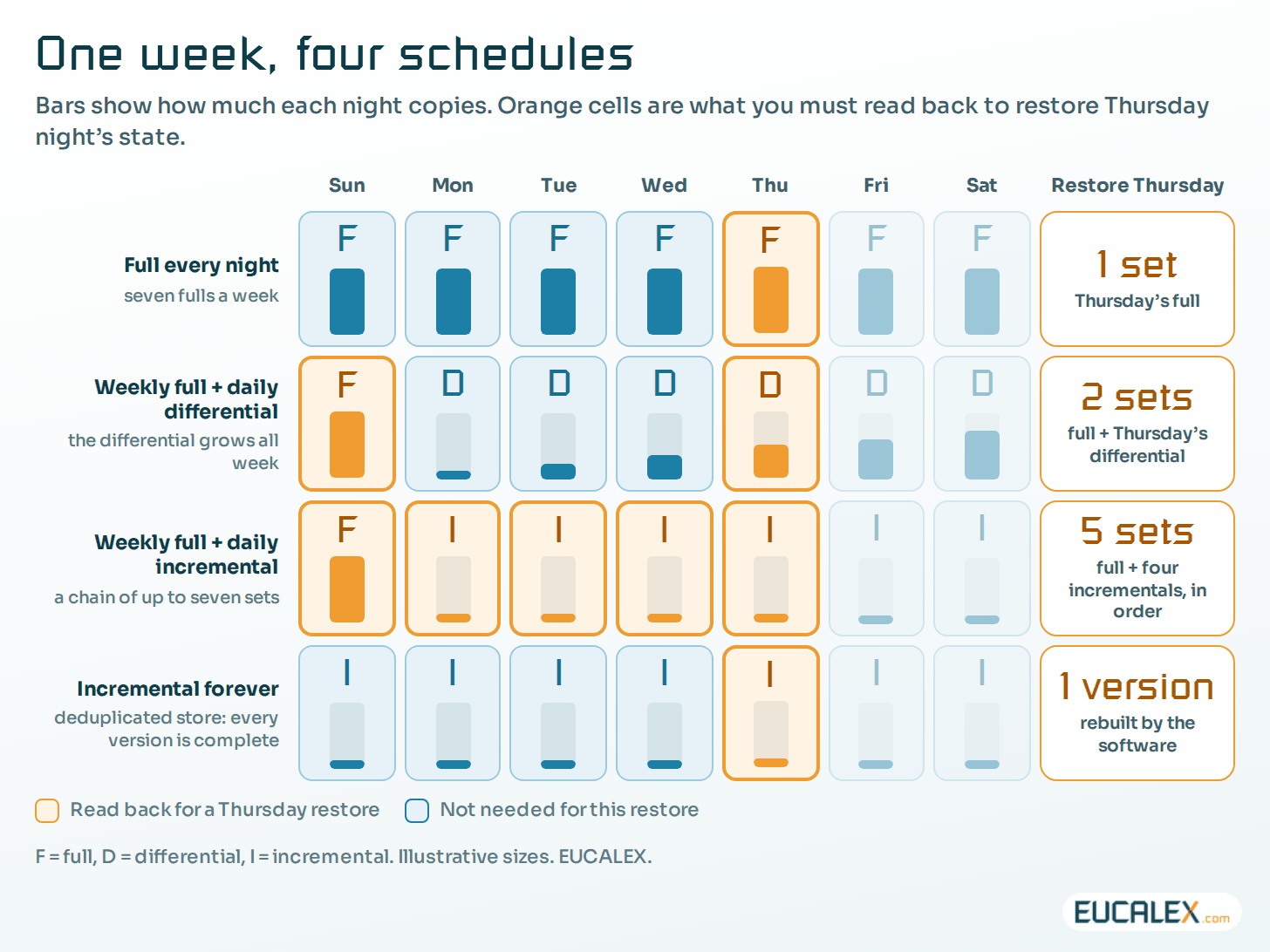
Every schedule is built from a handful of methods. They differ in two ways that matter on the day: how much each run copies, and how many sets you must read back, in order, to get the system back.
- Full: copies everything selected, every time: the longest job, the simplest restore.
- Differential: copies everything changed since the last full, so it grows every day until the next full.
- Incremental: copies what changed since the previous backup of any kind: the smallest job, and the longest chain to read back.
- Block-level incremental (delta): copies only the changed blocks inside a file, so 50 MB of a 20 GB database file rather than 20 GB. Same chain logic.
- Synthetic full: the backup server merges the last full and its incrementals into a new full, without touching production. One set to restore.
- Incremental forever with deduplication: one full at the start, then changes only, into a store that keeps each unique block once. Every version restores completely and can be deleted without breaking the others. Many NAS backup applications and current backup tools work this way.
The less a job copies, the more a restore must read back. Classic incremental is the cheapest to run and the most fragile to restore: acceptable for a file share, a risk for a supervision server that a line is waiting for.
| Method | Each run copies | A restore needs | Watch out for |
|---|---|---|---|
| Full | Everything selected | One set | Long jobs overrun the maintenance window |
| Differential | Everything changed since the last full | The full + the latest differential | Grows every day until the next full |
| Incremental | Changes since the previous run | The full + every incremental, in order | One damaged link breaks every later restore point |
| Block-level incremental | Changed blocks only | Same as incremental | Relies on change tracking; same chain risk |
| Synthetic full | Nothing extra from production | One set | The merge happens on the backup server: verify it |
| Incremental forever + deduplication | Changes only, each block stored once | One version, rebuilt by the software | The whole history sits in one store: protect and check it |
Copies that look like backups, and when they are not
Several tools make a second copy without giving you a way back in time. Each has its use. None replaces a versioned backup, and the first two are regularly presented as one.
- Mirror: a one-way copy that keeps the destination identical to the source. A file deleted or encrypted on the source is deleted or overwritten on the mirror at the next run. It protects against a dead disk or a stolen laptop, not against a mistake, corruption or ransomware.
- Synchronisation (sync): a two-way copy between two places, such as a PC and a NAS. A change on either side, deletions included, reaches the other within minutes. Excellent for sharing and working offline. As a backup, it adds a second way to lose the data.
- RAID (redundant array of independent disks): keeps a volume running when a disk fails, by writing data redundantly across several disks. It writes bad data as faithfully as good data. RAID is availability, not backup.
- Snapshot: a point-in-time view of a volume, taken in seconds on the same storage. Ideal to undo a bad change, but it dies with the storage: it counts as a backup only once replicated to another device. Immutable snapshots, which even an administrator cannot delete before their expiry date, resist an intruder with administrator rights.
- Disk clone: a copy of a whole disk onto another disk, ready to swap in. The fastest way back for a PC or an industrial PC, but it is one version, frozen on the day it was made.
- Disk image: the whole disk (operating system, applications, drivers, licences, settings) saved as a file, which can be restored onto the same or equivalent hardware starting from an empty disk, a “bare-metal” restore. Unlike a clone, you can keep several dated images.
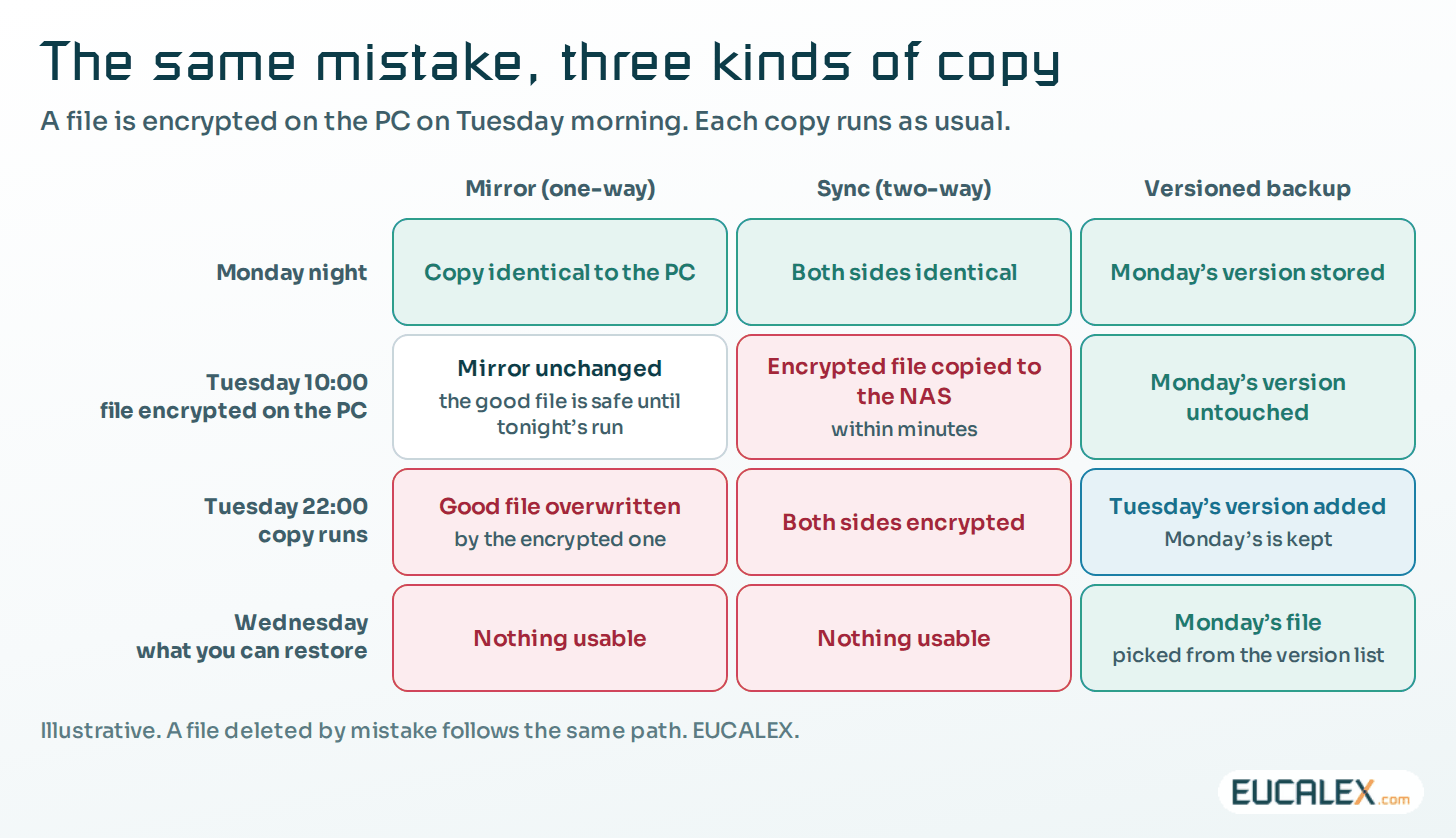
Many mirror and sync tools can keep previous versions. Switched on, out of reach of the folder’s users and kept long enough, that option makes them behave like a backup. Check it; do not assume it.
Which backup for which system
The three numbers give very different answers from one system to the next. Four questions sort most cases:
- Can it be rebuilt from a standard? An office PC deployed from a standard image can be re-imaged quickly: only its user data needs a backup. A PC that drives a machine, an instrument or a human-machine interface (HMI) cannot be rebuilt that way. Its configuration, drivers and licences make it unique.
- Does it hold data that exists nowhere else? Local data on an instrument PC, or the batch database, needs its own frequent backup. A PC whose files all live on a server does not.
- Is it consistent while it runs? A database or a supervisory control and data acquisition (SCADA) server with open files needs an application-aware backup, or the database’s own backup tool. A plain file copy of a running database is not a reliable backup.
- Is it itself a backup target? A NAS that holds the backups of other systems needs its own copy elsewhere, or it becomes the single point of failure.
| System | What matters | Backup type | Frequency and retention |
|---|---|---|---|
| Office or client PC | The user’s files; the PC itself is replaceable | User folders kept on the file server, which is backed up; the PC rebuilt from the standard image | Server versions daily; standard image updated at each release |
| Critical PC (machine, instrument, HMI, industrial PC) | Configuration, licences, local data; long rebuild | Full disk image, bare metal; daily backup of local data; a clone on a spare when minutes count | Image after each approved change and periodically; baseline + last known good |
| Engineering workstation | The tool versions that open the programs | Disk image, or one virtual machine per toolchain version | After each tool change; kept as long as programs depend on it |
| SCADA or supervision server | Project, alarms, historical data; open files | Cold image in a maintenance window + application-aware backup of project and data | Image after each approved change; data daily, under grandfather-father-son (GFS) retention |
| Database server (historian, laboratory or batch records) | Consistency and point-in-time recovery | The database’s own backups: full + differential or incremental + transaction logs | Logs every 15 to 60 minutes when the RPO is short; weekly full; GFS |
| NAS or file server | Shared data; often also the backup target | Snapshots on the NAS + versioned backup to a second device off site | Snapshots hourly or daily; backup nightly; GFS |
| Programmable logic controller (PLC) and safety PLC | The program actually running in the controller | Full copy of the uploaded program, compared with the offline project | After each change; every version kept |
| Network devices | Switch, firewall and remote-access configurations | Configuration export, full each time | After each change and weekly; every version kept |
Images for the machines that run the line
For a SCADA server, an engineering workstation, an HMI or an industrial PC, the image matters most: rebuilding one from installation media takes days, and an image brings the operating system, drivers, licences, application and configuration back at once.
A running SCADA holds open files, so a hot copy is not consistent unless the backup is application-aware. The reference for an industrial server remains a cold, bare-metal image taken in a maintenance window, plus an export of the project and configuration, kept offline.
Three rules keep images useful:
- Refresh them through change control. An image made at commissioning and never refreshed brings back old software and loses every later patch, recipe and configuration change. Take a new image after each approved change, and keep the commissioning baseline too.
- Keep the tools that open the data. For a PLC, the image of the engineering workstation is part of the backup: a program is useless without the software version that opens it (the version trap described in the companion article).
- Plan the hardware it will go back onto. An image restores onto the same or equivalent hardware. A different model may not start, or may lose a licence tied to the old disk or network card. Keep a compatible spare, or a restore option that supports different hardware, and prove it with a restore test (see the companion article).
Which backup for which stage of the system’s life
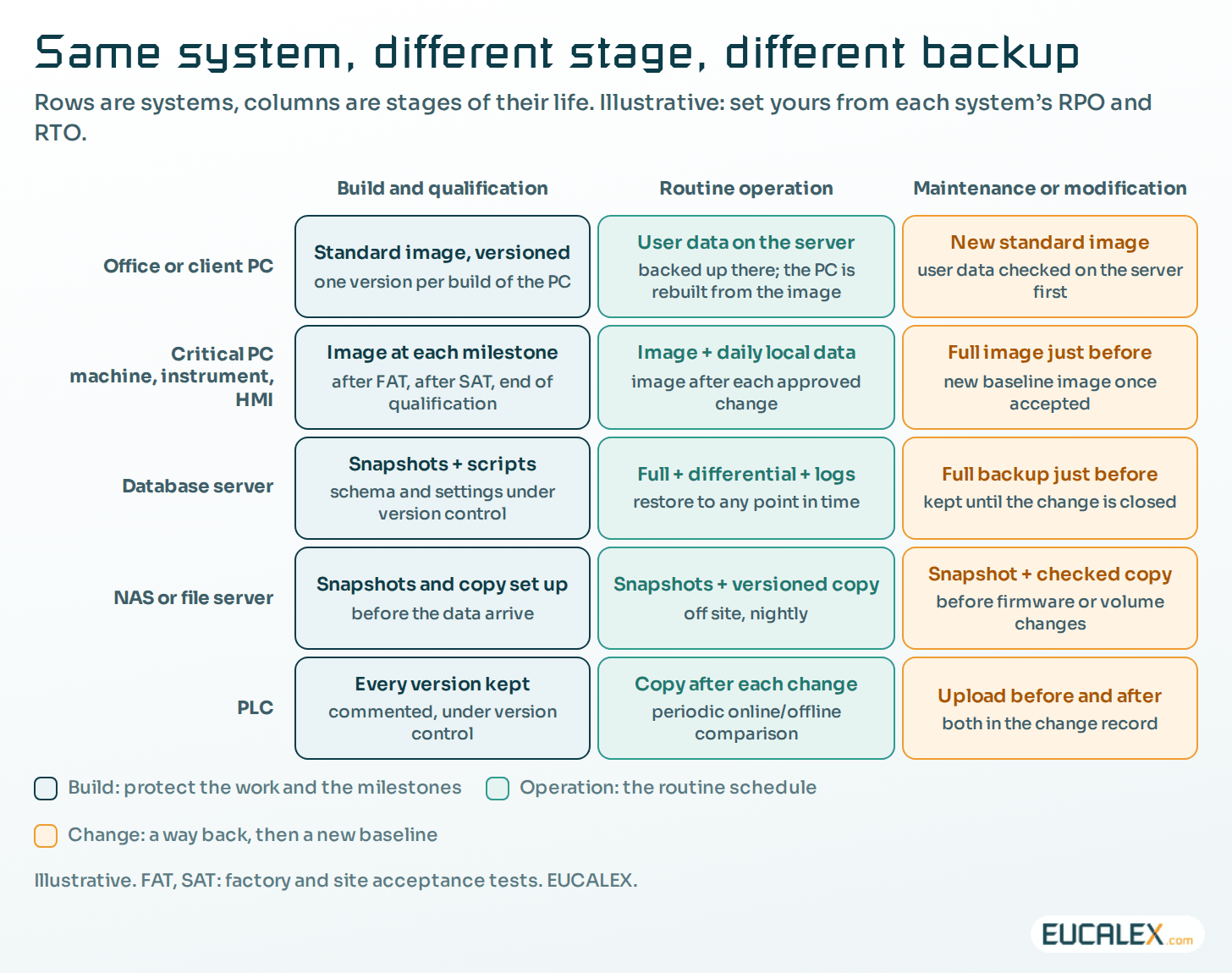
The same system does not need the same backup while it is being built, while it runs and while it is being modified. The type changes with the situation, not only with the system.
- Build and qualification: development, configuration, factory acceptance test (FAT), site acceptance test (SAT) and qualification. The system changes every day and production does not depend on it yet. What must not be lost is the work and the milestones: keep programs, projects and configurations under version control, take a snapshot before each risky configuration step, and an image at each milestone, such as after the FAT, after the SAT and at the end of qualification. The last one is the qualified baseline, kept for the life of the system.
- Routine operation: the system is stable and production depends on it. Here the schedules and retention described below apply: an image after each approved change, data backups sized on the RPO, one copy off site and one offline or immutable.
- Maintenance or modification: just before the intervention, take a dedicated backup (image, program or configuration export, data) and write its reference in the change record. It is the way back if the change fails, so keep it until the change is closed. Once the change is accepted, the new state becomes the new baseline and gets its own backup. On a virtual machine, a hypervisor snapshot is a convenient way back during the work, but delete it afterwards: VMware, for one, advises against using snapshots as backups and against keeping one beyond 72 hours.
- Decommissioning: the last backup is followed by archiving, meaning the data and the means to read them, for the whole retention period (see below).
Weekly full, daily incremental: the classic combination
It is one of the most common schemes, often offered ready-made, and for a file server or a historian it is a sound one: a full on Sunday at 02:00, an incremental every 24 hours from Monday to Saturday at 22:00. The longest restore, Saturday night, needs the full and six incrementals. Every Sunday starts a new chain, so a damaged incremental costs at most the rest of that week.
Four conditions make it work:
- Verify every job, not only its exit code: switch on the tool’s verification option and have a named person read the report every morning.
- Delete by whole chains. An incremental is worthless without its full and the incrementals before it, so retention keeps or deletes them together.
- Fit the full into the window. If Sunday’s full runs into Monday’s shift, switch to a synthetic full, not to a monthly full.
- Keep the chain away from the source: another device, other credentials, and one copy offline or immutable.
Two variants are worth knowing. A weekly full with daily differentials needs only two sets to restore, at the price of a differential that grows all week: a good choice when the RTO is tight and the data changes slowly. A daily full suits small data that matters a lot, such as PLC projects, network configurations and recipes, where a full takes seconds.
Some guides advise the opposite: a full only now and then, during the summer shutdown, and incrementals the rest of the year. That builds a chain months long, in which one damaged set in March breaks every restore point until August. Keep chains short, or let the software build synthetic fulls.
A year of dailies, and one version per month before that
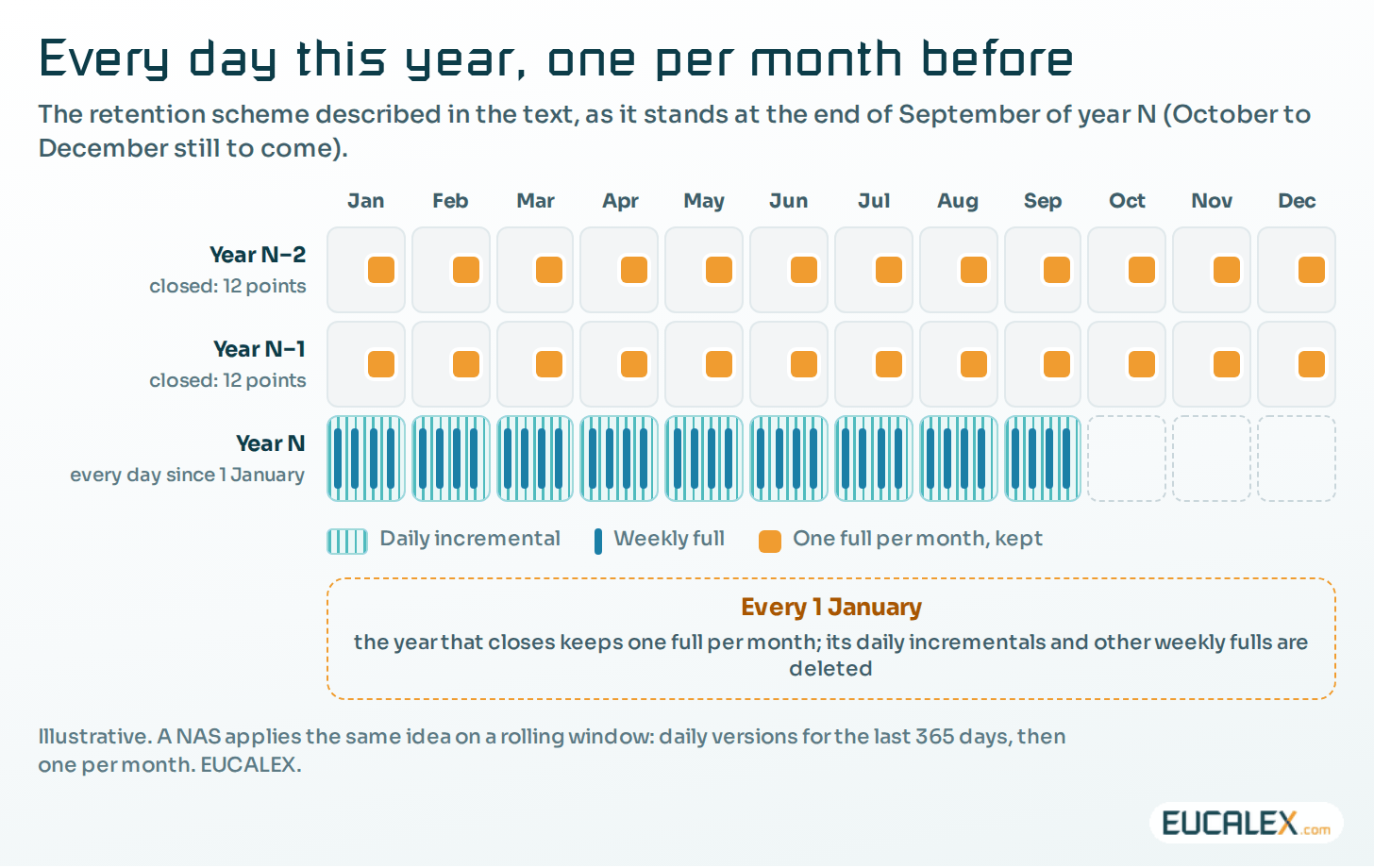
Retention decides how far back each schedule reaches. The classic scheme, grandfather-father-son (GFS), keeps daily versions (the sons) for a short period, weekly versions (the fathers) for longer and monthly versions (the grandfathers) for years: fine steps for recent events, coarse steps for old ones.
A variant we like for sites that need a long reach:
- Every day: an incremental. Every daily version of the current year is kept.
- Every week: a full, which starts a new chain.
- Every year: the year that has just closed is thinned out. One full per month is kept for it and for all the years before. Its daily incrementals and other weekly fulls are deleted.
Any day of the current year can then be restored, plus one point per month for the years before: with three closed years, about 365 daily points and 36 monthly ones. With classic chain files, thin by whole chains: keep one weekly full per month, without its incrementals, and delete the other weeks.
How a Synology NAS does it
On a Synology NAS, two backup applications apply this kind of retention without anyone managing chains by hand. Other NAS and backup products offer equivalents.
- Hyper Backup backs up the NAS itself (shared folders, applications, settings) to another NAS, a USB disk or a cloud store. It sends only changes after the first run, deduplicates them and keeps up to 65,535 versions. Once the version limit is reached, its Smart Recycle rotation keeps the earliest version of each hour for the past 24 hours, of each day for the past month and of each week beyond. A customised policy accepts up to seven retention rules. An integrity check detects corrupted versions.
- Active Backup for Business backs up PCs, servers and virtual machines onto the NAS: one full, then incrementals forever into a deduplicated store. Its advanced retention policy follows GFS, keeping the latest version of each day, week, month and year for as many days, weeks, months or years as you set.
On a deduplicated store there is no weekly full to schedule: every version is complete, and the policy only decides which to keep. The variant above becomes: the latest version of each day kept for 365 days, of each month for as long as needed (60 months for five years), and optionally of each year for longer. The window is rolling, which beats a calendar rule: December’s dailies do not vanish on 1 January.
Three cautions before calling the NAS “the backup”:
- One NAS is one copy, on site. Replicate it to a second NAS in another building or to a cloud store, or rotate disks kept offline: the 3-2-1-1-0 rule applies to the NAS too.
- Protect the console. A NAS administered with a production domain account and no multi-factor authentication (MFA) lets an intruder delete years of versions in a minute. Use a separate account with MFA, and immutable snapshots or an immutable copy where available.
- Watch the space. When the destination fills up, jobs fail or rotation deletes versions you meant to keep. Alert on both.
A backup is not an archive
Five years of versions do not turn a backup into an archive. The data integrity guidance of the UK medicines regulator (MHRA, 2018) defines a backup as “a copy of current (editable) data, metadata and system configuration settings maintained for recovery”. An archive keeps data and metadata for the long term, so that the process can be verified. GMP records that must be kept for years belong in an archive with its own controls: integrity and readability checks, and retrieval tested after system changes (Annex 11 §17). Old backup versions are a safety net, not the record.
What the rules actually ask
None of the texts imposes a method. All ask for a defined, protected and tested backup, and leave the schedule to your risk assessment.
- EU GMP Annex 11 (2011), §7.2: “Regular back-ups of all relevant data should be done.” Backup integrity and “the ability to restore the data should be checked during validation and monitored periodically”.
- US 21 CFR 211.68(b): backup data must be “exact and complete” and secure “from alteration, inadvertent erasures, or loss”, whether or not Part 11 applies.
- ISO/IEC 27002:2022, control 8.13: backup copies of information, software and systems “should be maintained and regularly tested in accordance with the agreed topic-specific policy on backup”.
- NIS2, Article 21(2)(c): the risk-management measures include “business continuity, such as backup management and disaster recovery”; see Article 21, measure by measure.
- #StopRansomware Guide (2023) of the US Cybersecurity and Infrastructure Security Agency (CISA) and partners: “offline, encrypted backups of critical data”, and up-to-date “golden images” of critical systems.
Mistakes we still find
- A mirror, a synchronised folder or a RAID volume presented as “the backup”.
- One image made at commissioning and never refreshed.
- A full once a year, with incrementals in between.
- Seven days of versions against a median dwell time of eleven days.
- The same nightly job for every system: too little for the database, too much for PCs that could simply be re-imaged.
- No backup taken just before a modification, so no way back when the change fails.
From the choice to the proof
Choosing the type, the schedule and the retention for each system and each stage is half of the work. The other half is showing that the backup comes back.
Next step: A backup is a hypothesis. A restore is evidence, why a backup stays a hypothesis until it has been restored, and how to test it in five steps.
Choose the backup from the restore you will need: system by system, stage by stage.
References
- EudraLex Volume 4, EU GMP Annex 11, Computerised Systems (2011), §7.2 backup; §17 archiving: health.ec.europa.eu
- MHRA, ‘GXP’ Data Integrity Guidance and Definitions, Revision 1 (March 2018), §6.17 archive and backup: assets.publishing.service.gov.uk
- CISA, FBI, NSA and MS-ISAC, #StopRansomware Guide (updated 2023): cisa.gov
- Mandiant (Google Cloud), M-Trends 2025 (April 2025): cloud.google.com
Related articles
All articles- A backup is a hypothesis. A restore is evidence.“We have backups” is not an answer. The question is when you last restored one, how long it took, and whether the line ran afterwards.
- NIS2 Article 21, measure by measure: what it means on a plant, and what proves itTen measures, written for every sector at once. Here is what each one turns into on an industrial site, and the evidence that survives an inspection.
- The UPS is installed. Nobody told the PLC it was about to lose power.On a lot of sites (including brand-new ones) the UPS is present, wired and green. And it still does not do half of what it was bought for.
EUCALEX
Have a project or a technical challenge?
Contact us: we will be pleased to discuss it with you, with no commitment.
Discuss your project with usStay informed
Receive new EUCALEX articles and technical insights by email.