
Electronic signatures an inspector accepts: meaning, linking, two components and the session rule
The inspector asks for a printed batch record. On screen the step shows “Approved by: jdupont”. On the printout there is a name and a date, and nothing else. Did that person perform the step, check it, or release it? Nobody in the room can say.
That is a Part 11 finding, and it goes back to a configuration choice someone made years earlier, probably in an afternoon. This article is for the people who configure signatures in a manufacturing execution system (MES), a laboratory information management system (LIMS) or an electronic quality management system (eQMS), and for whoever writes the operational qualification (OQ) tests.
Whether Part 11 applies to your record at all depends on the predicate rule behind it, and that question comes first. The rule section by section is in 21 CFR Part 11 on one page.
Three things people call a signature
An electronic signature is “a computer data compilation of any symbol or series of symbols executed, adopted, or authorized by an individual to be the legally binding equivalent of the individual’s handwritten signature” (§11.3(b)(7)). In practice, an identification code plus a password.
A digital signature is narrower: one “based upon cryptographic methods of originator authentication” (§11.3(b)(5)). Part 11 does not require it. The US Food and Drug Administration (FDA) wrote in October 2024 that “part 11 regulations do not specify a particular method to create a valid electronic signature”.
A signature drawn with a finger or a stylus is neither. FDA treats it as a handwritten signature executed to an electronic record, so the two-component rules do not apply to it. §11.70 still does: it must be linked to its record.
On a US drug site the signature also does predicate-rule work. It replaces the “full signature, handwritten” of §211.186(a) and names who performed and who checked each significant step (§211.188(b)(11)).
§11.50: three elements, on the screen and on every printout
A signed record shows “the printed name of the signer”, “the date and time when the signature was executed” and “the meaning (such as review, approval, responsibility, or authorship) associated with the signature” (§11.50(a)). The three are “subject to the same controls as for electronic records” and appear in “any human readable form” of it (§11.50(b)).
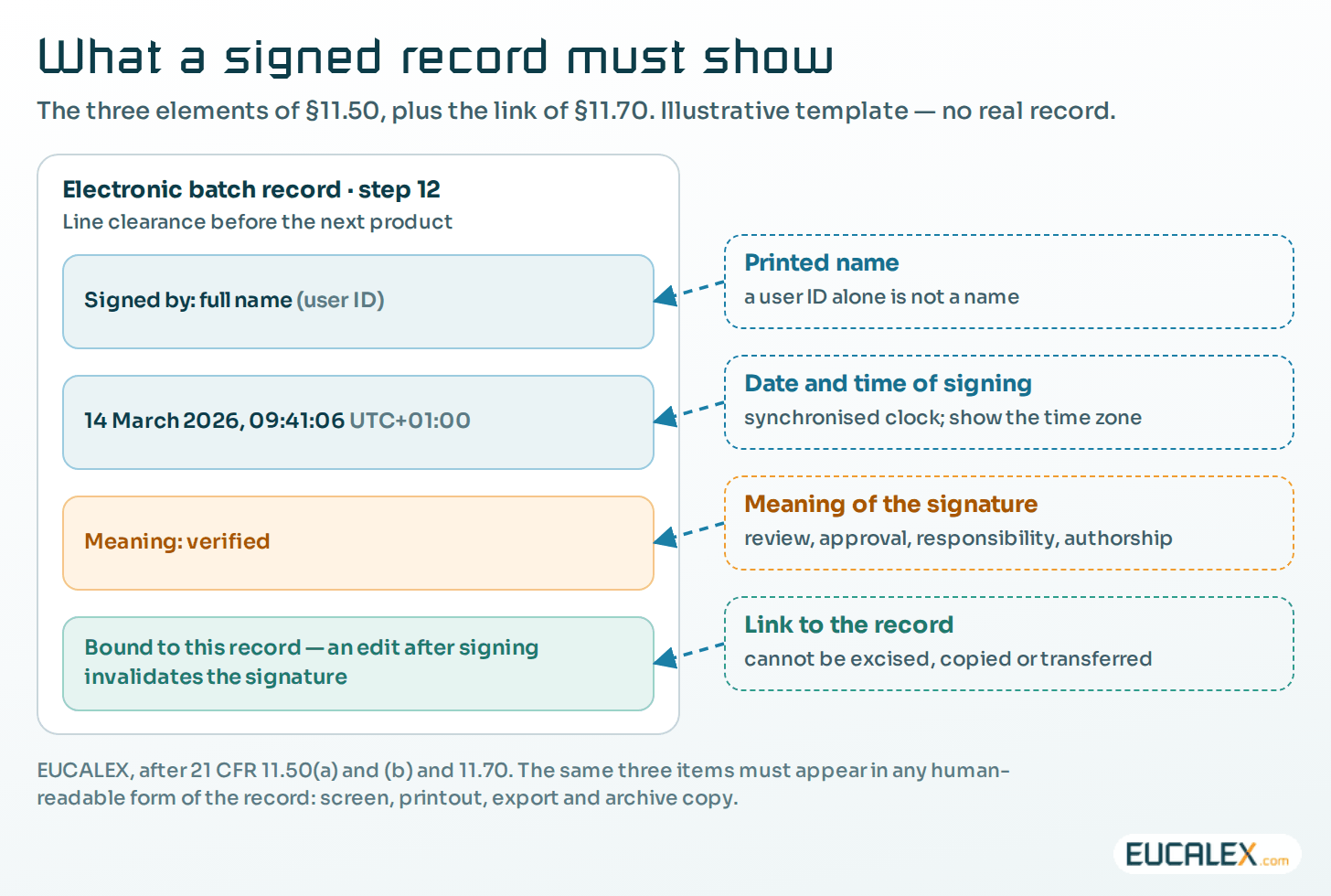
A user ID is not a printed name. “jdupont” satisfies nobody, so print the full name and let the user ID sit beside it. The meaning has to be specific, too. A single choice called “Signed” tells a reviewer nothing; configure a short list per step type (performed, verified, approved, released, rejected) and make the system ask for it. If it cannot ask, take the meaning from the step itself: a signature field labelled “Verified by”, printed with that label on every report, with the reasoning written into the validation report.
Exports are where the elements go missing. The screen shows three, the shift report two, the CSV export none. Test every human-readable form, the archive format included; Metadata makes the number mean something explains why.
§11.70: a link that cannot be cut
Signatures “shall be linked to their respective electronic records to ensure that the signatures cannot be excised, copied, or otherwise transferred to falsify an electronic record by ordinary means” (§11.70).
Usually the link is a database relation plus a checksum over the signed content. What counts is the behaviour you can demonstrate: change a signed field and the signature must disappear, be flagged invalid, or force a new signature. If the record still prints as if nothing happened, the link is decorative.
This also rules out two habits that still turn up: a scanned signature image pasted into a document, and a “signed by” typed into a free-text field that any administrator can edit.
§11.100: whose signature it is
A signature is “unique to one individual” and “shall not be reused by, or reassigned to, anyone else” (§11.100(a)). No line account, no shift account, and a retired user ID stays retired, even when the new starter happens to have the same initials.
The organisation verifies the person’s identity before assigning a signature (§11.100(b)). FDA’s October 2024 questions and answers leave the method open and give examples: an identity document, strong digital credentials, or observation.
Then there is the certification letter. Before or at first use, the organisation certifies to FDA that its electronic signatures are intended to be “the legally binding equivalent of traditional handwritten signatures” (§11.100(c)). The letter carries a handwritten signature, and since the amendment of 2 March 2023 (88 FR 13018) it may be sent in electronic or paper form. A surprising number of sites have never sent one.
§11.200: two components, and the session rule
A non-biometric signature uses “at least two distinct identification components such as an identification code and password” (§11.200(a)(1)). The interesting part is what happens after the first signature.
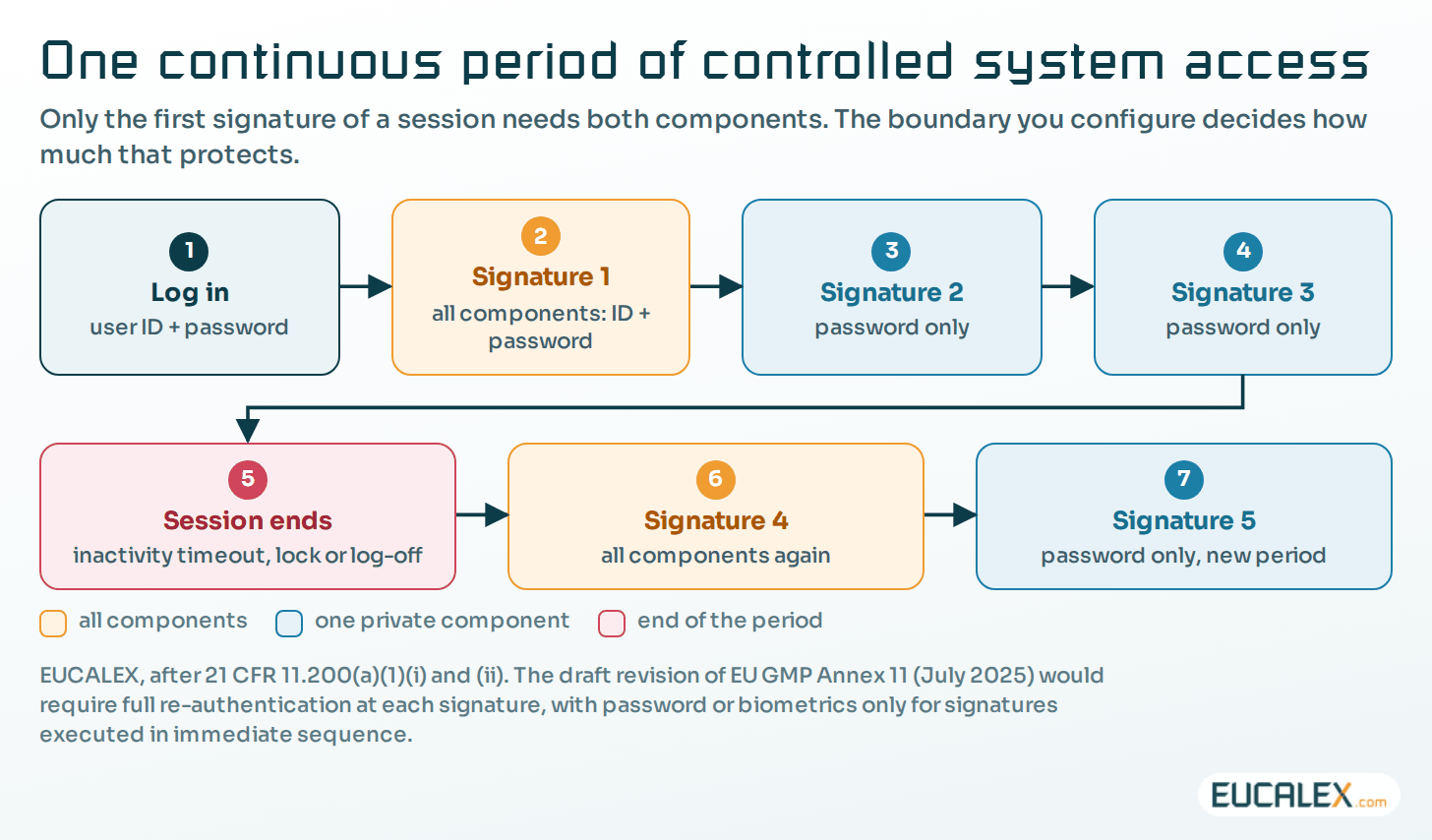
When someone signs a series of records “during a single, continuous period of controlled system access”, the first signing uses all components. Later signings use at least one component that only that individual can execute, in practice the password. Outside such a period, every signing uses all components (§11.200(a)(1)(ii)).
Part 11 never says where that period ends, so your configuration and your procedure have to: inactivity timeout, screen lock, log-off, change of user. Write the value down and test it. A session left open for a twelve-hour shift reduces the rule to one password prompt.
Two more clauses matter. Signatures are “used only by their genuine owners” (§11.200(a)(2)) and administered so that use by anyone else “requires collaboration of two or more individuals” (§11.200(a)(3)). In plain terms, no administrator may set a password to a value they know and then sign with it. A change forced at first use, and administrators kept independent of record content, make that true. FDA’s 2018 data integrity guidance asks for the same separation.
Biometric signatures (§11.200(b)) escape the two-component rule only if they “cannot be used by anyone other than their genuine owners”. A shared fingerprint reader on a production line where everyone wears gloves rarely meets that.
§11.300: the password and token controls people forget
- (a) Uniqueness of each combined identification code and password, so that no two people share a combination.
- (b) Periodic checks: issuances are “periodically checked, recalled, or revised”, which is where password ageing and the periodic access review belong.
- (c) Loss management: lost, stolen or compromised tokens and cards are deauthorised, and replacements issued “using suitable, rigorous controls”.
- (d) Transaction safeguards that “detect and report in an immediate and urgent manner any attempts at their unauthorized use to the system security unit”. An entry in a log nobody reads does not meet that sentence.
- (e) Initial and periodic testing of the devices that bear or generate codes (badges, tokens, readers) to show they still work and have not been altered.
What the European texts ask
EU GMP Annex 11 (2011) is brief. Section 14 expects electronic signatures to “have the same impact as hand-written signatures within the boundaries of the company”, to “be permanently linked to their respective record” and to “include the time and date that they were applied”. Section 12.4 adds the identity of operators “entering, changing, confirming or deleting data including date and time”.
The draft revision published for consultation on 7 July 2025, still only a draft, gives signatures their own section 13. It would require full re-authentication at each signature, at the security level of the system login, with password or biometrics alone allowed only for signatures executed “in immediate sequence”; a smart card alone, a PIN alone or reliance on the previous login would not be acceptable. It would log the date, the time “and, where applicable, the time zone”, prompt for the meaning, and display the full name, username, role and meaning. A wet-ink signature on a printout should carry a hash code printed on the signature page, so that any change to the electronic record invalidates it.
If you are configuring a system now for both markets, take the stricter reading: full authentication at each signature, meaning prompted, time zone displayed. It saves you a gap analysis later.
On the shop floor: shared screens, badges and clocks
Most signature findings on production systems come from three places, and the signature dialog is not one of them.
The first is the shared session. An operator panel logged in as “LINE3” attributes nothing to anyone. The draft Annex 11 calls shared accounts beyond read-only a data integrity violation, and FDA said in 2018 that a system with shared logins does not conform to CGMP. If the screen has to stay logged in for alarms, split the two jobs: a display session with no rights, and authentication at each signature. Data integrity findings are rarely a software problem goes further into this.
The second is the kiosk that logs itself in at boot. That is not an authentication, so whatever session sits underneath, the signature step has to ask for both components. FDA also suggests an automatic logout after idle periods, which gives you the session boundary §11.200 needs.
The third is the clock. A signature time is only as good as the clock behind it. Put servers, clients, interfaces and controllers on one time source, decide whether records are stamped in local time or coordinated universal time (UTC), and show which. Test the autumn clock change: in Europe, 02:30 on the last Sunday of October happens twice unless the offset is recorded. Where systems span time zones, FDA’s 2024 questions and answers ask for the zone to be indicated.
The tests that catch real failures
A test set that proves only that “the dialog appears and the record is signed” will pass on a system with every one of the failures below. The table is where we start when writing or reviewing OQ scripts; add what is specific to your workflow. In the life cycle, these tests belong in the OQ, traced to the requirements they verify.
| Requirement | Configuration check | OQ test | Typical failure |
|---|---|---|---|
| §11.50(a) three elements | Full name, date and time, and a meaning per step type | Sign one step of each type; read the record on screen | User ID and date only; meaning shown as “Signed” |
| §11.50(b) every readable form | Report, export and archive templates carry the three | Print and export a signed record; compare with the screen | The export drops the meaning or shows another time |
| §11.70 linking | Signature bound to the content; a change invalidates it | Edit a signed field, then reopen and print | The signature survives the change with no trace |
| §11.100(a) and (b) identity | Retired IDs never reused; identity checked before issue | Try to create a user with a retired ID; sample account requests | A line account, or an ID reissued to a new starter |
| §11.200(a)(1)(i) first signature | Both components; user ID not pre-filled from the session | Log in, then sign the first record | Only a password box; the ID comes from the login |
| §11.200(a)(1)(ii) session boundary | Inactivity timeout, lock and log-off enforced | Let the timeout expire, then sign again | An hours-old session still accepts a password alone |
| §11.200(a)(3) collusion | Administrators cannot set or read a usable password | Reset a password as administrator; try to sign as that user | The administrator can sign as anyone |
| §11.10(g) authority to sign | Roles decide which meanings a user may apply | Attempt an approval with an operator role | Any user can sign with any meaning |
| §11.300(d) attempted misuse | Lock-out threshold; alert to a named recipient | Enter wrong passwords until lock-out; check the alert | The alert lands in a log nobody reads |
| Time source | One time source; time zone displayed | Compare signature times with a reference clock across a clock change | Client, server and controller times differ |
Two failures never show up in a script, because nobody thinks to look: validation test accounts left active in production and still signing months later, and a report template edited after validation that quietly drops the meaning from every printout.
A signature that cannot say who signed, when, and what they meant is a timestamp with a name attached.
References
- US eCFR, 21 CFR Part 11, Electronic Records; Electronic Signatures, §11.100(c) as amended by 88 FR 13018 (2 March 2023).
- FDA, Electronic Systems, Electronic Records, and Electronic Signatures in Clinical Investigations: Questions and Answers, October 2024.
- FDA, Data Integrity and Compliance With Drug CGMP: Questions and Answers, December 2018.
- European Commission, EudraLex Volume 4, EU GMP Annex 11, Computerised Systems, 2011.
- European Commission, consultation on Chapter 4, Annex 11 and new Annex 22, opened 7 July 2025 (draft, not adopted).
Related articles
All articles- 21 CFR Part 11 on one page, and what the popular infographics get wrongThree subparts, ten sections, one page. What the rule actually says (trustworthy, reliable, equivalent; authenticity, integrity, confidentiality…
- No predicate rule, no Part 11: which of your electronic records the FDA actually regulates“Is this system Part 11?” is the wrong question. Part 11 follows the record, not the system. Four questions, starting from the Part 211 requirement…
- Metadata: the part of the record that makes the number mean somethingA value of 23 means nothing until you know its unit, its source, its time and who produced it. Where metadata is lost between instrument and report…
EUCALEX
Have a project or a technical challenge?
Contact us: we will be pleased to discuss it with you, with no commitment.
Discuss your project with usStay informed
Receive new EUCALEX articles and technical insights by email.