
What the operator must see, sign and change: designing a high-performance HMI for a GMP line
Day nine of a fed-batch culture, a little after two in the morning. The operator on nights has the suite on four monitors: two bioreactors, the media hold tank, the clean utilities. The bioreactor screen carries some ninety numbers, all in the same font, all white on the same dark blue. Dissolved oxygen has been sliding for two hours, inside its limits, from the middle of its range towards the bottom. Nothing has crossed anything, so nothing has alarmed. The agitation creeping up to compensate is on another screen.
When the low alarm finally comes, the morning meeting asks why nobody saw the drift. Everyone saw the number. Nobody saw the drift, because the screen showed a value and never a direction. The scene is a composite, but the pattern is one we meet on most sites we assess, in bioreactor suites and on packaging lines alike.
On a good manufacturing practice (GMP) line, the human-machine interface (HMI) decides what the operator notices, what they are allowed to change and how their actions become records. That makes it part of the validated system, with requirements someone has to write and tests someone has to run. ISA-101, the HMI standard of the International Society of Automation (ISA), gives the method for the first part; EU GMP Annex 11 and 21 CFR Part 11 give the test for the second.
Grey is the least of it
ANSI/ISA-101.01-2015, Human Machine Interfaces for Process Automation Systems, was ISA’s first standard on the subject. It treats the HMI as a life cycle, from philosophy and design through implementation, operation and maintenance, and it applies to continuous, batch and discrete processes. Two technical reports sit beside it: ISA-TR101.01-2022, HMI Philosophy, which develops subclause 4.2.1 of the standard with worked examples, and ISA-TR101.02-2019, HMI Usability and Performance, which covers design, audit, validation and management of change.
Most people know the movement through its grey screens. The high-performance HMI overview that ISA publishes on its site (a 2012 paper from an HMI consultancy) gives grey backgrounds one line among more than a dozen. Other lines carry more weight: colour used sparingly and always with the same meaning, important values drawn as analogue indicators against their normal and abnormal ranges, embedded trends, a display hierarchy that reveals detail as it is needed, ways to prevent data-entry mistakes, and validation and security measures.
On a pharmaceutical line the last two items matter more than any palette. The HMI is where operators enter values that end up in a batch record, and where they sign.
Two other references help when operations and engineering disagree about a screen: the third edition (2019) of EEMUA 201 on control rooms, from the Engineering Equipment and Materials Users Association (EEMUA), which covers console design, graphics and devices used outside the control room, and ISO 11064-5:2008 on displays and controls. Neither is a GMP text.
The philosophy is a controlled document
ISA-101 starts with an HMI philosophy, then a style guide that turns it into rules for each screen element. On most sites we assess, neither exists: each skid supplier brought its own idea of what red means. On a GMP site the philosophy deserves four signatures, from operations, automation engineering, quality and the OT security lead, and six subjects.
- Colour. Which colours are reserved for alarms, one per priority, and the rule that no normal state uses them, which retires the green running motor first.
- Levels and navigation. What each display level shows, and the most clicks an operator may need to reach any screen from the one in use.
- Data entry. Limits on every operator entry, old and new values shown before confirmation, and the additional check that EU GMP Annex 11 §6 asks for critical data entered manually, by a second operator or by validated electronic means.
- Identity and roles. Which roles exist and what each may change. The Food and Drug Administration (FDA) explains in its December 2018 data integrity questions and answers (question 5) why shared logins break attribution, and accepts shared read-only accounts only for viewing.
- Signatures and records. Which operator actions are GMP records, which need a signature, and what each signature means.
- Devices. Fixed panels, thin clients, tablets: what each kind of device may do.
Once signed, the philosophy belongs in the user requirements for every new skid, so that packaged equipment arrives speaking the site’s language. The article on writing user requirements that drive the qualification shows where such requirements go and how they become tests.
Four levels, built around a batch phase
The display hierarchy changes an operator’s shift more than anything else in ISA-101 practice. The overview ISA hosts describes four levels. Level 1 shows the operator’s whole span of control and is not used for control actions. Level 2 is the working screen of one unit, with what the operator needs for most tasks on it. Level 3 gives the detail of one piece of equipment or one control scheme, for diagnosis. Level 4 holds support and diagnostic displays, down to a single point.
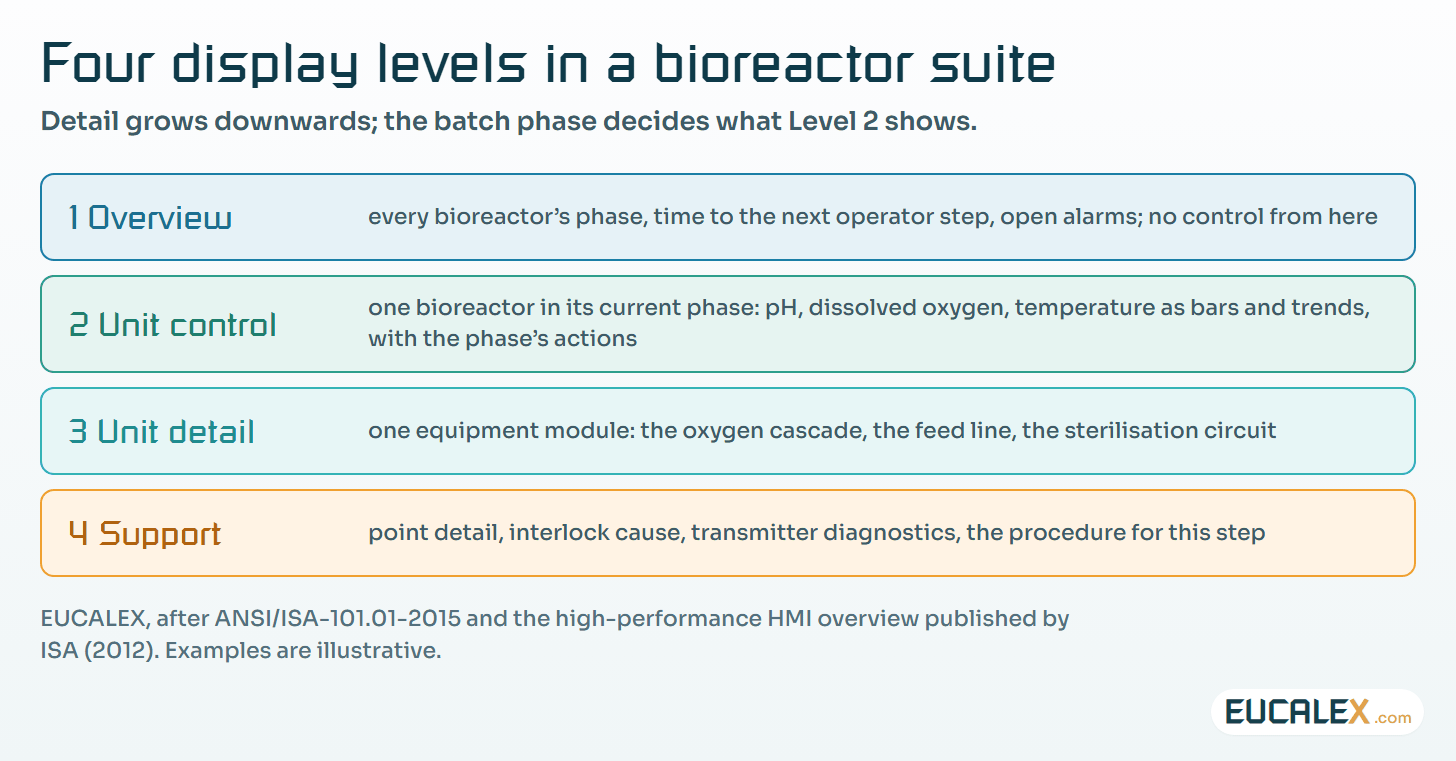
A batch process adds one thing that continuous plants rarely need: the right Level 2 screen changes with the phase. During inoculation the operator watches different values from those during the feed or the harvest. A phase-aware Level 2 shows the active phase and step, the time spent in it, the next operator action, and only the parameters that matter now.
Each of those parameters should show three limits that legacy screens merge into one number: the operating range the operator aims for, the alarm limit, and the limit from the process validation. Drawn as an analogue bar with a trend beside it, the dissolved oxygen of the opening scene would have shown its slide two hours before the alarm.
One screen, before and after
A packaging line shows the same problem in another setting. The operator wears gloves, stands, and glances at the panel between two interventions. Legacy blister-line screens spend most of their pixels on a drawing of the machine and very few on the batch.
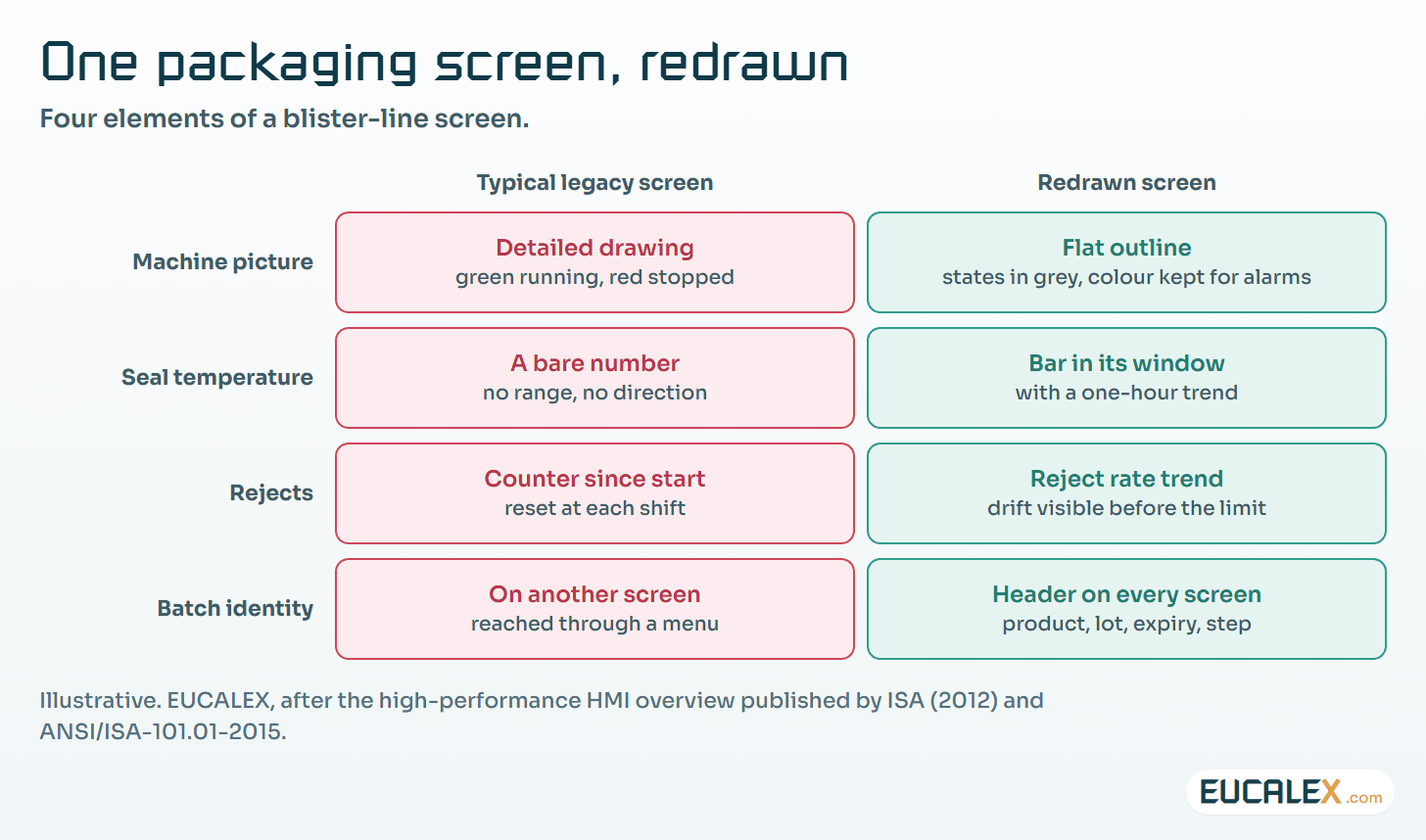
The redrawn screen answers the three questions the operator asks at the panel: is the line making good product, is anything drifting, and which batch am I on. The batch header matters most in packaging, where a line clearance error starts with an operator who believes the previous batch is finished.
Signing at the screen
Most GMP findings about HMIs concern identity and records. 21 CFR 11.10(e) asks for secure, computer-generated, time-stamped audit trails of operator entries and actions. Annex 11 §12.4 asks systems to record who enters, changes, confirms or deletes data, with date and time, and §9 that the reason for changing GMP-relevant data is documented and the audit trail readable.
For signatures, 21 CFR 11.50 requires the signed record to show the printed name of the signer, the date and time, and the meaning of the signature, including on the electronic display. 21 CFR 11.200(a)(1) requires at least two distinct identification components for signatures not based on biometrics. Annex 11 §14 expects electronic signatures to have the same impact as handwritten ones, to be permanently linked to their record, and to include the time and date. Our one-page reading of Part 11 sets out the rest of the regulation.
Translated to the screen, a good signature dialog says what is being signed: the parameter, its old and new values with units, the batch, and the meaning of the signature. It asks for a reason from a list the philosophy defines. The audit trail view sits one level below the screen where the change was made, filtered by batch.
| HMI element | Requirement | What the test shows |
|---|---|---|
| Login and roles | Annex 11 §12.1 and §12.3; 21 CFR 11.10(d) and (g) | Each role attempts each class of action, including one it must not have; the refusals are recorded |
| Critical setpoint entry | Annex 11 §4.7 (data limits) and §6 | Values below, at and above each limit; a critical entry triggers its second check |
| Signature dialog | 21 CFR 11.50 and 11.200(a)(1); Annex 11 §14 | Name, date and time, and meaning appear on screen and on the printout; a new session asks for every component |
| Audit trail view | 21 CFR 11.10(e); Annex 11 §9 and §12.4 | A changed GMP value shows who, when, old and new values and the reason; no role can edit the entry |
| Clock | Annex 11 §12.4; 21 CFR 11.10(e) | HMI, controller and historian times compared with the site time source; the offset is documented |
| Alarm presentation | Site HMI philosophy and style guide | Each priority appears in its own colour, and no normal state uses an alarm colour |
| Tablet or thin client | Annex 11 §12.1; 21 CFR 11.10(h) | A device that is not registered connects and gets read-only access, or none |
The packaging line has its own trap. Gloves and short interventions push teams towards a shared line login, left open all shift. Every action under it is then unattributable, whatever the audit trail records. Badge readers and short automatic logouts cost less than the deviation that follows the first inspection.
Tablets and thin clients
Mobile HMIs arrive through the side door: a tablet for the sampling round, a thin client in the corridor. When ISA announced ISA-TR101.02 in 2019, it listed a technical report on mobile devices among the committee’s further work. The series as ISA presents it holds the standard and the two reports above, so the rules for a tablet in a grade C corridor are for the site to write.
Three rules cover most cases. Start read-only, and allow writing only for named tasks, such as recording a sample. Bind each device to the site’s device register, which is what 21 CFR 11.10(h) device checks amount to in practice. And keep the same roles, signatures and audit trail as the fixed panel: a tablet is another door into the same validated system.
What a migration does to the qualification scope
A control system or SCADA (supervisory control and data acquisition) migration is when most sites redraw their screens, since every graphic is rebuilt anyway. Copying the legacy screens looks safe, yet a rebuilt screen is a new screen for the qualification, even when it looks the same.
Annex 11 §10 puts any change to a computerised system, configuration included, under a defined procedure; §4.8 asks that data moved to another format or system keep their value and meaning, batch history and audit trails included. The risk assessment then settles test depth. Navigation, every operator action, signatures, audit trails and alarm presentation are new and get tested. Controller logic that is not touched can rely on its existing evidence, if the migration proves it really was not touched.
The article on tying test depth to risk explains how to argue that split, and the one on what each qualification stage proves where each kind of evidence belongs. One element is often missing from the plan: operator training on the new screens, recorded before the first batch. Operators who rehearsed on a simulator are part of the evidence that the system is fit for use.
The best migrations we have seen start with a workshop where senior operators lay out, phase by phase, what they need to see and what can wait one click. It costs a few days, removes many legacy graphics, and is the part of the project operators feel they own.
Five common mistakes
- Treating grey as the project. A recoloured legacy screen remains a legacy screen. Hierarchy, analogue indicators and entry checks are where the value lies.
- Copying screens during a migration. The copy keeps every weakness and is tested as a new screen anyway.
- A shared login on the line panel. It makes every action unattributable, and the audit trail cannot repair that afterwards.
- Signature dialogs that do not say what is signed. A bare password prompt has the operator sign blind.
- Calling every hidden alarm shelved. ANSI/ISA-18.2-2016 keeps three things apart: shelving, started by the operator and temporary; suppression by design, driven by plant state; and out of service, for maintenance. Each needs its own indication on the HMI.
Where to start
- Sit with a senior operator through one batch phase. Note what they look at, what they look for on another screen, and what they write on paper. One page is enough, and it is the first draft of the Level 2 screen.
- Write the six subjects of the philosophy on four pages. Colour, levels, entry, roles, signatures, devices. It is done when operations, automation, quality and OT security have signed it.
- Add the table above to the next periodic review of one line. Run the seven tests on the existing screens; the gaps become the change requests.
A screen is validated for what it lets people do. It is well designed when it shows them what to do first.
References
- ISA, ISA-101 Series of Standards: ANSI/ISA-101.01-2015, ISA-TR101.01-2022 and ISA-TR101.02-2019: isa.org
- High Performance Graphics to Maximize Operator Effectiveness, version 2.0, 2012, published on ISA’s site: isa.org
- EEMUA 201, Control rooms: a guide to their specification, design, commissioning and operation, third edition, 2019: eemua.org
- ISO 11064-5:2008, Ergonomic design of control centres, Part 5: Displays and controls: iso.org
- EudraLex Volume 4, Annex 11: Computerised Systems, 2011, clauses 4.7, 4.8, 6, 9, 10, 12 and 14: health.ec.europa.eu
- 21 CFR Part 11, Electronic Records; Electronic Signatures, §§ 11.10, 11.50 and 11.200: ecfr.gov
- FDA, Data Integrity and Compliance With Drug CGMP: Questions and Answers, December 2018, question 5: fda.gov
- InTech, New ISA101 HMI technical report focuses on usability and performance, July/August 2019: isa.org
- How DCS Migration Improves Operator Experience, InTech, April 2023: isa.org
- HMIs Are Not iPhones: HMI Upgrade Considerations, InTech, December 2023: automation.com
Related articles
All articles- Forty alarms at three in the morning: alarm management for the GMP operatorAn alarm system is judged by one person, at night, in the first minutes of an upset. What counts as an alarm on a GMP site, what ISA-18.2, IEC 62682…
- 21 CFR Part 11 on one page, and what the popular infographics get wrongThree subparts, ten sections, one page. What the rule actually says (trustworthy, reliable, equivalent; authenticity, integrity, confidentiality…
- Writing a URS that actually drives the qualification, and deciding whether you need a DQA user requirements specification is either the root of every test that follows or a wish list nobody can test. How to write it one line at a time…
EUCALEX
Have a project or a technical challenge?
Contact us: we will be pleased to discuss it with you, with no commitment.
Discuss your project with usStay informed
Receive new EUCALEX articles and technical insights by email.