
Catch it at the controller: where to listen when attackers use your own engineering tools
The sensor raises its flag at 02:14. A program download has gone to the controller of a filling line, sent from the engineering workstation in the automation office, with the vendor’s own software and a valid engineering account. The antivirus on that workstation has nothing to say, and the firewall between the office network and the plant saw nothing cross it. The on-call engineer opens the change log. There is an approved change for that controller: Thursday, day shift.
That scene is a composite of what we see on industrial sites. When an intruder works with your own tools, the only thing that separates the attack from maintenance is context: which machine spoke to which controller, when, and whether anyone approved it. That context lives in the traffic between the engineering workstation (EWS), the human-machine interfaces (HMI) and the programmable logic controllers (PLC), and in the change records of the site. A sensor at the boundary sees neither.
Attacks that bring no malware
The pattern has a name. In joint guidance of 7 February 2024, the US Cybersecurity and Infrastructure Security Agency (CISA) and nine partner agencies described living off the land (LOTL): intruders who use the tools already on a network instead of bringing their own. CISA says the guide draws on organisations compromised by Volt Typhoon. Among its first recommendations: maintain baselines of network, user and administrative activity, and enhance IT and operational technology (OT) network segmentation and monitoring.
On a plant, the native tools are the engineering ones. The catalogue MITRE keeps of attacks on industrial control systems (ICS), ATT&CK for ICS, describes Program Download (T0843) as the vendor-specific calls that load a user program into a controller, and notes that an online edit lets the controller keep running meanwhile. Change Operating Mode (T0858) covers the switch to programming mode a download may need. In the 2015 attack on Ukrainian power distribution, MITRE records, IT helpdesk software moved the mouse on control devices (T0886).
SANS instructors make the same point. Dean Parsons writes that once authorised access exists, often through stolen credentials, no exploit or custom malware is needed to act on the process. Lesley Carhart adds that controlling an HMI or an engineering workstation is often enough. Antivirus has nothing to object to: the software is legitimate, the account valid, the commands well formed.
Where the visibility stops
Most monitoring projects start at the IT/OT boundary, watching north-south traffic between office and plant. Parsons argues that this shows little of what affects operations, because the decisive actions happen east-west, inside the control network. SANS’s 2025 State of ICS/OT Security report, built on answers from more than 330 practitioners, puts full visibility across the ICS Cyber Kill Chain at about one organisation in eight, with coverage thinning at Levels 2 and 1 of the Purdue model and at remote sites.
The figure is self-reported, and it echoes the third of the SANS ICS five critical controls, network visibility and monitoring. Parsons names four assets that come up again and again as targets: controllers, engineering workstations, HMIs and data historians. Those four, and the conversations between them, are where the listening should start.
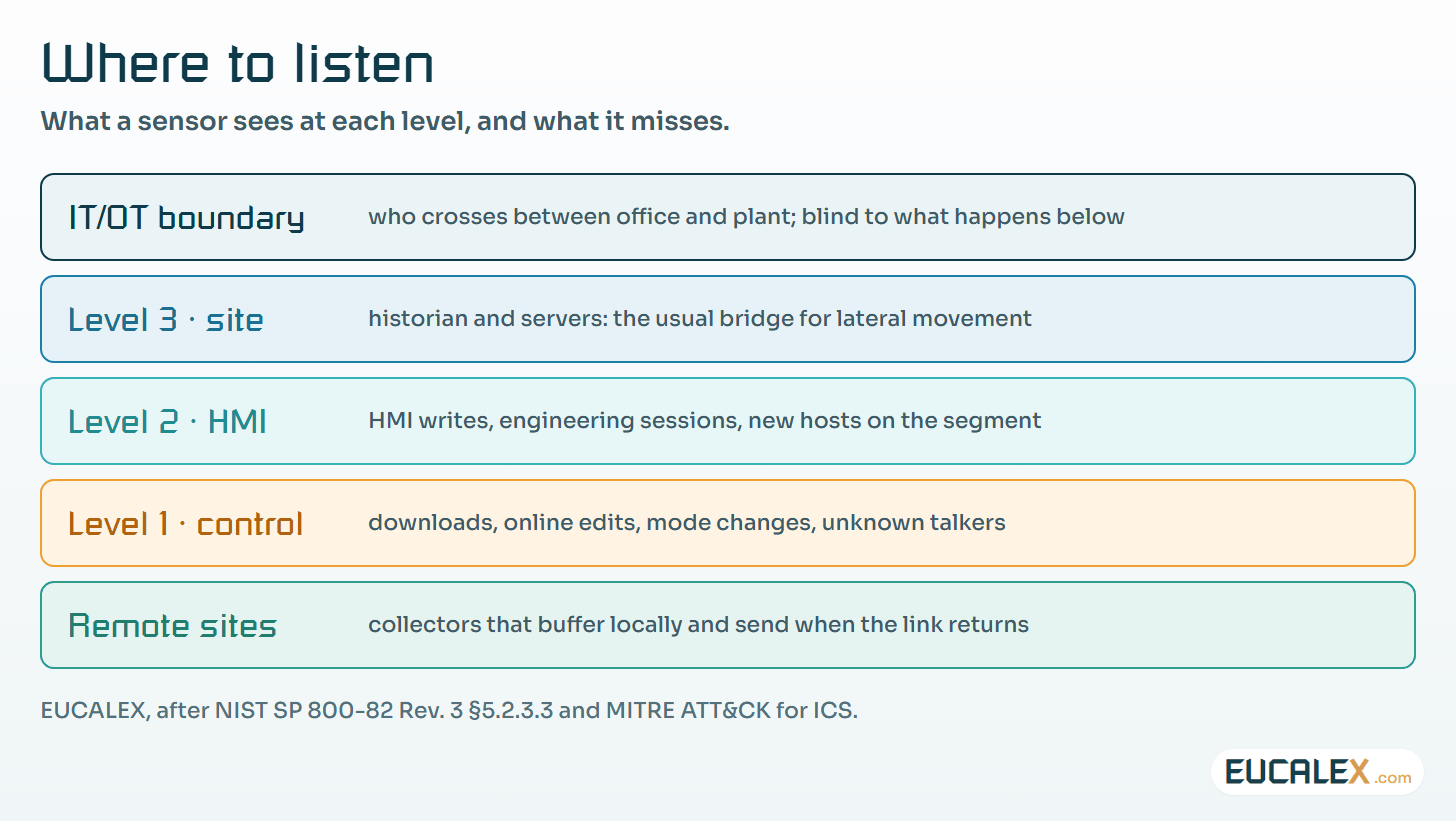
Four assets and the conversations that matter
The engineering workstation holds the projects and the authority to change any controller it can reach, which is what makes it worth an intruder’s effort. Its traffic to a controller is rare and meaningful: uploads, downloads, online edits, forces, mode changes. Each occurrence should match a change.
The HMI talks to its controllers all the time, mostly reads. The writes are what matter: set points, start and stop commands, alarm acknowledgements. MITRE’s Modify Parameter (T0836) describes the abuse, an out-of-bounds or unexpected value written to a parameter the program relies on. A burst of writes to the parameters that hold a validated range, from a station that normally only displays them, is worth a look.
The historian sits between plant and office, reading from everything and read by everyone, which makes it the usual bridge for lateral movement. Does anything write through it to Level 2, and who reaches it from outside?
Then there is the device nobody declared. A laptop that suddenly talks to a controller, a second station claiming to be the supervisory master: MITRE calls the latter a Rogue Master (T0848). On a plant with a stable bill of materials, a new talker on a control network is an event in itself.
What the wire shows, and what makes it an alert
A passive sensor that understands the industrial protocols can decode each of these events. Decoding is the easy part. Each one also happens legitimately many times a year, and alerting on all of them produces a list nobody reads by the second week. Carhart looks at Level 1 for downloads, mode changes and logic differences outside maintenance windows. The window is the useful word.
| Event on the network | ATT&CK for ICS | Usual legitimate cause | Alert when |
|---|---|---|---|
| Program download or online edit | T0843 | An approved logic change | No change record, outside its window, or from a host that is not a declared engineering station |
| Controller mode change | T0858 | Maintenance, commissioning | Outside a window, or a controller left in a remote programming mode afterwards |
| Burst of parameter writes | T0836 | Recipe load, operator adjustment | Writes to validated parameters from a station that does not normally write them |
| New device talking to a controller | T0848 | Contractor or vendor laptop | Always, until someone identifies it |
| Remote session reaching Level 2 | T0886 | Vendor support | No ticket or approval, or a path that bypasses the jump host |
The last row reaches beyond the controller. The SANS 2025 report says that half of the incidents its respondents reported began with unauthorised external access. The sensor cannot judge a session it has never been told to expect.
Change control is the detection rule
Here a regulated site has an advantage it rarely uses. EU Good Manufacturing Practice (GMP) Annex 11, in its 2011 text, requires in clause 10 that “any changes to a computerised system including system configurations should only be made in a controlled manner in accordance with a defined procedure.” Every approved change to a controller already names the system, the reason, the person and the planned date, as set out in when a repair becomes a requalification. That record is the baseline the sensor lacks.
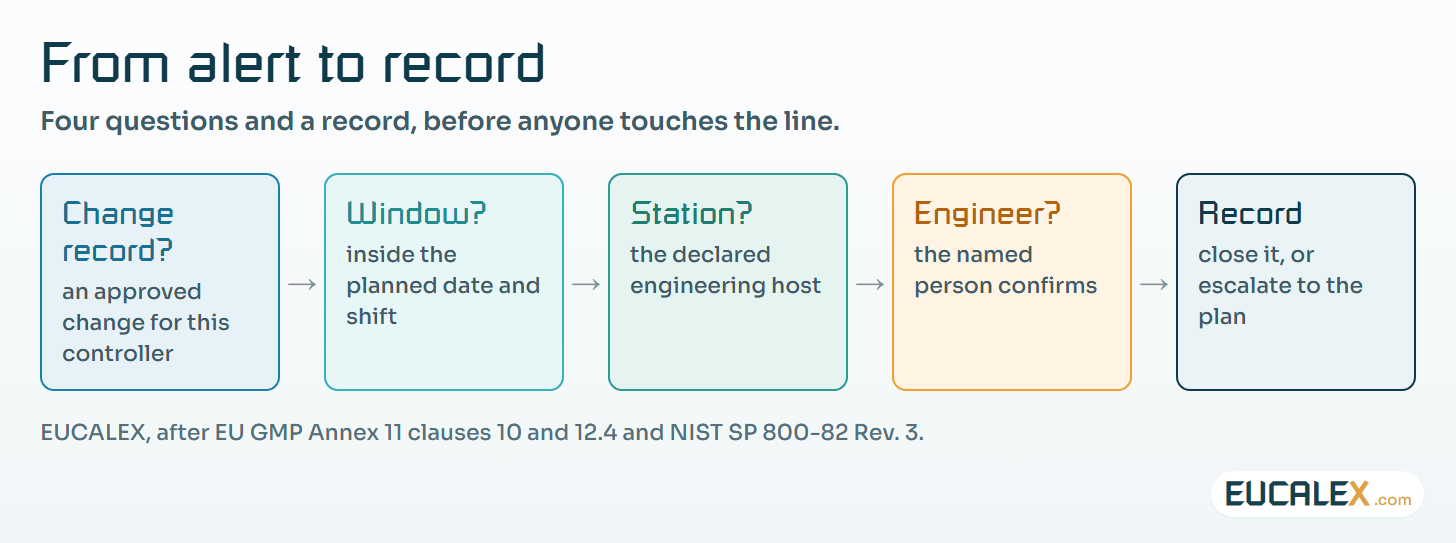
Put the two side by side and the download sorts itself. If it matches an approved change, on the right controller, inside the planned window, from the declared engineering station, it is documented maintenance. If any of the four does not match, it is an alert, whatever the account and the software. That needs no machine learning, only the approved change windows in front of whoever reads the alerts.
NIST Special Publication (SP) 800-82 Rev. 3, the OT security guide of September 2023, notes in §5.2.3.3 that OT traffic is typically more deterministic than IT traffic, and that knowing the normal state of the OT network is a prerequisite for monitoring it, a passive learning mode being a possible first step. Its configuration management overlay adds a physical safeguard: where controllers have key switches, keep them in run or remote mode and manage the key (CM-5).
The sensor answers when something changed and from where. It does not prove what changed. That is the job of comparing the program in the controller with the released version. The two checks close each other’s gaps: an alert without a comparison leaves the batch question open, and a comparison made once a year finds the change months after the batches it touched.
Placing the sensors on a real line
Start where the conversations meet. On most lines that is the cell or area switch where the engineering station, the HMIs and the controllers share a segment. A mirror port on that switch, or a passive network tap, gives the sensor a copy of the traffic without placing anything in the control path. On the sites we assess, the first obstacle is often an unmanaged switch with no mirror port in the panel, and replacing it is the real first project.
Choose the line by consequence, as Parsons recommends: the most targeted and critical assets first. On a pharmaceutical site the most critical are the controllers that hold critical process parameters: the sterilisation hold, the filling weight, the rejection logic.
Two limits belong in the design. NIST SP 800-82 Rev. 3 warns that a monitoring system may be unable to judge encrypted traffic, which matters as controllers adopt secured protocols. And a mirror port can drop packets under load: test the sensor once with a planned download during a shutdown rather than trust its datasheet.
IEC 62443-3-3:2013 places system requirement (SR) 6.2, continuous monitoring, under its foundational requirement on timely response to events. A sensor at Level 2 on the lines that matter, with alerts somebody acts on, is that requirement on the floor.
Remote sites and unattended skids
Every site has places nobody watches: the water for injection plant, the tank farm, the effluent treatment. For such sites Carhart recommends lightweight, passively tapped collectors that buffer locally and send when the link returns (store-and-forward), so a backhaul outage does not erase the evidence.
The same post asks for a central register of remote access endpoints, sessions brokered through a jump host, as in vendor remote access without opening your cell network, and a security baseline for field service laptops. The laptop matters as much as the link: a vendor laptop plugged into a skid panel is the new device of the table above, and the sensor at that panel is the only witness.
Triage with the people who run the line
An alert about a controller is only as good as the person who reads it. The analyst sees that a download happened; the automation engineer knows whether it was the planned one, and the operator noticed whether the line behaved oddly. Carhart lists operator observations among the main sources of detection at Levels 2 and 1, and recommends cyber briefings, structured change windows and clear reporting expectations on shift.
Jason Christopher, who wrote the SANS 2025 report, notes that organisations including field technicians and operators in tabletop exercises report readiness 1.7 times higher than those that do not. Triage is where that shows. Write down who is called for an alert on each line, at night and at weekends, and what they may decide. Whether to isolate or keep producing is a separate decision, prepared in advance as described in the OT incident decisions to take before the call.
Close every alert with a record, even a false one: an alert explained by a change that ran late is a finding for change control. Annex 11 clause 12.4 asks systems to record who entered or changed data, with date and time; the alert record does the same for the network side.
Where to start
- Write the list of who may talk to one line’s controllers. Engineering stations, HMIs, historian collectors, by address and role, on one page signed by the automation lead. It is done when an unknown address on that line would be obvious.
- Listen to one switch. Mirror the cell switch of that line to a passive sensor in learning mode, and compare what it sees with the list. Every difference is either an omission on the page or a finding.
- Give the alerts the change calendar. Send the approved change windows for that line to whoever reads the alerts, and write one rule: a download or mode change outside a window is called in. Test it with a planned download at the next shutdown.
Five common mistakes
- A sensor on the firewall only. It sees the intruder enter and loses them where logic and set points are changed.
- Alerting on every download. Without the change windows the alerts become noise, and the one that mattered is closed with the rest.
- Trusting the engineering workstation because it is ours. It is the most powerful machine on the control network, and the one an intruder wants.
- Remote sites with no buffer. The link fails, the collector drops its data, and the evidence of the night disappears with it.
- Triage without the engineer. The analyst cannot tell a planned download from a hostile one, and the reflex is to unplug something.
The download at 02:14 looked like engineering work because it was engineering work. Only the change record could say whether it was yours.
References
- Lesley Carhart, “Catch it at the Controller: Extending Visibility into ICS L2/L1 and Remote Sites”, SANS blog, 9 February 2026: sans.org
- Dean Parsons, “OT and ICS Incident Response in the Era of Living-off-the-Land Attacks”, SANS blog, 13 February 2026: sans.org
- Dean Parsons, “ICS/OT Network Visibility: Start Protecting the Top Targeted and Most Critical Assets First”, SANS blog, 12 May 2026: sans.org
- Jason D. Christopher, “The SANS 2025 State of ICS Security Report: Progress, Pressure, and the Path to Resilience”, SANS blog, 20 November 2025, on the report of 14 November 2025: sans.org
- CISA, NSA, FBI and partners, Identifying and Mitigating Living Off the Land Techniques, joint guidance, 7 February 2024: cisa.gov
- MITRE ATT&CK for ICS, Program Download (T0843): attack.mitre.org
- NIST SP 800-82 Rev. 3, Guide to Operational Technology (OT) Security, September 2023, §5.2.3.3 and CM-5: csrc.nist.gov
- IEC 62443-3-3:2013, System security requirements and security levels, SR 6.2: webstore.iec.ch
- EudraLex Volume 4, Annex 11: Computerised Systems (2011), clauses 10 and 12.4: health.ec.europa.eu
Related articles
All articles- The SANS ICS Five Critical Controls: five things, in an order that mattersNot another framework to comply with. A prioritisation, derived from analysing actual industrial attacks, in which the first control decides what…
- What owners say, what assessments find: the SANS 2025 OT survey read for a GMP site330 practitioners told SANS where their OT security stands: faster detection, slow recovery, thin visibility near the controllers, remote access as…
- Zero trust below Level 3: what to apply, what to adapt, and what to enforce at the conduitA controller cannot authenticate a request. How to sort the zero trust tenets for a real cell, and what each measure costs a GMP site in change…
- Isolate, run by hand or keep producing? The OT incident decisions to take before the callAn OT incident plan is mostly decisions taken in advance: which response each area allows, who may order it at night, and how the batch is judged…
EUCALEX
Have a project or a technical challenge?
Contact us: we will be pleased to discuss it with you, with no commitment.
Discuss your project with usStay informed
Receive new EUCALEX articles and technical insights by email.