
Breaking down data silos: why data integration decides whether digital transformation works
Ask how many good units a packaging line produced last week and you may well get three answers. The enterprise resource planning (ERP) system counts what was booked into stock. The manufacturing execution system (MES) counts what operators confirmed. The historian counts pulses from a sensor at the end of the line. None of them is wrong. Each system sees the line through its own window, with its own identifiers and its own clock.
That is what a data silo looks like on a plant. The data is there, but it cannot be joined, so every analysis starts with someone copying numbers into a spreadsheet. Digital transformation promises decisions based on data, and it only delivers when data from the enterprise systems, the laboratory and the shop floor can be put side by side, trusted and understood. Getting there is the work of data integration.
Five benefits usually appear in the business case: better access to data, a complete picture instead of fragments, better decisions, secure handling of data, and better collaboration. Below, each one is translated into what it means, and what it costs, on a site working under good manufacturing practice (GMP).
Where the silos are, and why they form
A typical site runs six or seven systems, each holding part of the truth about a batch. The ERP has orders, materials, stock and costs. The MES runs the batch, holds the electronic batch record and knows the equipment status. The laboratory information management system (LIMS) has samples, results and specifications. The historian stores time series from the programmable logic controllers (PLCs) and the supervisory control and data acquisition (SCADA) layer: temperatures, pressures, speeds, alarms. The quality management system (QMS) holds deviations, corrective and preventive actions (CAPA) and change control, and the computerised maintenance management system (CMMS) work orders, calibration and spare parts.
Between them sit spreadsheets, e-mail attachments and exports. That is the unofficial integration layer, and on most sites it carries more than anyone would like to admit.
The silos have understandable causes. Each system was bought by one department to solve one problem, and each has its own identifiers: a material carries one code in the ERP and another in the MES, a machine is a tag in SCADA and an asset number in the CMMS, and the batch number is written three different ways. The operational technology (OT) network is kept apart from IT, for sound security reasons. And while every system has an owner, the flows between them rarely do. Everyone owns a box; nobody owns the arrow.
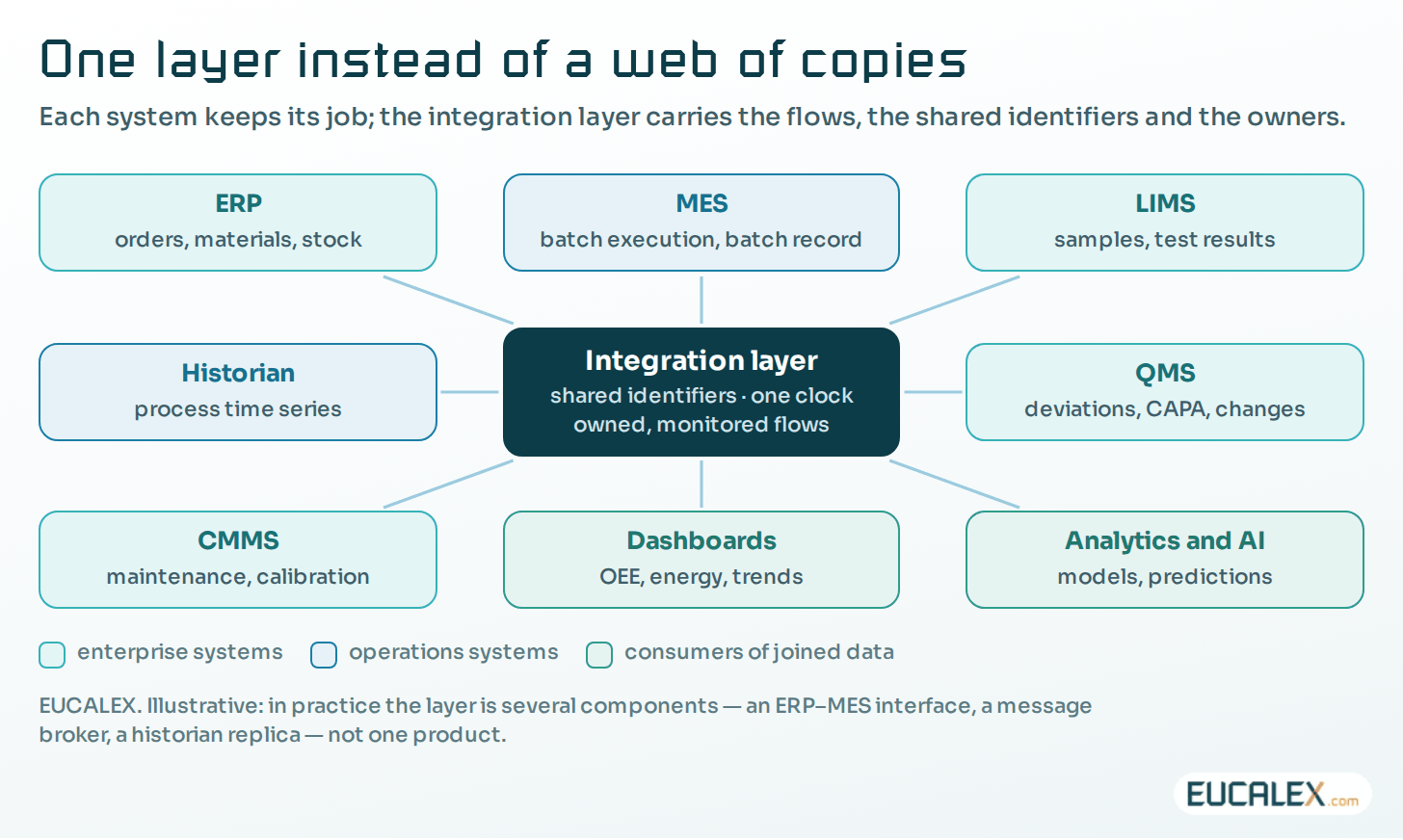
So integration is not a product you buy. It is the set of flows between these systems, the shared identifiers that let their data be joined, and the rules that keep those flows secure and correct. The five sections below follow the five benefits.
1. Make data accessible, without opening the plant
Accessible means that the people who need data can get it, in a usable form, without asking someone for an export. For a process engineer chasing a drift, that is the batch’s temperature curve next to its test results and its deviations. For a planner, it is the real state of the lines rather than yesterday’s report.
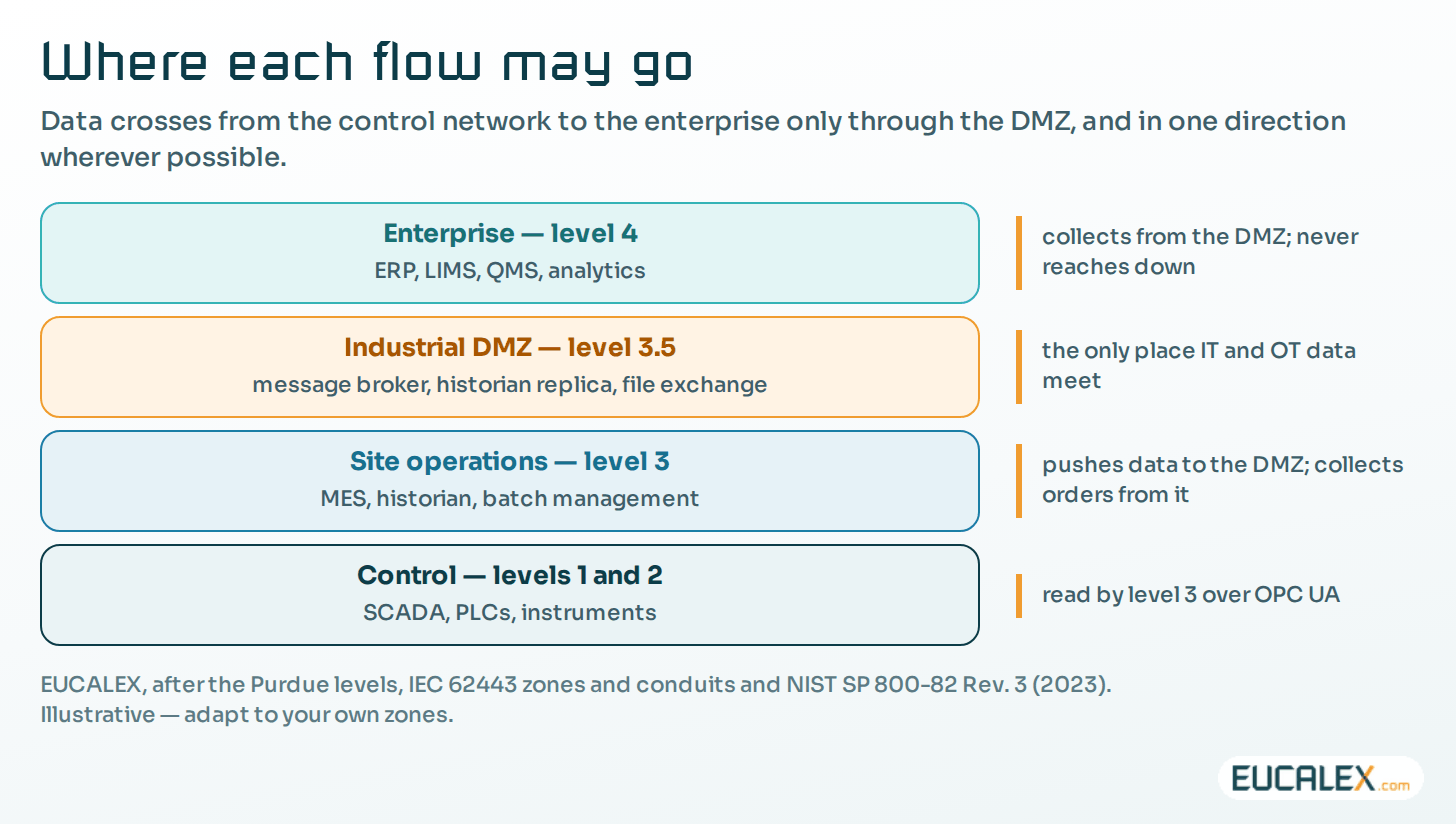
On a plant, accessible must never mean open. A direct connection from an office laptop to a SCADA server or a PLC flattens the network the security architecture was designed to segment. Our rule is simple: data leaves the control network, users do not come in. Production data is pushed to a replica or a message broker in the industrial demilitarised zone (DMZ), and enterprise users and applications read it there.
Three habits make data accessible quickly. Publish rather than share databases: expose data through a defined interface (an application programming interface (API), a message, a replicated table) instead of letting other applications read a system’s own database, so that the next vendor update does not break every consumer. Make access read-only by default; consumers of process data rarely need to write anything back, and where they do (an order sent to the MES, a recipe parameter) that is a separate flow, specified and validated as such. And keep one catalogue: a short list of what data exists, where it lives, who owns it and how to get it saves more time than any dashboard.
2. One picture needs one vocabulary
Combining sources only gives a complete picture if they describe the same thing in the same way. Most integration projects find this out late, usually when a dashboard shows two lines that ought to be one. Four things have to be shared before data can be joined.
- Identifiers. One code per material, per piece of equipment and per batch, or a maintained table mapping the codes between systems. Master data is the least visible part of the work and the one that decides it.
- An equipment model. ISA-95 (IEC 62264-1) describes a site as a role-based hierarchy (enterprise, site, area, work centre, work unit) and gives ERP and MES a common grammar for orders, materials and production results. Naming historian tags and MES equipment after the same hierarchy is what lets you tie a temperature to a batch; see Purdue, ISA-95, IEC 62443.
- Time. Every system stamps data with its own clock. Synchronise all of them from one reference and store timestamps with their time zone, or events will come out in the wrong order around the clock change in spring and autumn.
- Units and meaning. A value without its unit, its instrument and its context is just a number; see metadata: what makes the number mean something.
The technical pattern then depends on the flow. Three terms come up in the table. OPC Unified Architecture (OPC UA, IEC 62541) is the standard interface for reading data from machines and control systems together with its structure and quality. MQTT is a lightweight publish–subscribe protocol (an OASIS standard, version 5.0 since 2019): producers publish to a broker and consumers subscribe to what they need. B2MML is MESA International’s XML implementation of ISA-95 for ERP–MES exchanges.
| Pattern | Good for | Watch out for |
|---|---|---|
| Point-to-point interface (file drop, database link) | One flow between two systems, set up quickly | Links multiply with every new system; failures are silent; nowhere to monitor them all |
| ERP–MES messages (ISA-95, B2MML) | Orders, material consumption, production confirmations | Needs agreed identifiers for materials, equipment and batches; version the message definitions |
| OPC UA from machines and SCADA | Reading values with their structure, units and quality over secure sessions | Information models differ between machine builders; agree them before the purchase order |
| Publish–subscribe broker (MQTT) with a site namespace | Many consumers of the same events: dashboards, historian, analytics | Needs a naming convention and an owner; turn security on; the broker belongs in the DMZ |
| Historian and data lake for analysis | Long time series, comparisons across batches, AI models | Without batch and equipment context it becomes a swamp; decide which copy is the GMP record |
Machines are the hardest part, because every builder delivers its own interface. That is a project in its own right: see why MES projects stall at the shop floor interface.
3. Turn integrated data into decisions
“Data-driven decisions” only become concrete once you can name the decision, the data it needs and the person who will act on it. A few first use cases come up again and again on production sites.
Overall equipment effectiveness (OEE) is usually the first: MES states, historian stops and ERP quantities joined per line and per shift show where the capacity goes, and which loss to attack first. Review by exception follows closely. Batch record data and process data are checked automatically against their limits, so quality assurance (QA) reviews the exceptions rather than every page, and release comes sooner on better evidence.
- Deviation investigations. The process curve, the equipment’s maintenance history and the results of neighbouring batches on one screen. Root cause and scope get settled with fewer assumptions.
- Energy per unit produced. Utility meters from the historian divided by good units from the MES: where to cut consumption, and proof that the cut worked.
- Complaints and recalls. Batch genealogy from the MES and distribution data from the ERP answer “which batches, which customers?” in minutes rather than days. In manufacturing, that is what a better customer experience really means.
Start with two or three use cases, each with a named owner and a measure of success. A use case nobody owns produces a dashboard nobody opens. If you are not sure which ones your site is ready for, measure before you build.
4. Secure the flows, and keep the data correct and lawful
“Security and privacy” usually gets one line in an integration plan. On a GMP site it has three distinct parts: security, integrity and privacy.
Start with security. The IEC 62443 series divides a network into zones, groups of assets sharing the same security requirements, and routes all communication between zones through conduits. Every integration flow is a conduit, so it needs a direction, a protocol, an authenticated account and a place where it is logged. The US National Institute of Standards and Technology (NIST) says the same in its OT security guide: use a DMZ to “prevent direct traffic between the corporate and OT networks”. OPC UA and MQTT both support encrypted, authenticated connections. Turn them on. Where to begin is covered in zones and conduits: where to start.
Integrity is the part GMP cares about most. Data crossing an interface can be lost, duplicated, truncated or attached to the wrong batch. EU GMP Annex 11 requires that systems “exchanging data electronically with other systems should include appropriate built-in checks for the correct and secure entry and processing of data” (§5). The PIC/S data integrity guidance adds that interfaces “should be assessed and addressed during validation to ensure the correct and complete transfer of data” (PI 041-1, §9.4). On the ground, that means a record count or checksum on each transfer, a reconciliation between source and destination, an alarm when a transfer fails, and a written answer to the question “which copy is the record?”.
Privacy is the one people forget. Plant data contains personal data: user names in audit trails, operator IDs on batch steps, badge events. The General Data Protection Regulation (GDPR) asks for personal data to be “limited to what is necessary” for the purpose (Article 5(1)(c)), protected by design and by default (Article 25) and processed securely (Article 32). An OEE dashboard has no use for operators’ names. Pass the team or the shift, and keep names where the GMP record requires them.
5. Make integration a shared project
Integration crosses department boundaries by definition, so it fails when only one department owns it. Goodwill is not enough; it needs a little structure.
Begin with an owner for every flow. Annex 11 defines a process owner, responsible for the business process, and a system owner, responsible for the system and the security of its data. A flow between two systems needs the same thing: one person who is told when it fails and who approves any change to it. Then a small integration board (IT, automation, QA and the use-case owners) meeting on a fixed rhythm to set priorities, naming rules and changes.
Interfaces also have to sit inside change control. Renaming a tag, a material code or a message field breaks every flow that depends on it, so change control should ask “which flows use this?”, and the data flow map below gives the answer. Keep a glossary next to the data catalogue as well, so that production, quality and IT mean the same thing by “batch”, “line” or “good unit”. It sounds trivial until the first meeting where they do not.
Where to start: a data flow map
The PIC/S guidance notes that “the creation and assessment of a data flow map may be useful in understanding the risks and vulnerabilities of computerised systems, particularly interfaced systems” (§9.1.6). It is also the most useful integration document we know of. For each use case, draw the flows, then record one line per flow.
| Field | What to write | Example |
|---|---|---|
| Source and destination | Systems, and the security zones the flow crosses | LIMS (enterprise) to MES (operations), through the DMZ |
| Data | Records, fields, format | Final result and status, per batch and test |
| Trigger and frequency | Event, schedule, volume | On approval of each result; a few per hour |
| Pattern and direction | Interface type; which side opens the connection | Message through the DMZ broker; the MES collects it |
| GMP relevance | Record or copy? Used for which decision? | Copy; the LIMS holds the record; used for the release status |
| Owner | Who is told on failure and approves changes | The LIMS system owner |
| Built-in checks | Completeness and correctness | Count and checksum per message; daily reconciliation |
| Failure handling | Alarm, retry, manual fallback | Alarm after two failed retries; release blocked until reconciled |
Then five steps, in this order:
- Choose two or three use cases, each with an owner and a measure of success.
- Map their data flows, starting from the existing ones, spreadsheets included.
- Fix the identifiers, the equipment model and the clocks of the systems involved.
- Choose the pattern for each flow, build it through the DMZ, and validate GMP flows in proportion to their risk.
- Measure the use case, then extend the same layer to the next one.
Five common mistakes
The expensive one is buying the platform before choosing the use cases. A data lake with no context and no owners turns into a swamp; start from the decision, not the tool. The cheap-looking one is letting point-to-point links multiply. Each costs little on its own, but together they can neither be monitored nor changed safely.
- Joining data without shared identifiers and a shared clock. The dashboard looks complete, and it is wrong.
- Opening a connection into the control network for convenience. It nearly always starts as temporary. Collect the data in the DMZ instead.
- Treating GMP interfaces as IT plumbing: no validation, no reconciliation, no alarm. The first inspector who asks about a transferred result will find the gap.
Every system on the site has an owner. Give every flow one as well, and the silos start coming down.
References
- EudraLex Volume 4, EU GMP Annex 11 Computerised Systems (2011), §5 and glossary (process owner, system owner), health.ec.europa.eu
- PIC/S PI 041-1, Good Practices for Data Management and Integrity in Regulated GMP/GDP Environments (1 July 2021), §9.1.6 and §9.4, picscheme.org
- ISA, ISA-95 Enterprise-Control System Integration (IEC 62264), isa.org
- IEC 62443-3-2:2020, Security risk assessment for system design (zones and conduits), webstore.iec.ch
- NIST SP 800-82 Rev. 3, Guide to Operational Technology (OT) Security (September 2023), nvlpubs.nist.gov
Related articles
All articles- Why your MES project stalls at the shop floor interfaceThe software was selected in nine months. The integration with twelve machines from six vendors was scoped in an afternoon. Guess which one the…
- MQTT and Sparkplug on a plant: what the broker guarantees, and what a GMP site must addMQTT moves plant data cheaply and Sparkplug gives it a shape, but neither keeps a record. What the three QoS levels really promise, what birth and…
- Measure before you build: digital maturity assessment as the first deliverableFive levels from the BioPhorum Digital Plant Maturity Model, seven phases of assessment, and the reason level 1 and 2 plants cannot skip straight to…
EUCALEX
Have a project or a technical challenge?
Contact us: we will be pleased to discuss it with you, with no commitment.
Discuss your project with usStay informed
Receive new EUCALEX articles and technical insights by email.