
Checking the hardening of an HMI you may not install anything on
The good manufacturing practice (GMP) periodic review of a packaging line reaches the security section. One question: is the operator panel still configured the way the supplier delivered it, and was that configuration any good? The answer on file is the supplier’s installation record, signed at qualification. Since then the panel has had two service packs, a replaced disk and a remote support session nobody can fully describe.
IT has a compliance scanner that would answer in minutes, but it needs an agent on the host. The support contract forbids third-party software, and quality would treat an agent as a change to a validated system. So the review records “configuration as per supplier documentation” and moves on. On the sites we assess, that sentence covers most human-machine interfaces (HMIs) and engineering workstations.
There is a middle path: read the configuration from the machine itself, with nothing installed and nothing changed. A free script built for operational technology (OT) does exactly that. Running it remains an act on a validated system, though, and its report is worth little until it becomes a baseline you compare against.
What the tool is, from its own pages
SANS lists it among its free tools: the Configuration Hardening Assessment PowerShell Scripts (CHAPS), created by Don C. Weber of Cutaway Security. The project describes CHAPS as read-only scripts for checking the security configuration of Windows systems where assessment software cannot be installed, written for engineering and operator workstations, HMIs, historians and management servers.
Version 2, released on 14 April 2026, runs 63 checks in a fixed order, in three variants: PowerShell 3 and later, PowerShell 2 for Windows 7 or Server 2008 R2, and a batch file for the command prompt when PowerShell is locked down. The release notes claim coverage back to Windows XP. Each variant uses only what ships with Windows (registry, management queries, netsh, auditpol) and writes a Markdown report to the screen, which the operator redirects to a file.
The checks come from public baselines: Microsoft’s, the Center for Internet Security (CIS) benchmarks and the US Defense Department’s Security Technical Implementation Guides (STIGs). The authors say plainly that CHAPS does not replace Microsoft’s Security Compliance Toolkit, whose Policy Analyzer compares a captured baseline with a later snapshot. Use that where you may install software, and CHAPS where you may not.
A second script, chaps-analyze.ps1, reads a finished report on another machine. It matches each negative line against a knowledge base of 59 entries and returns a severity, a recommendation, references and a MITRE ATT&CK technique mapping. The code is under the GNU General Public License v3, with a commercial licence for anyone embedding it in a closed product; the project states that the reports themselves carry no licence obligation.
| Section (checks) | Examples of what is read | What it tells you on an HMI |
|---|---|---|
| System information (26) | Updates, BitLocker, local administrator passwords, risky services, compilers | Whether the host still matches its qualified description |
| Security (7) | File-sharing version and signing, old encryption protocols, audit policy | Whether the host can be read or relayed from the network |
| Authentication (9) | Remote desktop, local administrators, cached logons, WDigest | Whether a stolen password goes further than one panel |
| Network (11) | Listening ports, name resolution, firewall profiles, shares | Whether the host matches the conduits in your zone model |
| PowerShell (7) | Version 2 still present, script logging, remote management | Whether an intruder’s scripts would leave a trace |
| Logging (3) | Event log sizes, command-line auditing | Whether an investigation would find anything a week later |
Read-only is not the same as no impact
Read-only means CHAPS writes nothing of its own on the host. It does not mean the run is invisible. Three details from the project’s documentation and code matter on a production HMI.
- It runs as Administrator. Without elevation most checks come back marked [x], unknown. The scripts are unsigned, so the documented run sets the execution policy to Bypass for the current window only. On a host with application allow-listing the script may be refused: a good result, and not one to work round without the system owner.
- One check tries to reach the internet. In the PowerShell 3 script, the missing-patch check tests a connection to a public web address, then queries Windows Update. Isolated, it fails and says so; with a path out, your OT monitoring sees the attempt. Each check has a switch at the top of the script: turn this one off and use your own patch records.
- The report is sensitive. It lists the host name, addresses, accounts, software and listening ports. The documentation asks you to take it off by an approved channel and delete the local copy. Treat it as a controlled record.
The script also has to reach the HMI. On most lines that means removable media, through the same scanning station and log as any other file, as set out in the article on bringing portable storage under control. Two header fields default to the author’s company and “plant1”: set them, or every report on file names the wrong auditor.
Under GMP, the run is a controlled act
EU GMP Annex 11 (2011), clause 10, asks that “any changes to a computerised system including system configurations should only be made in a controlled manner in accordance with a defined procedure.” A read-only script changes no configuration, so a full change request for every run would be heavy. Running elevated code on a validated system with no record at all is just as hard to defend at inspection.
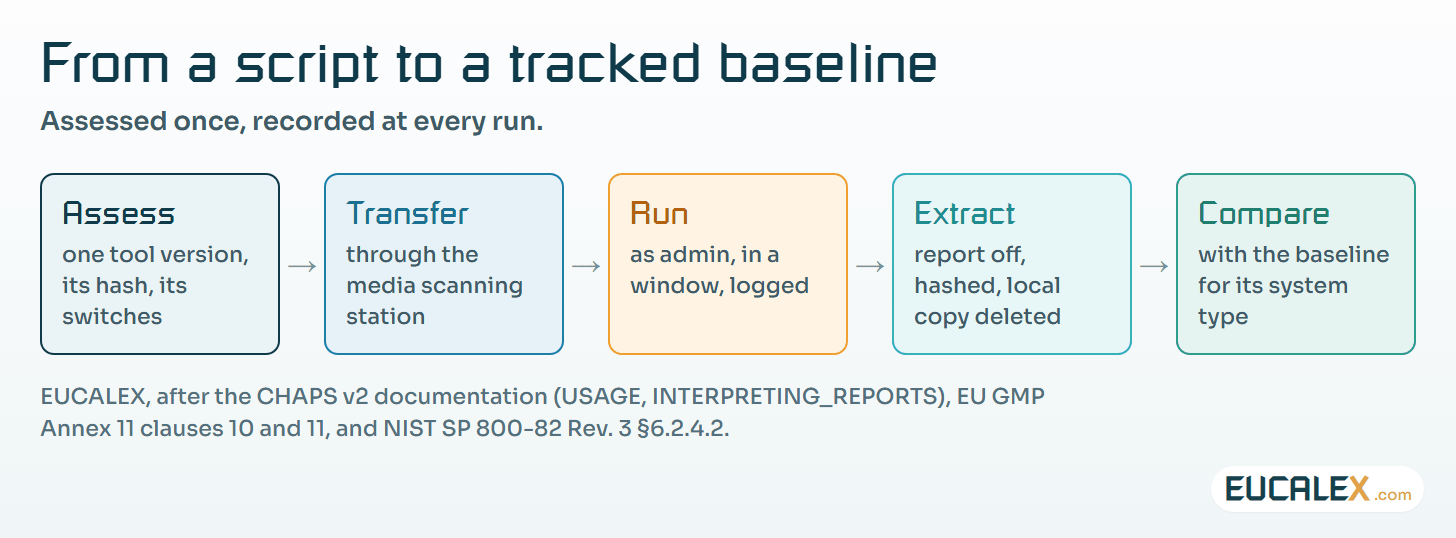
What works on the sites we assess is a standing procedure for read-only diagnostic tools. Each tool version is assessed once: what it reads, which switches are set, and the hash of the exact script file. Each run is then logged like a maintenance intervention: date, host, person, window, and the hash of the report taken off. A new version of the script is a new assessment, never a silent download onto the transfer key.
The other half is already in Annex 11. Clause 11 asks that computerised systems be periodically evaluated, including “security and validation status reports”. A dated CHAPS report, compared with the previous one, is exactly that kind of evidence. When a finding calls for a fix, the fix is a change in the ordinary sense, routed as described in the article on when a repair becomes a requalification.
Reading the report for an HMI, not for an office computer
Every line starts with one of four marks: [+] in line with the recommendation, [-] against it, [*] information only, [x] the check could not complete. The project’s own guide warns that the report does not know the machine’s role, does not judge exploitability and does not say whether a fix is safe. On an HMI, most of the work lies in those three gaps.
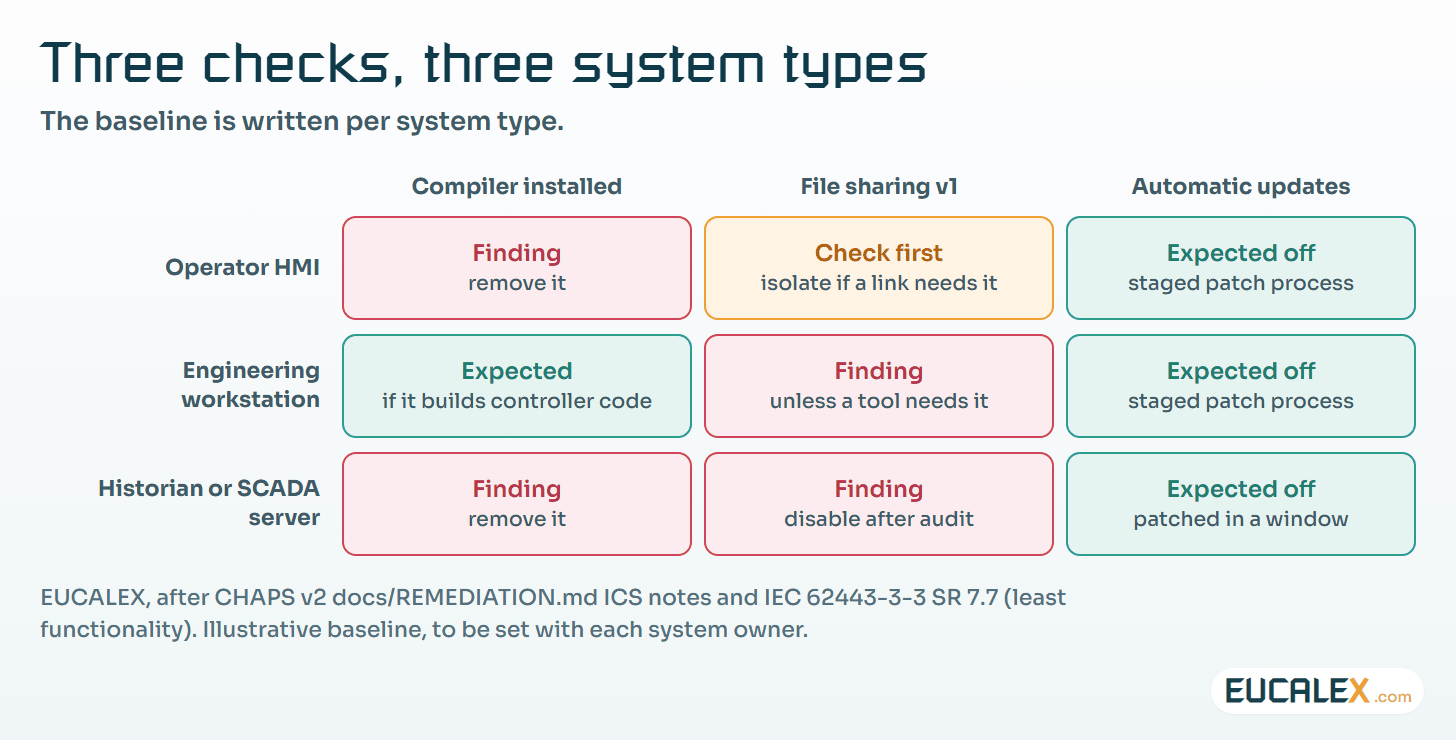
Some negative findings are wrong for OT as written. CHAPS marks Windows Update negative unless automatic scheduled installation is set, while its own remediation guide notes that OT systems patch in maintenance windows, through staged updates. On a validated HMI, uncontrolled updates would be the finding. The right record is a documented patch process, and the [-] line is closed by reference to it.
Others need the supplier before anyone touches them. The guide warns that legacy HMI or controller software may depend on version 1 of the Windows file-sharing protocol, old authentication or old encryption, and says to audit before disabling. When the dependency is real, the answer is a compensating control around the host, the approach in the article on shielding legacy controllers.
And some findings depend on the machine’s job. A compiler on an engineering workstation that builds controller code is expected; on an operator panel it is a tool left for an intruder. Unquoted service paths and writable program folders, often left by vendor installers, are real privilege escalation routes, and their fix is tested with the supplier.
| Finding | Office reading | HMI or workstation reading | Who decides |
|---|---|---|---|
| Automatic updates not scheduled | Enable automatic installation | Expected: patches follow a staged, documented process | System owner, with quality |
| File sharing version 1 enabled | Disable it | First find which controller or HMI link uses it; isolate if needed | Automation engineer and supplier |
| Compiler installed | Remove unless needed | Expected on an engineering workstation; removed from an operator panel | System owner |
| Unquoted service path | Quote the path | Often a vendor service: fix, test, tell the supplier | Supplier, under change control |
To decide what comes first, sort every [-] line into three bins with the automation engineer and the supplier. First, settings that let one stolen password spread: WDigest storing credentials, weak legacy authentication, no Local Security Authority (LSA) protection, one local administrator password on every panel. Then fixes that need supplier testing, planned for the next window or version. Last, accepted deviations, each with a compensating control, a name and a review date.
Read the [x] lines as carefully as the others. An [x] is not a pass. It is a check that told you nothing, and the guide is explicit that an [x] on an elevated run deserves investigation.
From one report to a baseline
A single report is a photograph. The standards ask for something you can hold the system to over time. IEC 62443-3-3:2013 includes system requirement (SR) 7.6, “Network and security configuration settings”, and SR 7.7, “Least functionality”. IEC 62443-4-2:2019 carries both at component level, as component requirement (CR) 7.6 and CR 7.7. NIST SP 800-82 Rev. 3 §6.2.4.2 says that “organizations should document the approved baseline configuration for their OT devices”.
CHAPS gives you the observed state; the baseline is yours to write. Write one per system type, not per host: operator HMI, engineering workstation, historian or supervisory control and data acquisition (SCADA) server. For each of the 63 checks, record the expected result and, where it differs from the tool’s recommendation, why. The analyser accepts an override file, so your site’s severities and wording can live beside the bundled knowledge base without editing it.
Then track drift. Run the script at each periodic review and after each significant change, and compare the new report with the last accepted one. The reports are plain text, so an ordinary file comparison shows every line that moved. A setting that changed with no change record behind it is a finding for quality as much as for security. The comparison also feeds the zone-level rating described in the article on IEC 62443-2-2 and the periodic review.
What it does not see
CHAPS reads Windows hosts, one at a time, at one moment. It does not scan the network and says nothing about controllers, switches or Linux-based panels. A clean report on an engineering workstation proves nothing about the network around it. Nor is it a CIS or STIG compliance statement: the checks map one to one to no benchmark version.
It does not see the third-party components inside the HMI software either, a supplier question covered in the article on open source inside the HMI. None of that is a reason to skip it. Where the honest answer to “how is this panel configured?” is a document signed years ago, a dated report read from the machine is a large step.
Where to start
- Assess one version of the tool once. Record the script hash, turn off the internet patch check, set the two header fields, and write the run procedure. It is done when quality has signed a one-page assessment.
- Run it on one machine that is not producing. A standby panel, a training HMI or a spare engineering workstation of the same build. It is done when the report is off the host, hashed and filed, and the local copy is gone.
- Sort the findings and write the first baseline. Three bins, an owner for each line, and the expected result for that system type. It is done when the next periodic review compares against it.
Five common mistakes
- Counting [+] lines as a score. Sixty positive lines can sit beside one shared administrator password that opens every panel.
- Applying the remediation guide in one pass. Disabling file-sharing version 1 on an HMI that still talks to an old controller can cut the link the line needs; the guide says audit first.
- Downloading the latest script onto the transfer key on the day. The version that runs on a validated system is the one that was assessed, with its hash.
- Leaving the report behind. On the HMI, on the key, or in a mailbox: it is a map of the host for whoever finds it.
- Reading [x] as nothing to see. An incomplete check is a gap in the evidence, and the next run should close it.
The supplier’s installation record tells you how the panel was configured on the day it was signed. A read-only check tells you how it is configured now, and the baseline turns the difference into a decision someone owns.
References
- SANS Institute, Cybersecurity Tools: CHAPS (Don C. Weber), page updated 17 June 2025
- Cutaway Security, CHAPS repository: README, docs and scripts
- CHAPS v2 release notes, 14 April 2026
- Microsoft Learn, Microsoft Security Compliance Toolkit: how to use
- Center for Internet Security, CIS Microsoft Windows Desktop Benchmarks
- IEC 62443-3-3:2013, System security requirements and security levels
- IEC 62443-4-2:2019, Technical security requirements for IACS components
- NIST SP 800-82 Rev. 3, Guide to Operational Technology (OT) Security, September 2023
- EudraLex Volume 4, Annex 11: Computerised Systems (2011)
Related articles
All articles- Reading an OT workstation’s event logs for intrusion, without installing anything on itDeepBlueCLI reads exported Windows event logs for the traces of a hands-on intruder. What an OT site must record first, and how to triage what it…
- Open source inside the HMI: the ten risks a GMP site inherits, and the change control that answers themOperator panels, gateways and SCADA packages are built from open-source components the site never chose. The ten OWASP open-source risks read for a…
- Legacy PLCs are not going away. Shield them.The controller cannot authenticate, cannot be patched and runs a process worth more than the project that would replace it. That is not a dead end…
EUCALEX
Have a project or a technical challenge?
Contact us: we will be pleased to discuss it with you, with no commitment.
Discuss your project with usStay informed
Receive new EUCALEX articles and technical insights by email.