
Reading an OT workstation’s event logs for intrusion, without installing anything on it
The question came on a Monday morning, from the production manager rather than from IT: had anyone been on the line’s engineering workstation over the long weekend? A project file showed a new modification date, nobody in the automation team remembered opening it, and the antivirus had nothing to report. We meet this scene, in one form or another, on most sites we assess.
The workstation usually holds part of the answer in its Windows event logs. Whether anyone can read it depends on two decisions taken long before that Monday: what the machine was set to record, and how far back its logs still go.
On the Windows hosts of a plant (human-machine interface (HMI) servers, engineering workstations (EWS), historians, batch servers), the event logs are the nearest thing to a flight recorder for hands-on intrusion: an account created, passwords tried in a row, PowerShell started from somewhere it should not be.
DeepBlueCLI, a free tool written by Eric Conrad and listed among the SANS Institute’s tools, reads those logs and points at the entries worth a look. It works on an exported copy, on an analyst’s laptop, with nothing installed on the HMI. On a site under good manufacturing practice (GMP), most of the work is in what comes before the tool and after it. Host hardening and network monitoring are other subjects; this article stays with what the host wrote down.
What the tool is, from its own pages
The project’s read-me file describes DeepBlueCLI as “a PowerShell Module for Threat Hunting via Windows Event Logs”. In practice it is a script, DeepBlue.ps1, run against a live log of the machine it sits on (the Security log by default, from a PowerShell window opened as administrator) or against an exported .evtx file. It reads the Security, System, Application, Windows PowerShell and Sysmon logs. For command lines it relies on Security event 4688, PowerShell events 4103 and 4104, and Sysmon event 1.
Its findings come out as PowerShell objects that export to a spreadsheet or a web page and can be attached to a deviation or an incident record as they stand. The detection rules sit beside the script in plain text, regexes.txt for suspicious command lines and safelist.txt for the ones to ignore. An engineer can open them and explain to quality why a line was flagged.
Two companions share the repository. DeepBlue.py, a Python port for Linux, is described by its own read-me as an alpha covering command lines only. DeepBlueHash collects file hashes from Sysmon and can check them against VirusTotal; on many plants, sending hashes of a vendor’s binaries to an online service needs someone’s approval first.
The code is published under the General Public License version 3 (GPL-3.0), and its last commits date from 28 June 2023. The tool is stable and readable, not actively developed: treat it as a documented reading aid whose rules you can check line by line, not as a product with a support contract.
Why the intruder looks like your integrator
In February 2024, CISA, the NSA, the FBI and partner agencies in several countries published joint guidance on living off the land (LOTL), intrusions carried out with the tools already present on the system. It states that LOTL stays effective because many organisations lack the baselines needed to tell legitimate behaviour from malicious, and that the agencies’ red teams often find broad exceptions for PsExec “because administrators regularly use it for their job duties”.
On a plant that sentence describes the integrator. Remote support sessions, PsExec to push a patch to six HMIs, PowerShell to collect diagnostics: an intruder with a valid account uses the same tools, and antivirus has no reason to object. Remote access software: the tool is legitimate, and that is precisely the problem makes the same point for remote access tools. What separates the two is context, and the event log is where the context is written.
What it flags, and the innocent explanation on a plant
Each detection reads specific events, and each event exists only if the host was set to write it. On engineering hosts most hits have an ordinary cause, so the last column is where triage starts.
| Detection | Events read | What the host must record | Usual innocent cause on a plant |
|---|---|---|---|
| Account created or added to a group | Security 4720; 4728, 4732, 4756 | Account management auditing | A commissioning engineer creating a local operator account during site acceptance tests |
| Password guessing or spraying | Security 4625 (more than five failures), 4648 | Logon failure auditing | A service or scheduled task still using a password changed at the last review |
| Long, encoded or obfuscated command lines, web download strings | Security 4688, PowerShell 4103 and 4104, Sysmon 1 | Process creation with command line; PowerShell module and script block logging | Installers and backup agents that pass encoded PowerShell |
| PowerShell started through WMIC or PsExec | Security 4688, Sysmon 1 | Process creation with command line | An integrator’s script deploying an update to several HMIs at once |
| New service, event log service stopped, log cleared | System 7045, 7036, 7040, 104; Security 1102 | System and Security logs kept long enough | A remote support tool installing its service for each session; a technician clearing a full log on an old HMI |
The thresholds can be read in the script: guessing is reported after more than five failed logons on one account, spraying when the failures spread over several accounts, and a command line longer than 1,000 bytes is reported as long.
Run it on a copy, not on the HMI
Running DeepBlueCLI on the host means an administrator PowerShell session on a validated machine, often a change of the script execution policy, and a copy of the tool folder, which its read-me warns antivirus may flag because it ships sample logs of real attacks. That is three unplanned changes before the first result.
Exporting needs nothing beyond Windows. The built-in command wevtutil writes a log to a file: wevtutil epl Security D:\export\ews01-security.evtx, and the same for System, Microsoft-Windows-PowerShell/Operational and, where Sysmon runs, its log. Hash each file before it leaves the host, carry it on the site’s controlled media, and run the script against the copy: .\DeepBlue.ps1 .\ews01-security.evtx.
One command must never appear in that procedure. wevtutil cl clears a log: it destroys the evidence, and the clearing itself writes the events (Security 1102, System 104) that DeepBlueCLI reports as possible tampering.
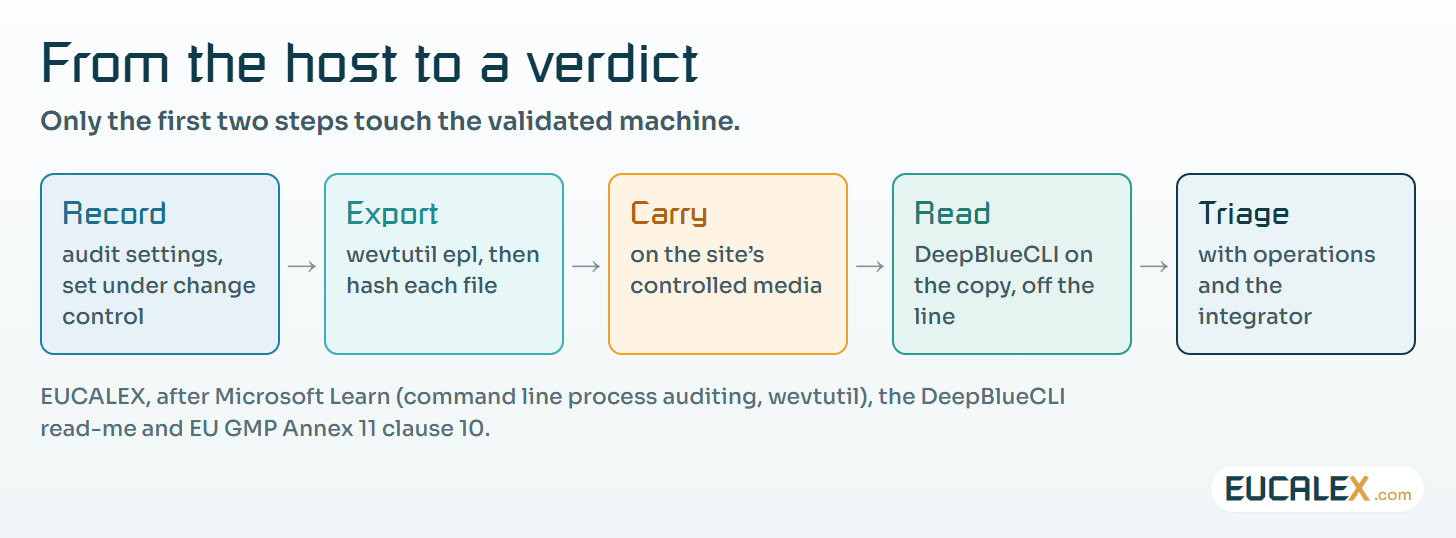
An exported log is a record like any other: the file, its hash, the host, the export time and the person who made it are what make it usable weeks later, as metadata: the part of the record that makes the number mean something explains for GMP data. Write the export once as an approved procedure, so that on the day it is routine work.
It only finds what the host was told to record
Event 4688 carries the command line only when two policies are set, Audit Process Creation and “Include command line in process creation events”. Microsoft’s page on command line process auditing shows neither configured by default, and rates the event volume as low to medium, depending on system usage. On the HMIs we see, which run the same few programs all shift, it sits at the low end, and a stranger stands out against that routine.
The same page warns that, once enabled, anyone allowed to read the Security log can read every command line, and command lines can contain passwords. A vendor batch file that calls a database tool with the password in its arguments is a familiar sight on older HMIs. Restrict who reads the log, and raise the script with the vendor.
Event 4104 comes from PowerShell script block logging, which records the content of every script block processed. Microsoft recommends Protected Event Logging when it is used for anything beyond diagnostics; the events are then encrypted and must be decrypted with the private key, on a secured collector, before any tool can read them. Decide where that key lives before switching the protection on.
Sysmon, which Microsoft describes as a system service and device driver that remains resident across reboots, adds richer process data. On a validated host it is new software, with its own qualification and a question for the HMI vendor. DeepBlueCLI works without it.
Retention decides whether the logs are still there when someone asks: open the Security log of one EWS and note the date of its oldest event. The CISA guidance recommends central collection so that logs do not roll over as quickly, and because some intruders clear local logs.
Time decides whether they can be compared with anything. NIST SP 800-92, the log management guide of September 2006, asks in §5.5 that each system’s clock be synchronised to a common time source. An HMI a few minutes adrift turns every comparison with the batch record into an argument.
Turning the logging on is a GMP change
EU GMP Annex 11, in its 2011 text, says in clause 10 that “Any changes to a computerised system including system configurations should only be made in a controlled manner in accordance with a defined procedure.” An audit policy is a system configuration. The usual pattern is a domain group policy written by IT that reaches the OT hosts overnight: the change is sound, and the GMP side has no record of it.
The change record is short. It lists the policies, the new maximum size of each log, the host where it was tried first, what was watched afterwards (processor load, free disk, the HMI’s response times) and how to reverse it. Ask the HMI vendor whether the settings are supported on their release.
The effort pays back at the periodic review. Annex 11 clause 11 lists security among the points a periodic evaluation should cover, and clause 12.1 asks for controls that restrict access to authorised persons. A dated log review, with its findings explained, is evidence for both.
What a hit means, and who you call
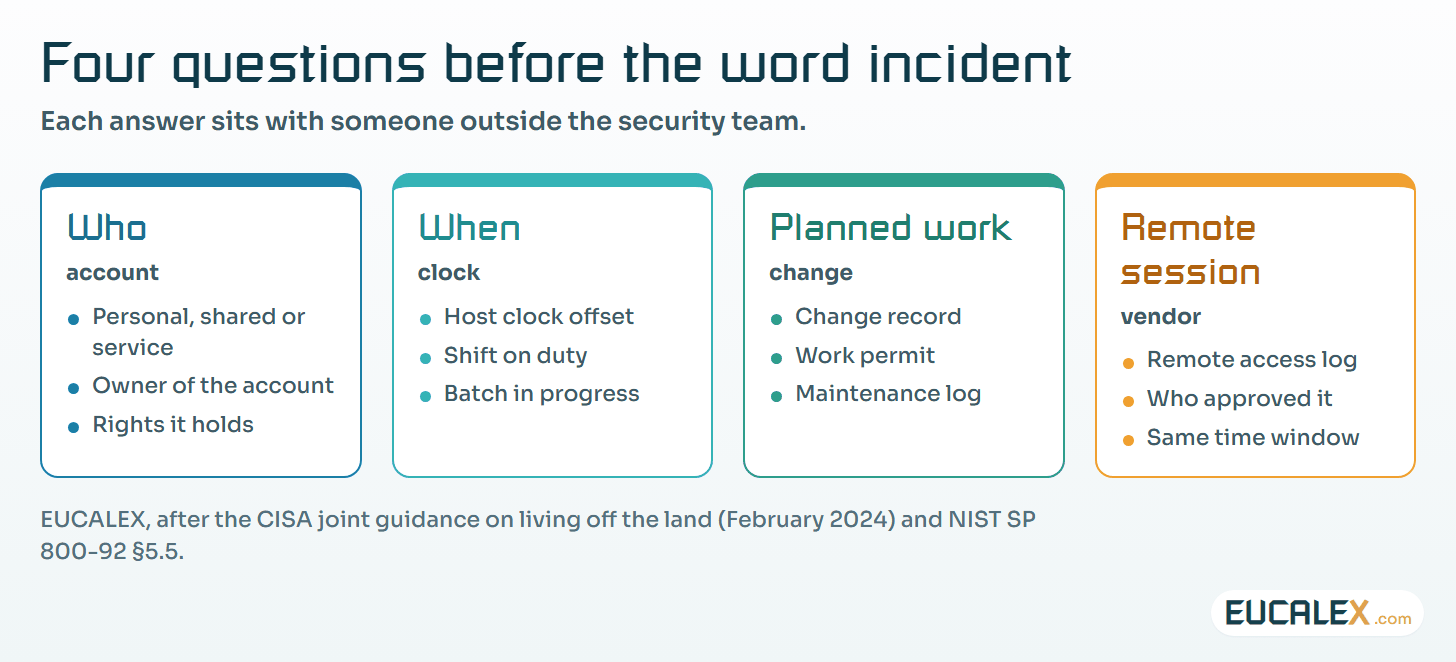
A hit is an event to explain, not yet an incident; the distinction is set out in event, issue, incident, attack: the word you choose has consequences. Triage runs with operations and, usually, the integrator, in a fixed order:
- Who. The account in the event, and whether it is personal, shared or a service account.
- When. The time, read against the host’s clock offset and the shift pattern.
- Planned work. The change record, the work permit and the maintenance log for that host and that window.
- Remote session. The remote access log for the same period, if the vendor was connected.
A hit with an answer goes into safelist.txt as a narrow pattern, with a comment pointing to the change number, so that the next review stays quiet on it and the reason is on file. Keep the pattern tight: a broad PsExec exception is exactly what the CISA red teams report finding and using.
A hit without an answer moves to the incident path. Keep the exported files and their hashes untouched, and follow the OT incident decisions to take before the call: who may isolate the host, and what the line does meanwhile.
Where to start
- Measure one workstation. On one EWS, note the date of the oldest event in the Security log and check whether event 4688 shows a command line. It is done when both facts are written in the system file.
- Raise the audit change. Process creation with command line, script block logging and a larger Security log, on that host first, under change control. It is done when the host has run a full production week with the settings on and nothing on the watch list moved.
- Read the copy with the integrator. After the next planned maintenance visit, export the logs and run DeepBlueCLI on the copy, with the integrator explaining each hit. The explained hits become the first entries of the safelist.
Five common mistakes
- Running the tool on the HMI. An administrator session and a folder of attack samples on a validated machine, when a copy would do.
- Hunting in logs that were never recorded. Without command line auditing, event 4688 says a process started and nothing about what it was told to do.
- Clearing a full log to make room. It erases the evidence and raises the very alert an intruder would.
- Safelisting by tool name. An exception for every PsExec run hides the intruder along with the integrator.
- Enabling audit settings outside change control. The logging is right; the missing record is a finding of its own at the next inspection.
The useful question on Monday morning is not which tool to run. It is whether the workstation was told, months earlier, to write down what happened.
References
- SANS Institute, DeepBlueCLI, tool page by Eric Conrad, last updated 17 June 2025: sans.org
- DeepBlueCLI repository, read-me and detection files, GPL-3.0, last commits 28 June 2023: github.com
- Microsoft Learn, Command line process auditing (event 4688): learn.microsoft.com
- Microsoft Learn, about_Logging, Windows PowerShell 5.1 (script block logging, event 4104, Protected Event Logging): learn.microsoft.com
- Microsoft Learn, wevtutil (export-log): learn.microsoft.com
- Microsoft Sysinternals, Sysmon: learn.microsoft.com
- CISA, NSA, FBI and partners, Identifying and Mitigating Living Off the Land Techniques, joint guidance, 7 February 2024: cisa.gov
- NIST SP 800-92, Guide to Computer Security Log Management, September 2006, §5.5: csrc.nist.gov
- EudraLex Volume 4, Annex 11: Computerised Systems (2011), clauses 10, 11 and 12.1: health.ec.europa.eu
Related articles
All articles- Checking the hardening of an HMI you may not install anything onA read-only script can tell you how a validated HMI is really configured. How to run it under GMP, read its report, and turn it into a baseline you…
- Remote access software: the tool is legitimate, and that is precisely the problemSigned, expected, often excluded from inspection, and encrypted past the firewall. Five agencies wrote the guide; the part industry needs is what it…
- Event, issue, incident, attack: the word you choose has consequencesIt looks like a vocabulary slide. It is a liability slide. Escalating a word is easy; walking it back is not.
EUCALEX
Have a project or a technical challenge?
Contact us: we will be pleased to discuss it with you, with no commitment.
Discuss your project with usStay informed
Receive new EUCALEX articles and technical insights by email.