
Data integrity by design: fix the data flow before you configure the system
A balance prints a ticket, a technician types the value into the batch record, a spreadsheet recalculates it, and a PDF is signed at the end. Each step can be qualified or validated on its own and the result can still be wrong. The value was copied by hand, the spreadsheet was editable, and nobody can show which number came first.
That is the problem data integrity by design is meant to solve. Many data integrity gaps are not individual mistakes at all. They were built into the process long before go-live: a transcription step nobody removed, an instrument that saves results to a local folder, a shared login, a clock nobody synchronised. Fixing them after an inspection means a remediation project. Fixing them on the whiteboard means a meeting.
What “by design” means
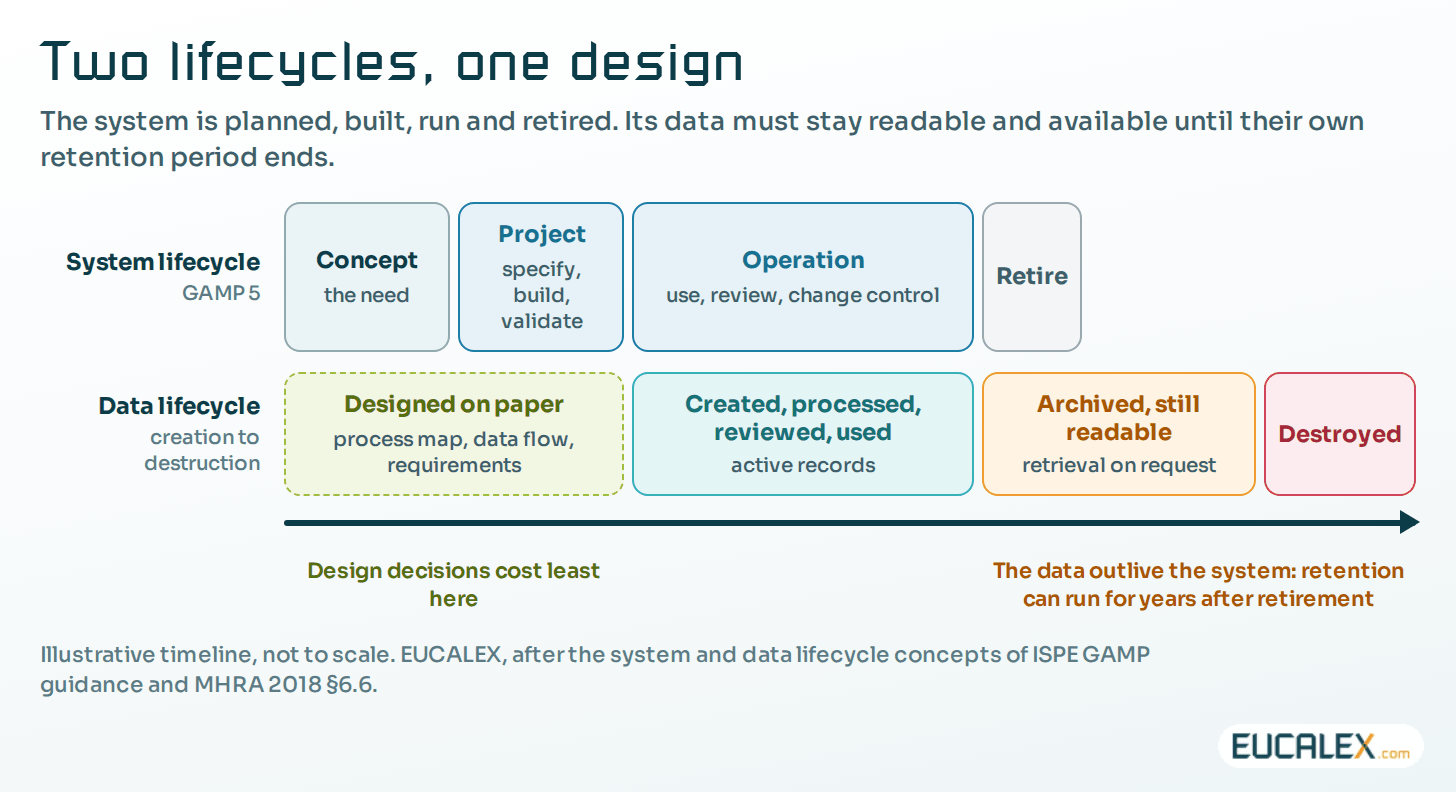
The idea is set out in an ISPE GAMP good practice guide, Data Integrity by Design (2020). Data integrity is built in from the first planning of a business process, through the implementation and operation of the computerised systems that support it, to their retirement. The guide joins two lifecycles that are often managed apart: the system lifecycle, which validation teams know from GAMP 5, and the data lifecycle, from creation to destruction.
Regulators ask for the same thing in their own words. The UK regulator, MHRA, expects organisations to “implement, design and operate a documented system that provides an acceptable state of control based on the data integrity risk” (2018, §3.4). The draft revision of EU GMP Annex 11, published for consultation in July 2025, asks that risks be reduced, “if possible, by modifying processes or system design” (§4.4).
Start from the process, not from the system
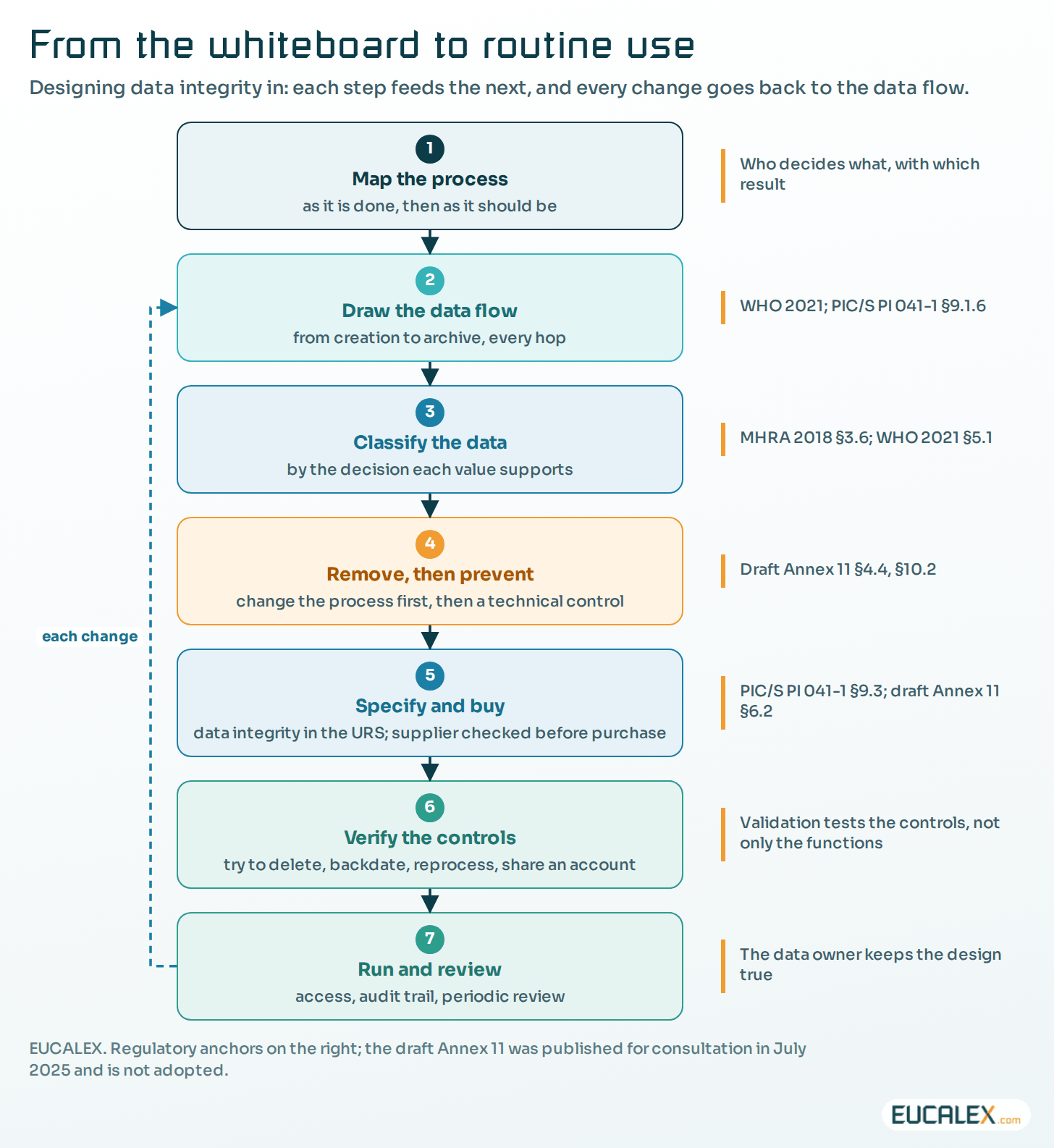
The usual order is to choose a system, configure it, and then write the procedures. That puts the data last. Designing for data integrity turns it round: describe the business process first, then how the data moves through it, and only then decide what the system must do.
Two pictures do most of the work. The first is a process map of the real activity, as it is done today and as it should be: who does what, where, with which equipment, and which decisions hang on the result. The second is a data flow diagram that follows each piece of data from its creation to its archive, showing every transfer between systems, every manual entry, calculation and copy, every place it is stored, and who can change it.
Both are now recommended in writing. The World Health Organization’s data integrity guideline (2021) recommends documenting data flows and data process maps to assess and control data integrity risks. PIC/S notes that a data flow map “may be useful in understanding the risks and vulnerabilities of computerised systems, particularly interfaced systems” (PI 041-1, §9.1.6). And the draft Annex 11 asks that requirements include “process maps and data flow diagrams” where relevant (§6.2).
The diagram is where the problems show up. Take a packaging line: a reject count travels from a sensor to a programmable logic controller (PLC), an operator panel, a historian (the database that stores process values over time) and a manufacturing execution system (MES) before it reaches the batch record. Each hop can lose, duplicate, round or re-time a value. Each hop is also somewhere a control can go.
Classify the data by the decision it supports
Not all data deserve the same effort, and the guidance says so openly. The effort “should be commensurate with the risk and impact of a data integrity failure” (MHRA 2018, §3.6), and WHO asks for data integrity risk assessments that consider data criticality (2021, §5.1).
The practical test is the decision the data supports. A value that releases a batch, confirms a stability result or closes a deviation is critical; a value used to plan maintenance is not. Intended use also decides what the original record is (for a system that creates electronic data, usually the electronic record, not its printout), and so what has to be protected, reviewed and kept.
Remove the risk before you control it
Once the weak points are on the diagram, the design choice follows a simple order. First remove the risk by changing the process. Then prevent it with a technical control. Only after that, detect it with a procedure, with training and behaviour supporting all three. A second-person check of a transcribed value is a detection control. Connecting the balance so that nobody transcribes anything is a design decision.
The guidance points the same way. The draft Annex 11 asks that critical data moved between systems go through “validated interfaces rather than on manual transcriptions” where possible (§10.2). WHO asks for processes designed “to avoid the unnecessary transcription of data” (2021, §9.3). MHRA lists synchronised clocks, and records available where the activity takes place so that nothing is jotted down informally and copied later (2018, §5.1).
| Weak point | What goes wrong | Design control (prevent) | Fallback if it cannot be designed out (detect) |
|---|---|---|---|
| Manual reading and typing | Wrong or selective values; no original | Direct capture: interface, barcode or connected printer | Second-person check against the original |
| Instrument with local storage | Files deleted or overwritten on the PC | Automatic transfer to a secured server; no local write access for users | Regular reconciliation of files against runs |
| Shared or generic accounts | Actions cannot be attributed | Individual accounts; rights by role; segregation of duties | Periodic review of accounts and rights |
| Unsynchronised clocks | Timestamps out of sequence | One time source; users cannot change the clock | Periodic clock check |
| Re-processing results | Testing into compliance | Every version kept; reason required; results locked after review | Audit trail review focused on reprocessing |
| Exports to spreadsheets | Editable copies used for decisions | Reports built in the system; calculations validated | Controlled templates checked against the source |
| Interfaces between systems | Values lost, duplicated, re-timed or converted | Validated interfaces with buffering and reconciliation | Interface alarms reviewed every day |
| Printouts of electronic data | Paper treated as the original; electronic data lost | Electronic record as the original; electronic signatures | Procedure linking each printout to its record |
Write it into the requirements, then prove it
A design only exists once it is written where the supplier and the validation team will read it. PIC/S expects data management and integrity requirements to be considered at the first stages of procurement and written into the user or functional specifications, and GMP-critical equipment to be assessed for its data integrity controls before purchase (PI 041-1, §9.3). The draft Annex 11 lists data integrity among the requirements a specification must cover (§6.2).
A user requirements specification (URS) written this way carries three kinds of requirement. There is what the process needs, the functions. There is how the data must be protected along their lifecycle: access, audit trail, time stamps, signatures, storage, backup, archive. And there is how the system sits in its environment, for instance a terminal close enough to the line for entries to be made at the time of the activity. How to write requirements that drive the tests is covered in Writing a URS that actually drives the qualification.
Validation then tests the controls as well as the functions. Try to delete a result, change the clock, reprocess without a reason, sign for someone else. Every attempt that succeeds is a design gap found before it turns into an inspection finding. What has to travel with each value is covered in Metadata: the part of the record that makes the number mean something.
Plan the end at the start
The data usually outlive the system. EU GMP keeps batch documentation for one year after the batch expires or at least five years after its certification, whichever is longer (Chapter 4, §4.11), and some records far longer. The system that created them may be replaced more than once in that time. So before go-live, someone has to decide how long each record type is kept and who signs off its destruction.
Format comes next. A raw data file is useless without a version of the application that can open it, so the question is which format stays readable, and with which software. Then where and how the records are archived and protected; a backup is not an archive, and which backup for which system explains the difference.
Retirement needs a plan too: migrate the data with a verified migration, or keep a validated way of reading them, such as a virtual machine of the old application. And when a third party holds the data (a contract laboratory, a cloud provider), the regulated company is still the one answering for them.
Owners, not only administrators
Every data flow needs an owner who understands the process. That is usually a process or data owner in the business, not the IT system owner who keeps the platform running. PIC/S expects data governance to address data ownership throughout the lifecycle (PI 041-1, §5.2.1). The data owner decides who may create, change and delete, has the audit trail reviewed where it matters, and approves changes to the data flow.
In operation, keep the design honest
A design decays. Accounts pile up, a new instrument turns up with local storage, an interface gets patched, a spreadsheet quietly reappears on someone’s desktop. Three routines keep it honest.
Review access regularly: remove leavers and rights nobody uses, and check that nobody can both create and approve the same record. Review audit trails by risk, looking first at deletions, reprocessing, changes after review and entries at odd hours rather than reading every line. And put the data flow under change control, so that every new interface, instrument or report starts with an update to the data flow diagram.
The US Food and Drug Administration asks for the same mindset: firms should put in place “meaningful and effective strategies to manage their data integrity risks based on their process understanding and knowledge management” (Data integrity questions and answers, December 2018).
Ten questions for the design review
Before a system is bought or a change is approved, the review can be short.
- Is there a current data flow diagram, from creation to archive?
- Which data support a GMP decision, and where is their original record?
- Where is a value typed, copied or recalculated by hand, and can that step be removed?
- Does any instrument or PC keep data locally, and how do they reach a secured server?
- Does every user have an individual account, with rights matching the role?
- Are all clocks on one time source, out of users’ reach?
- Are the audit trails switched on, and is it clear who reviews what, and when?
- How are interfaces checked for lost, duplicated or converted values?
- How long is each record kept, in which format, and how will it be read after the system is retired?
- Who owns the data, including data held by a contract laboratory or a cloud provider?
Data integrity is cheapest on the whiteboard, before the system exists.
References
- MHRA, ‘GXP’ Data Integrity Guidance and Definitions, Revision 1, March 2018.
- PIC/S, PI 041-1 Good Practices for Data Management and Integrity in Regulated GMP/GDP Environments, 1 July 2021.
- World Health Organization, Guideline on data integrity, TRS 1033 Annex 4, 2021.
- European Commission, consultation on Chapter 4, Annex 11 and new Annex 22, 7 July to 7 October 2025 (draft, not adopted).
- US FDA, Data Integrity and Compliance With Drug CGMP: Questions and Answers, December 2018.
- ISPE, GAMP RDI Good Practice Guide: Data Integrity by Design (2020).
Related articles
All articles- Metadata: the part of the record that makes the number mean somethingA value of 23 means nothing until you know its unit, its source, its time and who produced it. Where metadata is lost between instrument and report…
- Historian data in the cloud: which copy is the record, and what the analytics are allowed to decideSending historian data to cloud analytics is now an ordinary project. On a GMP site it is also a data integrity question: which copy is the…
- Writing a URS that actually drives the qualification, and deciding whether you need a DQA user requirements specification is either the root of every test that follows or a wish list nobody can test. How to write it one line at a time…
EUCALEX
Have a project or a technical challenge?
Contact us: we will be pleased to discuss it with you, with no commitment.
Discuss your project with usStay informed
Receive new EUCALEX articles and technical insights by email.