
Pro, Enterprise, LTSC or IoT: which Windows belongs on a qualified GMP line PC?
Monday, six in the morning, a blister packaging line. The supervisory control and data acquisition (SCADA) client on the line computer shows a progress circle instead of the batch overview. Over the weekend the corporate update service pushed the annual Windows feature update to every machine in the domain, and the automation runtime will not start on a release its supplier has not certified. The line waits. Quality opens a deviation. Someone asks the question nobody can answer quickly: is this machine still in its qualified state?
The scene is a composite, but every element of it turns up on the sites we assess. Its cause is rarely the update itself. It is a choice made years earlier, often by default: the line computer was built from the office image, on the office edition, under the office update policy.
Windows is not one product with one behaviour. Each edition comes with its own servicing contract: how long a release is supported, how often its features change, how it is licensed and how far it can be locked down. On a good manufacturing practice (GMP) line, that contract decides how often you requalify. Choosing the edition is a qualification decision, and it belongs in the specification of the system, not in the IT catalogue.
One Windows, several servicing contracts
Two ideas need separating: the edition (Pro, Enterprise, IoT Enterprise) and the servicing channel. The General Availability Channel (GAC) delivers one feature update a year; Microsoft supports each Windows 11 release for 24 months on Pro and 36 months on Enterprise. The Long-Term Servicing Channel (LTSC) freezes the feature set of a release for its whole life and delivers only the monthly quality updates, security fixes included. A new LTSC release arrives roughly every three years, and moving to it is an upgrade you choose.
The support length is where the editions part ways. Windows 10 Enterprise LTSC 2021 and Windows 11 Enterprise LTSC 2024 are supported for five years, to January 2027 and October 2029. The IoT Enterprise LTSC versions of the same releases get ten years, to January 2032 and October 2034. The five-year limit came in with the 2021 release: Windows 10 Enterprise LTSC 2019 is supported to January 2029. Outside LTSC, Windows 10 reached end of support on 14 October 2025.
| Edition and channel | Support per release | Feature changes | Licence route | Typical place in a plant |
|---|---|---|---|---|
| Windows 11 Pro (GAC) | 24 months | A feature update every year | Sold with the computer or at retail | Small machines bought off the shelf; best kept off a GMP line |
| Windows 11 Enterprise (GAC) | 36 months | A feature update every year | Volume licensing or subscription | Office, quality review and reporting terminals |
| Windows 10/11 Enterprise LTSC | Five years for LTSC 2021 and 2024 | None within a release; a new release about every three years | Volume licensing | Engineering stations and human-machine interfaces (HMIs) where group IT already holds the licence |
| Windows 11 IoT Enterprise (GAC) | 36 months | A feature update every year | Through the device maker | Appliances whose maker ships the feature updates |
| Windows 10/11 IoT Enterprise LTSC | Ten years | None within a release | Through the device maker, or by volume licence as an upgrade for fixed-function devices | Industrial personal computers (PCs), panel PCs, HMIs and SCADA clients |
Microsoft is explicit about who LTSC is for. Its overview says the channel “isn’t intended for deployment on most or all the PCs in an organization” and describes special-purpose devices that do one important task. It also warns that, because the feature set never changes, some external tools may stop supporting an old release. On a line, that warning reads the other way round: your automation supplier decides which release it supports, and the edition must follow its compatibility list.
There is no official “Windows Lite”
Search for a light Windows and you will find community builds that strip components out of the installation image, and debloat scripts that remove apps and services from a running system. Microsoft publishes no such edition. On a home computer they are a matter of taste. On a GMP or operational technology (OT) host they fail on four counts.
- Provenance. The image was assembled by someone outside your supplier chain. You cannot show an inspector where its binaries came from, or that nothing was added.
- Support. Neither Microsoft nor the automation supplier will support a modified image, and the supplier’s compatibility list names standard editions and builds.
- Updates. Removed components are what the monthly cumulative update expects to find. Updates fail or put components back, and the host drifts from its documented configuration.
- Repeatability. The same script run before and after a monthly update does not produce the same machine. Qualification needs a configuration you can rebuild.
What people want from a light Windows is legitimate: fewer moving parts, fewer surprises. LTSC and IoT Enterprise LTSC deliver that inside a supported product, and the rest is done with a minimal image built and documented by you.
What LTSC removes, and what it keeps
LTSC leaves out what changes by itself: no Microsoft Store preinstalled, none of the in-box apps that are updated through it, and no feature updates within a release. It keeps the monthly security updates, the management tooling (group policy, update services, device management) and the enterprise security features. Microsoft’s IoT documentation describes the LTSC edition as ideal for devices that “prioritize preservation of the original state of the OS”, which is a fair description of a qualified system.
Enterprise and IoT Enterprise, in both channels, also carry the lockdown features that Pro does not: Unified Write Filter (UWF), Keyboard Filter and Shell Launcher. Shell Launcher replaces the Windows desktop with the human-machine interface (HMI) application, so an operator never sees a desktop. Keyboard Filter suppresses key combinations such as Ctrl+Alt+Delete or the ones that open Task Manager.
The write filter deserves care in GMP. It redirects every write to a temporary overlay that is cleared at reboot, which keeps the machine identical day after day. It also discards anything the application wrote locally: alarm logs, audit trail files, a buffered batch record. Before switching it on, check that every GMP record goes to a server or to an excluded, documented location. Updates are applied in the filter’s servicing mode, which belongs in the patch procedure.
Windows 11 IoT Enterprise LTSC 2024 also relaxes the hardware minimum for device makers: two processor cores, 2 gigabytes of memory, 16 gigabytes of storage, legacy firmware accepted, and the Trusted Platform Module (TPM) and Secure Boot optional. That helps a machine builder reuse a proven panel. It is not an invitation to drop the TPM: Microsoft’s own requirements page warns that leaving it out can affect software the user needs, and disk encryption tied to the hardware depends on it.
Licensing decides who can install what
IoT Enterprise was long sold only through device makers: the original equipment manufacturer (OEM) preinstalls it and the licence travels with the device. Since 1 August 2023 Microsoft also offers Windows 10 IoT Enterprise LTSC 2021 through volume licensing, as an upgrade licence for existing fixed-function devices; that licence cannot be transferred with the device. Microsoft is clear on the limit: IoT Enterprise LTSC is for fixed-function, specialised devices, not a replacement for a general-purpose desktop.
Two practical consequences follow. A panel personal computer (PC) delivered by a machine builder with IoT Enterprise comes with its reinstallation image from that builder, and that image, with its drivers, is part of what you qualify. And an engineering station that is also used for email, office documents and browsing is a general-purpose computer, whatever its location in the plant.
Choosing by role, not by building
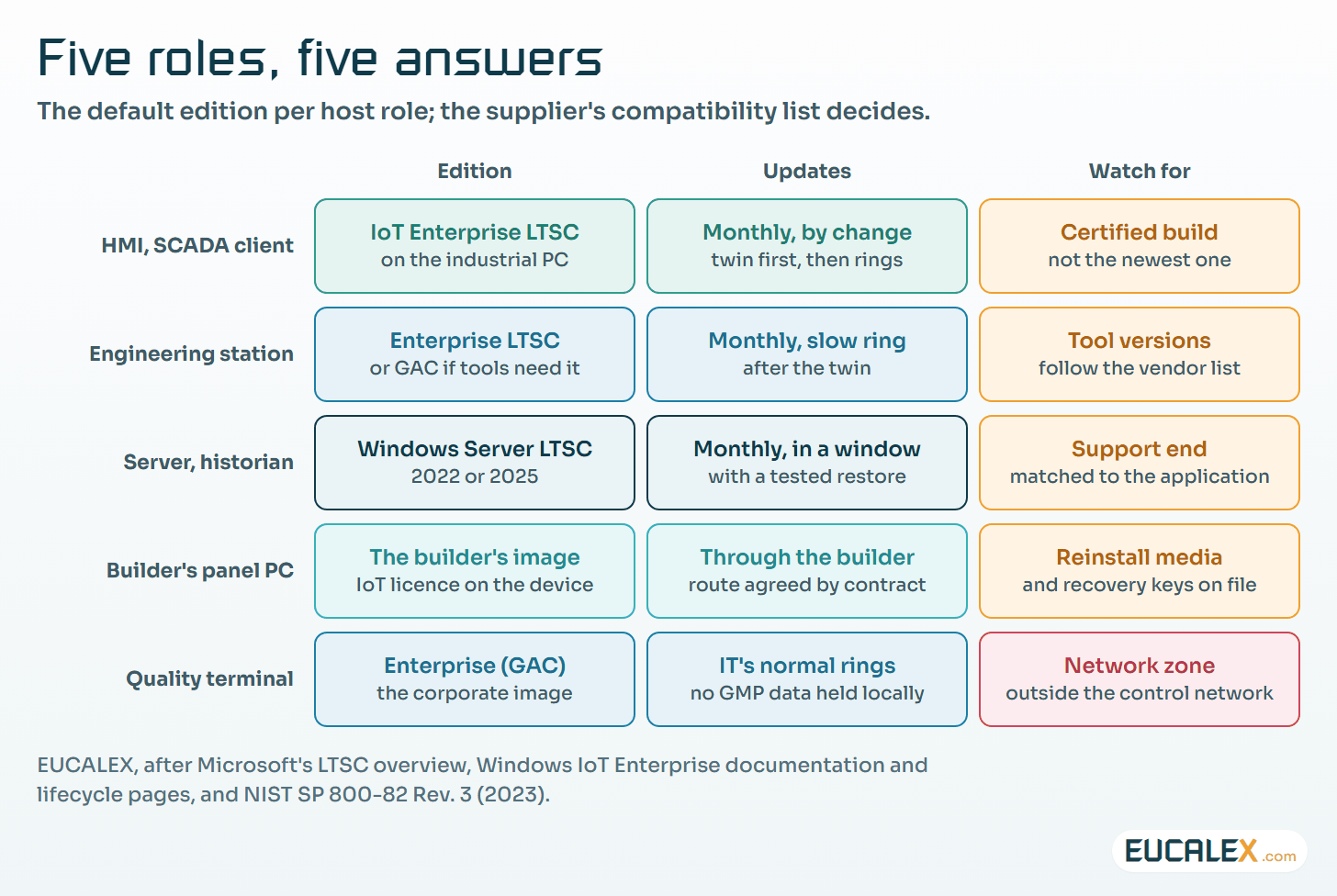
The figure gives the default answer for each role. HMIs and SCADA clients are the clearest case for IoT Enterprise LTSC: one task, a ten-year horizon, a machine nobody should browse from. Engineering stations are harder, because programming and configuration tools follow newer Windows releases faster than runtimes do. Enterprise LTSC fits when the tools support it; otherwise an Enterprise GAC station managed on a slow update ring, kept in its own zone, is the honest choice.
Servers, historians and batch servers do not belong on a client edition at all. Windows Server follows its own long-term channel: Windows Server 2022 is supported to October 2031 and Windows Server 2025 to November 2034. The terminals where quality staff review records can stay on the corporate image, managed by group IT, as long as they hold no GMP data locally and sit outside the control network.
Where group IT and the line pull in different directions
The same five frictions come up at almost every site we assess. None of them is solved by an edition alone, but each is made easier or harder by it.
- A five-year refresh against a fifteen-year line. Group IT renews PCs on a fixed cycle; a filling line runs far longer, and every replaced PC is a change to a qualified system. Take line computers out of the office refresh cycle and manage them as OT assets, owned by engineering, on industrial hardware with a long availability commitment from its maker. IoT Enterprise LTSC fits that horizon; identical spares bought at qualification cover the hardware side, as the article on choosing a path when a controller goes end-of-life sets out for the wider obsolescence plan.
- Encrypted disks against simple images. BitLocker is often mandatory in the group policy, and it changes how you back up and restore. Moving a protected disk into another computer, replacing the motherboard or updating the firmware all send BitLocker into recovery, which needs the 48-digit recovery password. Store those passwords where the site can reach them when the domain is down, suspend protection before a planned firmware update, and restore an image onto a spare at least once. The comparison of full, incremental, mirror and image backups explains which backup belongs at which stage.
- The corporate image carries what the line does not need. Collaboration clients, office suites, inventory and telemetry agents: each one adds services, network traffic, update events and attack surface, and each one is inside the scope of what you qualify. Build a minimal OT image from the supplier’s prerequisites, justify every component in it, and keep the list with the configuration record. The article on the risks open source brings inside the HMI shows how quickly that list grows.
- Automatic updates that stop production. NIST SP 800-82 Rev. 3 is direct on this point: “Consider separating the automated process for OT patch management from the automated process for non-OT applications.” It adds that patching should be deployed during planned OT outages. Windows Update client policies can defer feature updates by up to 365 days and pause updates for up to 35 days, but deferral is not control. Line PCs get their own update source and their own rings: a test twin, then one line, then the rest, each release recorded.
- Every change touches the qualified state. That is the point the other four come back to, and it is where the edition matters most.
What the GMP texts ask of the operating system
The texts do not name Windows, and they do not need to. They ask for a controlled change process and a periodic look at whether the system remains in a valid state.
| Text | What it says | What it means for the operating system |
|---|---|---|
| EU GMP Annex 11 (2011), Principle | “IT infrastructure should be qualified.” | The edition, release and build are part of the installation record, not an IT detail |
| Annex 11, §10 | Changes to a computerised system, including its configuration, “should only be made in a controlled manner in accordance with a defined procedure” | A feature update, a monthly update and a new image are all changes; the procedure says how each is handled |
| Annex 11, §11 | Periodic evaluation covers, among other things, upgrade history, security and validation status | The update history of the host is evidence, and support end dates belong in the review |
| Annex 11, §7.2 | The ability to restore backup data is checked during validation and monitored periodically | An encrypted disk you have never restored is not a backup strategy |
| EU GMP Annex 15 (2015), §11.4 | Quality risk management evaluates the impact of a planned change on validation, regulatory status and other systems | The depth of retesting follows the kind of change, decided before it is made |
GAMP 5 puts the operating system in software category 1, infrastructure software, which is qualified rather than validated: its correct installation and configuration are verified, and the application running on top of it is what you validate. That is what makes a proportionate approach possible. The operating system is not tested function by function; what is tested is that the validated application still behaves once the platform underneath has changed.
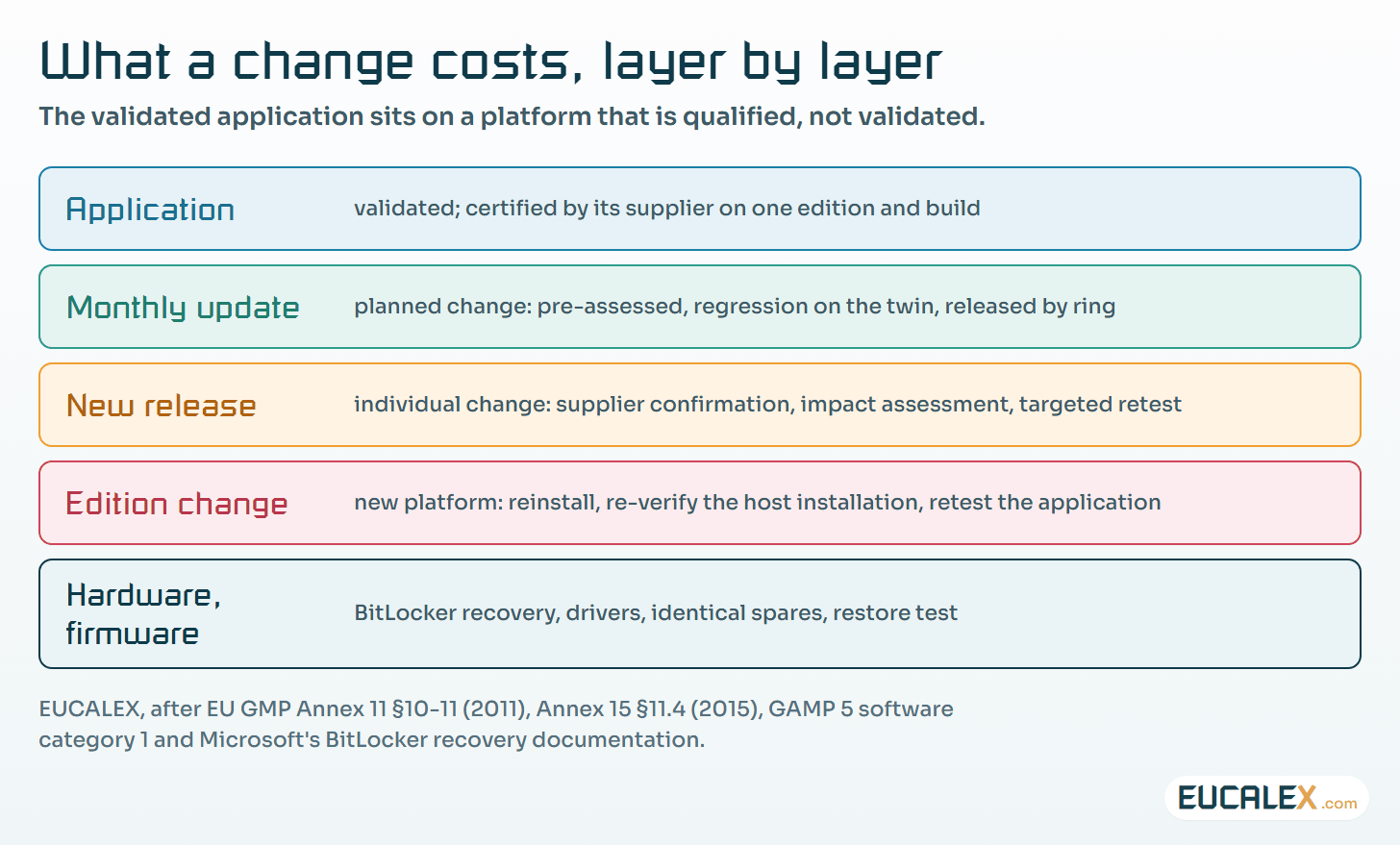
This is where the servicing channel turns into a cost. On GAC, a feature update reaches each host every year, and each one is a release the supplier must certify and you must assess. On LTSC, the same assessment happens once per release, and the monthly updates can run under a standing, pre-approved change record: regression on the twin against a short list of critical functions, release by ring, record per host. IEC TR 62443-2-3:2015 describes how asset owners and suppliers exchange the information that makes such a process work.
Five common mistakes
- Choosing the edition in the IT catalogue. The edition is a design decision for the system and belongs in its specification.
- Assuming LTSC means no updates. It means no feature updates. The monthly security updates have to be tested and installed like any other.
- Running IoT Enterprise LTSC as an office desktop. The licence covers fixed-function devices; a station used for email and browsing is general-purpose.
- Encrypting without a tested restore. A recovery password nobody can find, or an image nobody has restored, turns a disk failure into a long stop.
- Treating end of support as an IT date. Windows 10 left support on 14 October 2025. Extended Security Updates for organisations cost $61 per device in the first year, doubling each year, for at most three years: a bridge to a planned migration, not a substitute for one.
Where to start
- List every Windows host on one line with its edition, release, build and support end date. The list is done when each host has a date and an owner.
- Ask the automation supplier for its compatibility list and compare. Every mismatch becomes a change request or a documented risk.
- Write the update procedure for that line: update source, test twin, rings, the pre-approved scope of a monthly update and what triggers an individual change. It works when the next monthly update goes through without a deviation.
Isolation does not make the choice disappear. A line that cannot be patched quickly still needs the network protection described in the article on shielding legacy programmable logic controllers (PLCs), and its removable media still need the controls set out in the article on bringing portable storage under control.
The cheapest requalification is the one you never trigger. Pick the edition that changes only when you decide it should.
References
- Microsoft Lifecycle, product pages for Windows 10 Enterprise and Education, Windows 10 Enterprise LTSC 2019, Windows 10 Enterprise LTSC 2021, Windows 10 IoT Enterprise LTSC 2021, Windows 11 Enterprise LTSC 2024, Windows 11 IoT Enterprise LTSC 2024, Windows Server 2022 and Windows Server 2025.
- Microsoft Learn, Windows Enterprise LTSC overview and Windows 11 release information.
- Microsoft Learn, Windows IoT Enterprise FAQ, licensing and minimum system requirements.
- Microsoft, Windows IoT blog, Windows 10 IoT Enterprise LTSC 2021 available through Volume Licensing starting August 1st, 13 July 2023.
- Microsoft Learn, Unified Write Filter, Keyboard Filter and Shell Launcher.
- Microsoft Learn, Configure Windows Update client policies and BitLocker recovery overview.
- Microsoft, Windows IT Pro blog, When to use Windows 10 Extended Security Updates, 2 April 2024.
- European Commission, EudraLex Volume 4, Annex 11: Computerised Systems, in operation since 30 June 2011, and Annex 15: Qualification and Validation, in operation since 1 October 2015.
- NIST, SP 800-82 Rev. 3, Guide to Operational Technology (OT) Security, September 2023, section 6.2.11.
- IEC, IEC TR 62443-2-3:2015, Patch management in the IACS environment, and ISPE, GAMP 5 Second Edition, July 2022.
Related articles
All articles- Your controller is going end-of-life: choosing the path and bounding the requalificationA discontinued controller on a validated line leaves four paths, from a last-time buy to a full migration. How to pick one early and keep…
- Full, incremental, mirror or image: which backup for which system, and at which stageA NAS, an office PC, a critical workstation and a database do not need the same backup, and neither does a system being built, running or modified…
- Open source inside the HMI: the ten risks a GMP site inherits, and the change control that answers themOperator panels, gateways and SCADA packages are built from open-source components the site never chose. The ten OWASP open-source risks read for a…
EUCALEX
Have a project or a technical challenge?
Contact us: we will be pleased to discuss it with you, with no commitment.
Discuss your project with usStay informed
Receive new EUCALEX articles and technical insights by email.