
Think ten times before enabling BitLocker on an OT PC, server or virtual machine
Imagine a production line stopped at 6 a.m. An industrial personal computer (PC) has failed. Maintenance has a replacement machine, and the engineering team has a complete disk image. Under normal circumstances, restoring the system should be fairly straightforward.
Except that the original disk was protected by BitLocker. The restored system asks for a recovery key. The motherboard has changed, the Trusted Platform Module (TPM) is a different chip, and the recovery information sits in a central directory the local maintenance team cannot reach. The backup exists. The replacement PC is ready. Production still cannot restart.
The scenario is hypothetical, but the technical dependencies behind it are real, and they raise one question: did we improve the security of the production system, or did we add another way for it to fail?
In OT, availability is not just another security objective
Information technology (IT) security is usually discussed around the triad of confidentiality, integrity and availability. In operational technology (OT), the same three words carry different weights. NIST SP 800-82 Rev. 3 puts it plainly: OT security objectives “typically prioritize integrity and availability, followed by confidentiality, but also must consider safety as an overarching priority”.
Safety sits above the whole list. Availability, reliability and process integrity have immediate consequences on a plant: an outage can stop manufacturing, interrupt a critical process, compromise product quality or create a safety concern. The same guide, in its comparison of OT and IT (section 2.4), notes that many OT processes are continuous, that unexpected outages of systems controlling them are “unacceptable”, and that typical IT strategies such as rebooting a component are usually not acceptable.
Confidentiality still matters: manufacturing know-how, intellectual property, personal data and regulated records all deserve protection. But protecting information against disclosure must not quietly undermine the ability to recover the system that produces it.
A security control that protects data while making an essential industrial system hard to recover deserves careful evaluation. Full-disk encryption is exactly that kind of control.
BitLocker solves a real problem. Is it the one your OT system faces?
Microsoft describes BitLocker as volume encryption “addressing the threats of data theft or exposure from lost, stolen, or inappropriately decommissioned devices”. It is valuable when a device can be lost, stolen or handled by someone who should not have it. For laptops, portable engineering workstations and removable drives that carry sensitive data, the case is often compelling. NIST SP 800-82 Rev. 3 says the same in section 5.2.5.4: “Full disk encryption is recommended for portable laptops and devices.”
Now take a fixed industrial computer, installed in a locked automation cabinet, in a controlled production area, on a dedicated OT network. What is the realistic risk of someone stealing its drive and extracting sensitive data? And how does that risk compare with the operational impact of not being able to restore the machine after a hardware failure?
There is no universal answer. Physical access controls are never perfect, and a plant can hold highly sensitive data. In its data security section (6.2.3), NIST observes that “OT applications often focus on the availability of data” and asks, before encryption is deployed in OT, to “ensure that confidentiality or integrity is the goal of applying the security control”. That calls for a documented risk assessment, not an automatic deployment inherited from the corporate IT baseline. The same encryption policy applied to an office laptop and to a critical production server does not produce the same security outcome.
The hidden cost: backup, restoration and maintenance get harder
One of the most overlooked consequences of BitLocker in OT is how it interacts with disk imaging and disaster recovery. Images are how most sites maintain and recover industrial PCs: they carry the operating system, the drivers, the human-machine interface (HMI) or supervisory control and data acquisition (SCADA) software and its configuration. A proven image lets a technician replace a failed computer without rebuilding all of that.
The comparison of full, incremental, mirror and image backups explains where images fit in a backup plan. BitLocker adds three sets of questions to it.
- Disk imaging. Depending on the backup software and on whether the volume is locked or unlocked when it is read, an image contains encrypted sectors or a decrypted copy of the file system. The two vendors whose documentation we read describe it differently, and neither behaviour can be assumed from a test on an unencrypted PC.
- System restoration. BitLocker protection is tied to TPM measurements of the original platform. Microsoft’s list of common recovery triggers includes moving a protected drive into a new computer, upgrading the motherboard to one with a new TPM and upgrading the basic input/output system (BIOS) or Unified Extensible Firmware Interface (UEFI) firmware; whether a given change trips recovery depends on the protectors and the TPM validation profile in use. The system may be intact and still inaccessible until the right recovery information is typed in. Depending on the restore method, BitLocker may also have to be enabled again afterwards.
- Maintenance. Firmware updates, motherboard replacement, TPM changes and some boot configuration changes need preparation. Microsoft documents how to suspend BitLocker for planned hardware or firmware work, so that recovery is not triggered, and notes that protection resumes at the next reboot unless a reboot count was set.
| Situation | What the vendor documents | What it means on a line |
|---|---|---|
| Macrium Reflect, volume unlocked when imaged | The file system is imaged “in the clear”: incremental images possible, unused clusters skipped, better compression; Macrium recommends encrypting the backup file | The image store now holds what the disk encryption was protecting: it needs its own encryption and access control |
| Macrium Reflect, volume locked when imaged | The image is about the size of the whole file system; unused space cannot be omitted and encrypted data does not readily compress | Larger, slower images, and reading the restored volume requires the recovery key |
| Macrium Reflect, restore to another disk, size or a volume not unlocked | “BitLocker Removal”: the file system is restored in the clear and BitLocker must be manually re-enabled | Re-enabling encryption, and escrowing the new key, is a step of the restore procedure |
| Veeam Agent for Microsoft Windows, volume locked at backup time | Volumes must be unlocked when the job starts; a locked volume in scope makes the job fail | A data volume that is not unlocked at the backup hour produces a failed job: read the job reports |
| Veeam Agent, restore to a new location that is encrypted and locked | The agent deletes the encrypted partitions, formats the disk and restores the data unencrypted | Same as above: the restored host is no longer encrypted until someone re-enables it |
On a production line, the planned maintenance case is manageable. The emergency repair is where it hurts: the technician on shift may not have the administrative rights, the recovery key, the network access or the knowledge of how the original encryption was configured. Every extra dependency can lengthen the mean time to repair (MTTR).
When the recovery key becomes a single point of failure
Microsoft recommends storing recovery information centrally: in Active Directory for domain-joined devices, in Microsoft Entra ID for Entra-joined ones. That is legitimate practice. But what happens when the OT network is isolated, the domain is unavailable, or the only authorised administrator cannot be reached at that hour? A production system can stay stopped while engineers chase the 48-digit recovery password needed to unlock a perfectly functional disk.
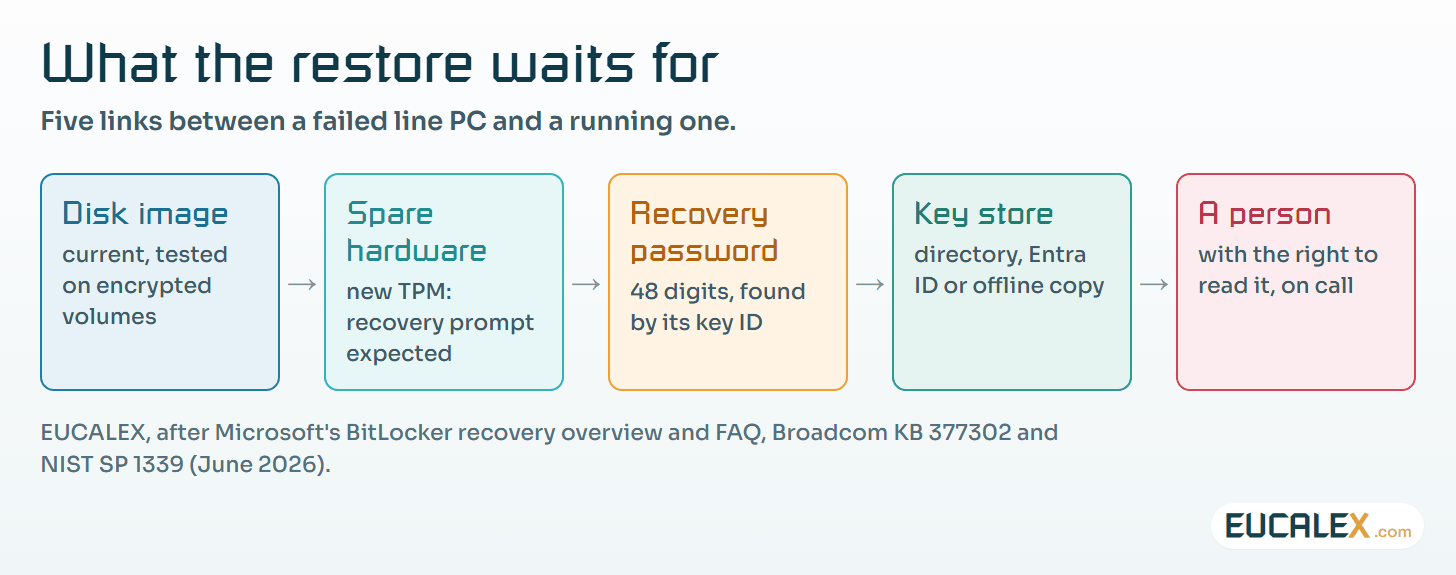
Two details from Microsoft’s documentation matter more in OT than in an office. Active Directory keeps every recovery password of a computer object, but they disappear when the object is deleted: a clean-up of “inactive” computers can take the keys of a PC that sits in a cabinet and rarely talks to the domain.
The second is in Microsoft’s BitLocker frequently asked questions (FAQ). When a policy requires the recovery key to be backed up, protection does not resume after a suspension if that backup fails. On an isolated cell, a suspended volume, whose key is stored unprotected on the disk, can stay that way without anyone noticing.
The consequences are worse if the recovery information was never properly backed up, belongs to an obsolete device record or was lost during a migration. The FAQ is explicit: “BitLocker is designed to make the encrypted drive unrecoverable without the required authentication.” If the recovery password, recovery key and every other valid unlocking method are gone, the data on that volume is gone with them.
Independent, usable backups may still bring the system back; without them, the loss can be final. The article on why a backup stays a hypothesis until it is restored makes the same point about backup encryption: key management is part of the backup.
In that situation, encryption is doing exactly what it was designed to do. The failure is in the recovery architecture.
Virtual machines and servers are not exempt
The same concern applies to industrial servers and virtual machines (VMs). On a physical OT server, full-disk encryption can complicate hardware replacement, emergency recovery, operating system repair and bare-metal restoration.
For VMs the dependencies differ. A VM using BitLocker inside the guest with a virtual TPM (vTPM) depends on its vTPM state, and on the hypervisor’s keys that protect it, being restored correctly. Broadcom documents, for VMware vSphere, that a Windows 11 or Windows Server VM migrated or restored from a backup may fail to boot if its vTPM is “missing, mismatched, or improperly configured”, and that if the VM is recreated or its vTPM reset, the guest “will likely stop at a BitLocker recovery prompt”. The same article has the administrator back up the key provider that protects those secrets.
None of this makes BitLocker or virtual TPMs unsuitable for industrial virtualisation. It means the backup and recovery architecture has to account for them. For a SCADA server, a historian, a batch management server or an application VM, a successful backup job proves very little. The question is whether the system can be restored, started and returned to service within its recovery time objective (RTO).
BitLocker does not replace ransomware protection
BitLocker protects data at rest. Once a volume is unlocked, Macrium’s documentation puts it simply: it is presented to the operating system “in the clear”, like any other file system. Authorised processes can read and modify it, and so can malware that runs with enough privileges, including malware that encrypts files for ransom.
Enabling BitLocker therefore does not, on its own, protect an industrial system against ransomware, malware or unauthorised changes made while the operating system is running. Nor does it replace network segmentation, access control, application allowlisting, endpoint protection, hardening or properly protected backups; for controllers that cannot be patched, the network measures in the article on shielding legacy programmable logic controllers (PLCs) do far more. BitLocker addresses a different threat, and that threat has to be weighed against the operational risk the control introduces.
Ten questions to ask before enabling BitLocker in OT
Before a critical industrial PC, server or VM is encrypted, the system owner, OT engineering, IT and cybersecurity should be able to answer ten questions together.
- What specific threat are we mitigating? Is there a credible risk of physical theft, unauthorised offline access or disclosure of sensitive information?
- How critical is the system? What happens if it cannot start or be restored?
- Is full-disk encryption necessary? Could another control address the identified risk without creating the same recovery dependencies?
- Is our imaging tool compatible? Have we checked its behaviour on locked and unlocked BitLocker volumes, and where the unencrypted image ends up?
- Can we restore onto replacement hardware? Has recovery been tested on a different motherboard, TPM or compatible spare computer?
- Where are the recovery credentials stored? Can authorised people retrieve them securely when the network, the domain or the cloud service is unavailable?
- Who can perform emergency recovery? Is someone available around the clock, including weekends and production shutdowns?
- Have we tested the maintenance procedures? Do firmware changes, hardware replacements and recovery-media operations behave as expected, and does protection resume afterwards?
- For VMs, are all recovery dependencies protected? Can the hypervisor, the vTPM state and the keys that protect it be restored?
- Can we meet our recovery objectives? Has the full restoration been demonstrated within the required RTO, with the recovered application and data verified?
If these questions have no answer, enabling BitLocker on a critical OT asset should not be treated as a routine configuration change. The answers belong in the asset record: the article on merging the Annex 11 system list with the OT asset inventory shows where encryption status and key location fit, and the OT incident decisions to take before the call include who fetches a recovery key when the line is down.
The objective is not to reject encryption
Disk encryption may be essential on some industrial assets: portable engineering laptops, removable media, devices exposed to theft, systems that hold highly sensitive or regulated information. On others, a risk assessment may conclude that alternative measures give an acceptable balance. Encryption must stay wherever legal, contractual or organisational requirements make it necessary, unless an authorised alternative is formally approved.
The point is not to disable BitLocker across the OT estate. It is to stop deploying it indiscriminately, without understanding the consequences. Where it is justified, the architecture includes secure recovery-key escrow, emergency offline access to the keys, imaging tools tested on encrypted volumes, documented maintenance procedures, protected backups and proven restoration tests. The article on which Windows edition belongs on a qualified line PC places the same BitLocker precautions in the wider choice of platform.
In regulated manufacturing, the assessment also covers validation, data integrity and change control. EU good manufacturing practice (GMP) Annex 11 (2011) asks that data “be secured by both physical and electronic means against damage” and that access to it “be ensured throughout the retention period” (§7.1); that “the ability to restore the data should be checked during validation and monitored periodically” (§7.2); and that the extent of security controls depend on the criticality of the system (§12.2). Turning encryption on or off on a qualified host is a configuration change under §10, made through the defined procedure.
Annex 11 §16 then asks for documented and tested continuity arrangements for systems supporting critical processes: a recovery key nobody can reach is a gap in them.
NIST SP 1339, the OT Backup Quick Start Guide published in June 2026, points the same way. It ties backups to change and risk management, asks for recurring restore tests on non-production systems that verify the functional integrity of the restored system, counts licence keys and operating system or VM images among what a restore needs, wants a spare parts plan with hardware “compatible with the digital backups”, and, where encryption is used, asks for good practice on algorithms and key management. That principle applies directly to encrypted hosts.
Conclusion: encryption is not a security success if recovery fails
A security policy may require every Windows device to have an encrypted disk. A deployment dashboard may show 100% compliance. An auditor may confirm that BitLocker is enabled. None of those measurements proves that a critical production system can be recovered after a failure.
In OT, the security outcome includes both protection against credible threats and the ability to maintain or restore essential operations. Before enabling BitLocker on a production PC, server or VM, look beyond how well it protects information: look at what it does to every future backup, maintenance job, hardware replacement and disaster recovery.
Think ten times before encrypting an OT disk, and test recovery before trusting it. On a plant, a protected system that cannot be restored is an operational failure, not a security success.
References
- NIST, SP 800-82 Rev. 3, Guide to Operational Technology (OT) Security, September 2023, sections 2.4, 5.2.5.4 and 6.2.3.
- NIST, SP 1339, OT Backup Quick Start Guide, June 2026.
- Microsoft Learn, BitLocker overview, BitLocker recovery overview and BitLocker FAQ.
- Macrium, Restoring BitLocker encrypted partitions, Macrium Reflect X knowledge base.
- Veeam, BitLocker encrypted volumes support, Veeam Agent for Microsoft Windows user guide.
- Broadcom, KB 377302: Windows 11 or Windows Server virtual machine fails to boot with error “The virtual machine must be encrypted.”, VMware vSphere.
- European Commission, EudraLex Volume 4, Annex 11: Computerised Systems, in operation since 30 June 2011, §7, §10, §12 and §16.
Related articles
All articles- Pro, Enterprise, LTSC or IoT: which Windows belongs on a qualified GMP line PC?Windows editions differ in support length, update cadence and licence route. Which suits an HMI, an engineering station or a server, and what a…
- Full, incremental, mirror or image: which backup for which system, and at which stageA NAS, an office PC, a critical workstation and a database do not need the same backup, and neither does a system being built, running or modified…
- A backup is a hypothesis. A restore is evidence.“We have backups” is not an answer. The question is when you last restored one, how long it took, and whether the line ran afterwards.
EUCALEX
Have a project or a technical challenge?
Contact us: we will be pleased to discuss it with you, with no commitment.
Discuss your project with usStay informed
Receive new EUCALEX articles and technical insights by email.