
OPC servers: how a PC reads a PLC, from OPC Classic to OPC UA, and what the PLC must open for it
The weekly yield report has come out of the same spreadsheet for eight years. It opens, fills itself with live values from the packaging line, and a supervisor copies the totals into the quality review. Then the PC under the desk is replaced, and the spreadsheet opens empty. Nobody knows which server fed it, where its tag list lived, or why the controller refuses the new PC. The report had been a computerised system all along. Nobody had written it down.
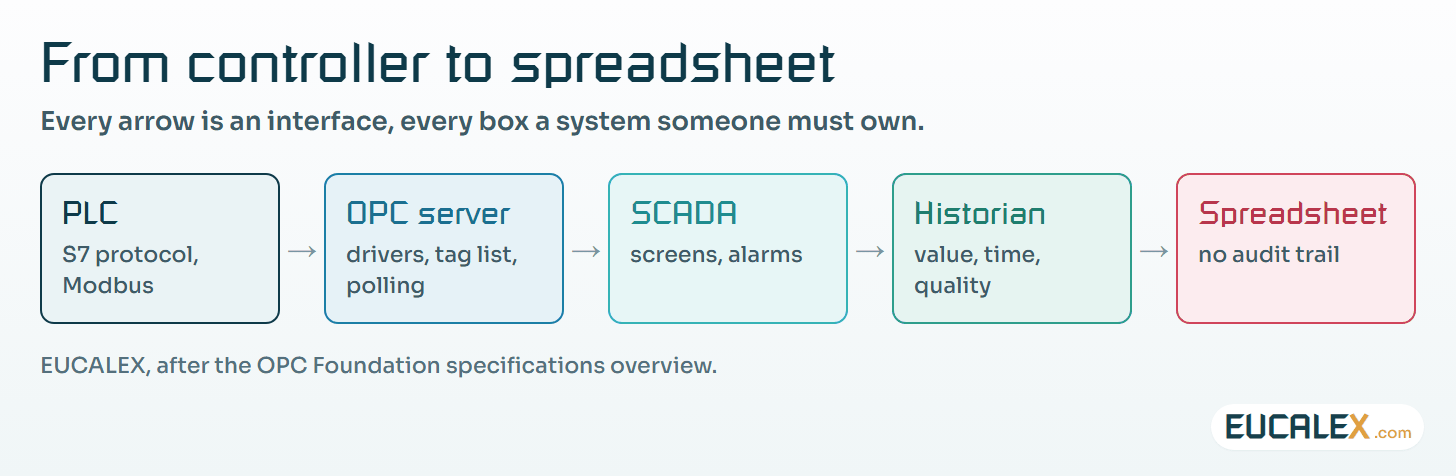
Behind that spreadsheet, and behind most SCADA screens, historians and MES interfaces on a plant, sits an OPC server: the software that turns a PLC’s memory into named values that a Windows application, or these days an application on almost any platform, can read. It is everywhere, it is cheap and nobody notices it until it stops. That is reason enough to look at it properly.
What an OPC server does
An OPC server faces two ways. Towards the plant, it speaks each controller’s own protocol through drivers (the S7 protocol for Siemens CPUs, Modbus for many others) and polls the addresses it has been told to read. Towards the applications, it presents those addresses as named tags through one standard interface, so a SCADA package, a historian or a spreadsheet needs to know nothing about the controller behind them.
The OPC Foundation’s Data Access specification defines what travels on that interface: a value, its time stamp and its quality. That triplet is the point of the whole exercise. A value flagged “bad”, because the controller did not answer or the address does not exist, is not a measurement. A client that ignores the quality flag will quite happily record a stale number as if it had just been read.
OPC Classic and OPC UA
There are two generations, and most sites run both.
| Aspect | OPC Classic (DA, A&E, HDA) | OPC UA |
|---|---|---|
| Foundation | Microsoft COM/DCOM: Windows only | Platform independent: PC, server, cloud, PLC, microcontroller |
| Released | Before UA; the family UA replaces | 2008 by the OPC Foundation; standardised as IEC 62541 |
| Security | Whatever Windows and DCOM enforce | Built in: X.509 application certificates, message signing, session encryption |
| Across machines | DCOM through firewalls: fragile | One TCP port, designed for networks |
| Where it runs | A Windows PC next to the line | Also inside the controller: S7-1500 from firmware V2.0, S7-1200 from V4.4 |
The data model matters less than you might think here; UA extends it. What really separates the two is that OPC Classic depends on DCOM, and DCOM has been shifting under everyone’s feet.
1. Why Classic connections broke: DCOM hardening
In 2021 Microsoft began enforcing a stronger authentication level on DCOM (security update CVE-2021-26414, guidance KB5004442). It came in three steps: available but disabled on 8 June 2021, enabled by default on 14 June 2022, and enforced with no way to turn it off from 14 March 2023. OPC Classic clients and servers on separate machines that did not negotiate the required level could stop talking to each other after a routine Windows update, which is how many automation teams first heard of it.
Sites reacted in one of three ways. Some patched both ends so they negotiate the higher level. Some moved client and server onto the same machine, so DCOM never crosses the network. Others put a tunneller on each side to replace DCOM with an ordinary TCP link. All three work. Only the first keeps the vendor willing to support you, and none is as clean as moving the link to OPC UA.
2. What an S7 CPU must open to be read
A PC-based server reading a Siemens S7-1200 or S7-1500 over the classic S7 protocol cannot do so with the CPU in its default configuration. Three settings decide it, and each one lowers a protection.
- PUT/GET access. Siemens states that on an S7-1500 you must enable PUT/GET communication in the CPU properties, under Protection. It stays off until someone deliberately switches it on.
- Non-optimised data blocks. PUT/GET only reaches data blocks with absolute addressing; symbolic, “optimised” blocks are out of reach. The data to be read has to be moved into blocks with optimised access switched off.
- Port 102 is always there. The S7 protocol runs ISO-on-TCP (RFC 1006) on TCP port 102 for programming and HMI connections, and Siemens documents it as a function that cannot be deactivated. Anyone who can reach that port can at least talk to the CPU.
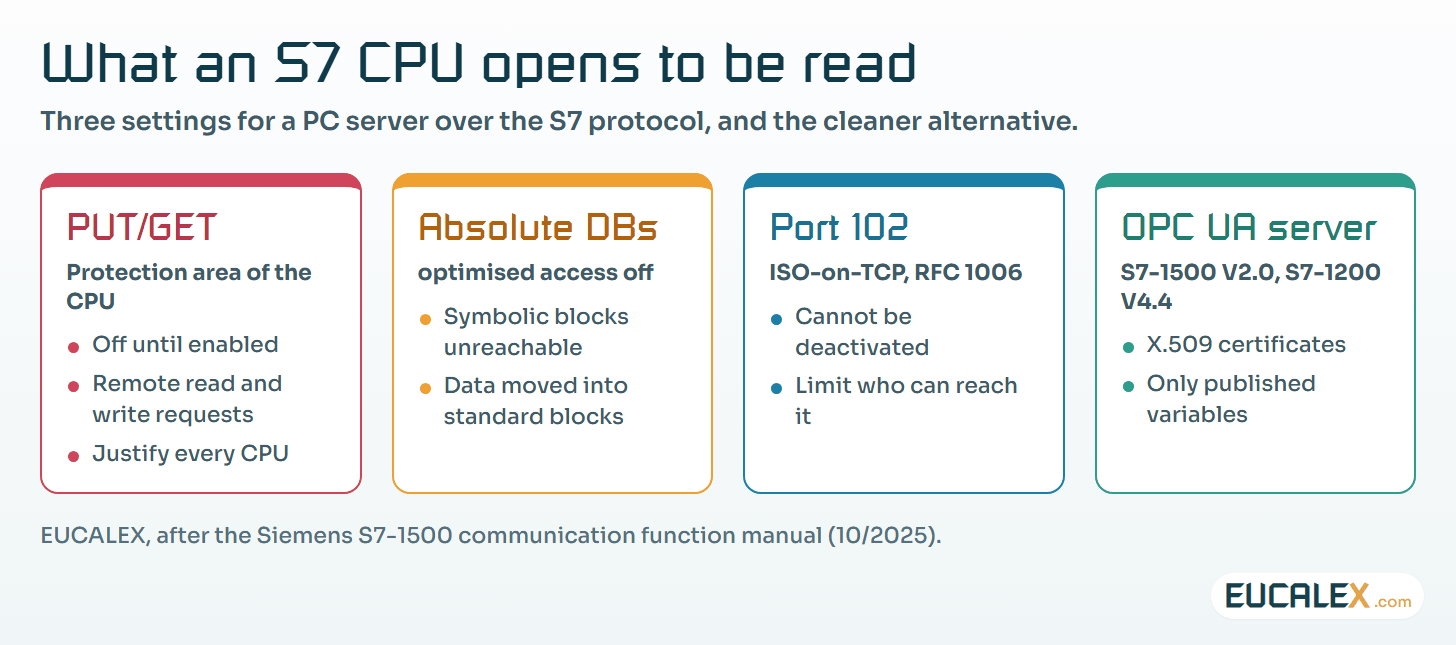
None of this is wrong in itself; thousands of lines run that way. But it is a decision, and on a regulated site it belongs in the system description and the risk assessment, along with the network segment that limits who can reach port 102. Where the firmware allows, the CPU’s own OPC UA server is the cleaner route. Siemens provides it on S7-1500 CPUs from firmware V2.0 and on S7-1200 from V4.4, with X.509 certificates, and only the variables you choose to publish are visible. Our note on zones and conduits explains where such a server should sit.
3. The spreadsheet at the end of the chain
A spreadsheet linked live to a server is the commonest OPC client on a plant and the least governed. It updates only while it is open, stores whatever the last read returned, and anyone who opens it can edit it. EU GMP Annex 11 is brief about electronic exchanges between systems:
“Computerised systems exchanging data electronically with other systems should include appropriate built-in checks for the correct and secure entry and processing of data, in order to minimize the risks.” (EU GMP Annex 11, §5)
A live-linked cell has none of those checks unless someone builds them. The quality flag is dropped, the time stamp is the PC’s, and the file keeps no audit trail. For a report that feeds a quality decision, the data should come from a historian or an MES that stores value, time and quality, with the spreadsheet reading a controlled export. Our article on metadata shows why the context matters as much as the number.
4. Moving from Classic to UA is a migration
Swapping a Classic server for a UA server, or for the controller’s own UA server, changes tag names, data types, update rates and the meaning of quality codes. Annex 11 §4.8 asks that, when data are transferred to another format or system, validation checks they are not altered in value or meaning. In practice: freeze the old tag list, map it one to one, run old and new side by side on the same process values for a while, and compare before you switch the historian or the report over.
Where to start
Eight steps are enough to bring OPC links under control:
- Inventory every OPC server and client on the site, spreadsheets and “temporary” PCs included.
- Record for each link: controller, protocol, server, tag list, update rate, consumer, owner.
- List the CPUs with PUT/GET enabled and non-optimised blocks, and justify each one.
- Check who can reach TCP port 102 on each controller, and restrict it to the systems that need it.
- Check the DCOM state of every Classic link that crosses machines, and plan its retirement.
- Prefer the controller’s OPC UA server with certificates for new links, where the firmware allows.
- Make clients honour quality: a bad or uncertain value is not recorded as a measurement.
- Move quality-relevant reports off live spreadsheets, onto a historian or MES export.
Five common mistakes
The one we meet most is PUT/GET enabled “for the test” and never switched off again, on a CPU that can be reached from the office network. Another is a little more creative: writing artificial changes into a PLC variable so that a change-driven client will display it. Configure the client to poll instead; the process value has to stay the process value.
- Turning DCOM security off to bring an old link back to life, rather than fixing either end.
- Treating the spreadsheet as a report when it is in fact a computerised system with no audit trail.
- Running cracked or unlicensed server drivers on a production PC. Leaving the legal problem aside, nobody can patch, support or validate them.
An OPC server is a translator. Decide who may speak through it, and never let a live spreadsheet stand in for a record.
References
- OPC Foundation, OPC Unified Architecture (2008; X.509 authentication, signing and encryption) and OPC Classic (COM/DCOM; DA values with time and quality), opcfoundation.org, opcfoundation.org
- Siemens, S7-1500, ET 200MP, ET 200SP, ET 200AL, ET 200pro, ET 200eco PN Communication, Function Manual, A5E03735815-AN, 10/2025: PUT/GET and absolute addressing, ISO-on-TCP port 102, OPC UA server on S7-1500 from V2.0 and S7-1200 from V4.4, support.industry.siemens.com
- Microsoft, KB5004442: Manage changes for Windows DCOM Server Security Feature Bypass (CVE-2021-26414), support.microsoft.com
- European Commission, EudraLex Volume 4, EU GMP Annex 11 Computerised Systems, §4.8 and §5, health.ec.europa.eu
Related articles
All articles- Siemens networks from PPI to PROFINET: what each one is, where it still runs, and how to keep it workingAn older plant often runs four Siemens networks at once: a PPI or MPI programming link, PROFIBUS to drives and remote I/O, a Modbus device behind a…
- Metadata: the part of the record that makes the number mean somethingA value of 23 means nothing until you know its unit, its source, its time and who produced it. Where metadata is lost between instrument and report…
- MQTT and Sparkplug on a plant: what the broker guarantees, and what a GMP site must addMQTT moves plant data cheaply and Sparkplug gives it a shape, but neither keeps a record. What the three QoS levels really promise, what birth and…
EUCALEX
Have a project or a technical challenge?
Contact us: we will be pleased to discuss it with you, with no commitment.
Discuss your project with usStay informed
Receive new EUCALEX articles and technical insights by email.