
Siemens networks from PPI to PROFINET: what each one is, where it still runs, and how to keep it working
The packaging hall went into service in the mid-2000s and has been extended three times since. The engineer sent to add one sensor finds an S7-300 programmed through an MPI adapter, a PROFIBUS line running to six drives and two remote I/O stations, a grey box on a DIN rail translating PROFIBUS into Modbus RTU for a radio pressure receiver, and a new filler on PROFINET. Four networks, four sets of rules, and a line that must not stop. Fitting the sensor takes an afternoon. Working out how the networks really hang together takes the week.
What follows is a map of that family: what PPI, MPI, PROFIBUS, Industrial Ethernet and PROFINET are, the limits that decide whether a change will work, and what a site should write down before the person who built it all retires.
One family, three generations
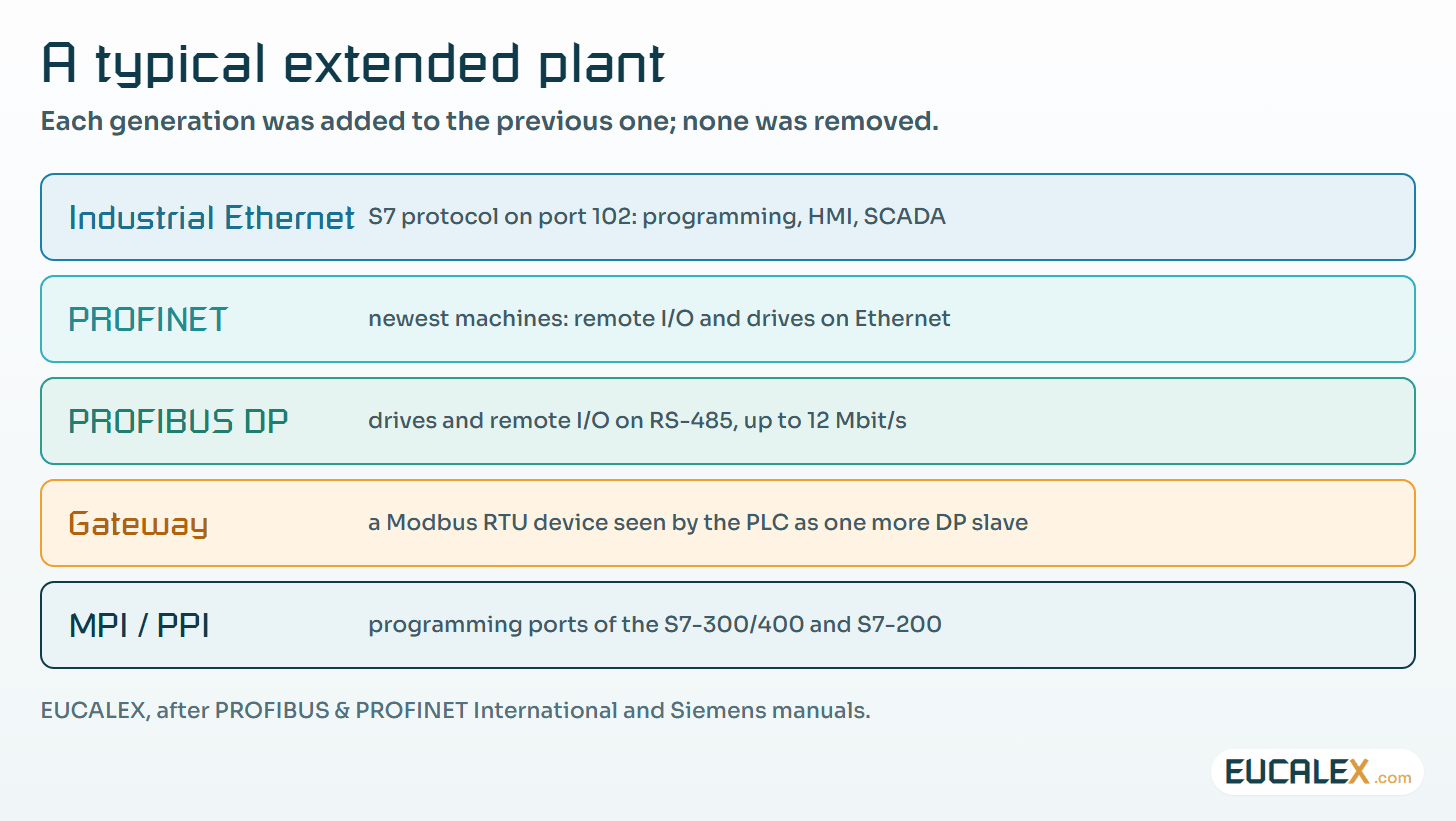
Siemens controller networks grew in layers. The first generation is serial, on RS-485: PPI for the small S7-200, MPI for the S7-300 and S7-400, PROFIBUS for field devices. The second is Ethernet carrying the S7 protocol between PCs, HMIs and CPUs. The third, PROFINET, brings the field devices themselves onto Ethernet. Plants rarely swap one generation for the next. They add, and so all three end up living side by side.
| Network | Medium | Data rate | Typical use |
|---|---|---|---|
| PPI | RS-485 | 9.6, 19.2 or 187.5 kbaud (default 9.6) | Programming and HMI for S7-200 |
| MPI | RS-485 | 187.5 kbit/s by default; up to 12 Mbit/s on some S7-300 CPUs | Programming, HMI, CPU-to-CPU on S7-300/400 |
| PROFIBUS DP | RS-485, shielded type A cable, or fibre | 9.6 kbit/s to 12 Mbit/s | Remote I/O, drives, field devices |
| PROFIBUS PA | MBP, bus-powered | 31.25 kbit/s | Process instruments, hazardous areas |
| Industrial Ethernet (S7 protocol) | Ethernet, ISO-on-TCP port 102 | Ethernet rates | Programming, HMI, SCADA, CPU-to-CPU |
| PROFINET | Ethernet | RT; IRT down to 31.25 µs cycles | Remote I/O, drives, motion |
1. PPI: the small controller’s port
PPI is the protocol on the ports of the S7-200 family, used by the programming software and by simple operator panels. The S7-200 system manual gives 9.6, 19.2 or 187.5 kbaud per port, 9.6 kbaud by default, plus a freeport mode for custom serial protocols. Anything faster goes through a PROFIBUS expansion module. If you still run S7-200s, the protocol is rarely the problem. Finding a programming cable and a copy of the software that can still talk to them is.
2. MPI: the programming network of the S7-300 and S7-400
MPI links programming devices, HMIs and CPUs over the same RS-485 physics. The S7-300 CPU manual gives 187.5 kbit/s as the default for all CPUs, 19.2 kbit/s to reach an S7-200, and up to 12 Mbit/s on some CPUs. On an older line, MPI is where most engineering laptops get plugged in. That makes the MPI port an access point to protect, whatever its size in the cabinet.
3. PROFIBUS DP and PA: the fieldbus
PROFIBUS is an open fieldbus. It began in 1987 as a joint project of companies and institutes, was first released in 1989, and is standardised with other fieldbuses in IEC 61158 and IEC 61784. DP connects controllers to remote I/O and drives; PA connects process instruments, with power and data on the same pair.
- Segments and addresses. An RS-485 segment carries up to 32 nodes, masters included. Beyond that, or to go further, repeaters join segments, up to 126 addresses per network.
- Termination. Both ends of every segment need an active termination that stays powered. A device switched off at the end of the line, or a terminating switch left on halfway along, is the classic intermittent fault, the kind that disappears whenever someone opens the cabinet to look.
- Speed against length. The faster the bus, the shorter the segment. For type A cable, PROFIBUS International gives the values below.
| Data rate | Maximum segment length |
|---|---|
| 9.6 to 93.75 kbit/s | 1,200 m |
| 187.5 kbit/s | 1,000 m |
| 500 kbit/s | 400 m |
| 1.5 Mbit/s | 200 m |
| 3 to 12 Mbit/s | 100 m |
- Device descriptions. Every device comes with a GSD file that tells the configuration tool what it can do. The GSD in the project is part of the configuration, so keep the version that was commissioned.
- Protocol versions. DP-V0 handles cyclic exchange and diagnostics; DP-V1 adds acyclic access for parameters and alarms; DP-V2 adds functions needed for drive control.
- PA. MBP runs at a fixed 31.25 kbit/s and powers the instruments over the bus. Its intrinsically safe version is the usual choice in hazardous areas.
4. Industrial Ethernet and the S7 protocol
On Ethernet, Siemens CPUs speak the S7 protocol for programming, HMI and CPU-to-CPU traffic, carried by ISO-on-TCP (RFC 1006) on TCP port 102. The S7-1500 communication manual lists that port among the functions that cannot be deactivated. Data exchange between CPUs uses instructions such as PUT/GET, which have to be enabled explicitly in the CPU’s protection settings and only reach data blocks with absolute addressing. Our article on OPC servers shows what this means when a PC reads the controller.
5. PROFINET: the fieldbus on Ethernet
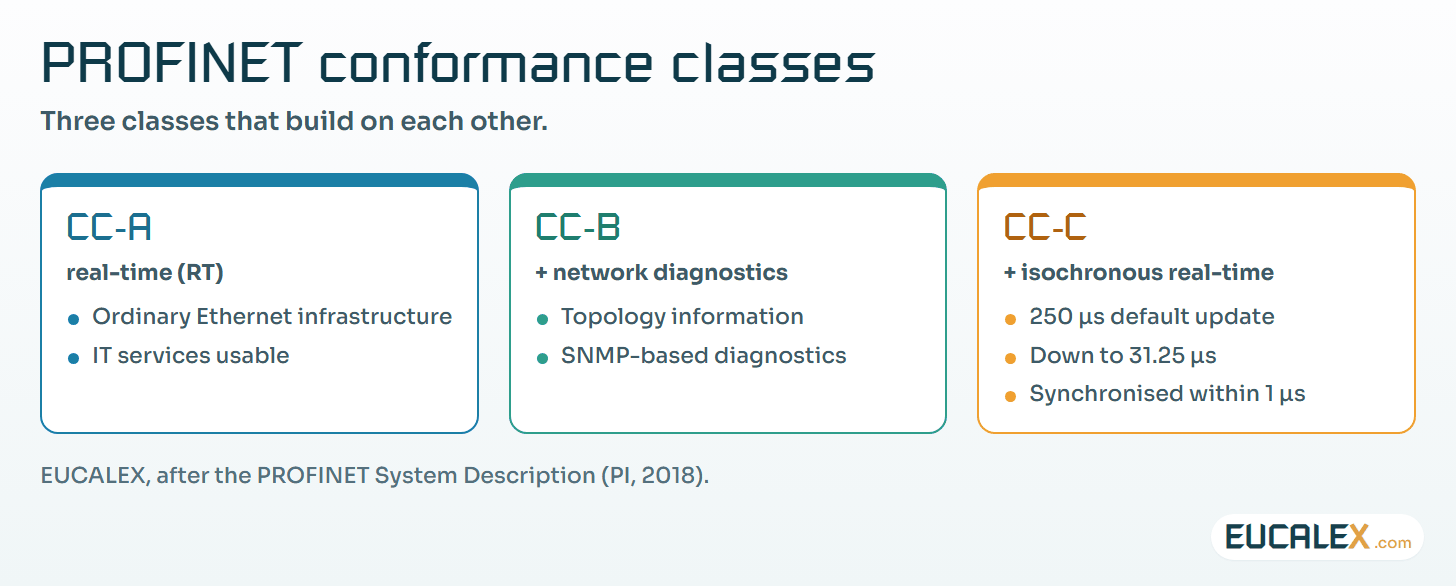
PROFINET, also standardised in IEC 61158 and IEC 61784, puts remote I/O and drives on Ethernet. PROFIBUS & PROFINET International defines three conformance classes, each building on the one before. CC-A offers real-time (RT) communication on ordinary infrastructure. CC-B adds network diagnostics and topology information. CC-C adds isochronous real-time (IRT), with bandwidth reservation and synchronisation: the default minimum update rate is 250 µs, down to 31.25 µs depending on the hardware, with devices synchronised to within 1 µs. Devices are described by GSDML files, the XML successor of GSD.
Moving from PROFIBUS to PROFINET changes what “the network” means. The fieldbus now shares switches, cables and sometimes address ranges with IT-like equipment. Our notes on industrial switches and on zones and conduits cover the consequences.
6. Profiles and gateways
PROFIdrive is the drive profile of PROFIBUS and PROFINET, standardised in IEC 61800-7, so that a drive behaves the same whoever built it. In its classic PROFIBUS form, the cyclic telegram carries a process data area (PZD), with control word and main setpoint going to the drive and status word and main actual value coming back, and optionally a parameter area (PKW) to read or write any drive parameter.
Gateways bring devices that speak something else, typically Modbus RTU on RS-485, onto PROFIBUS. To the PLC the gateway is one more DP slave described by its GSD. Towards the device it is usually the Modbus master, polling registers from a list configured inside the gateway. That mapping between registers and the PLC’s input bytes lives in the gateway, not in the PLC project. If nobody exports and files it, it dies with the box.
What changes on a regulated site
Network addresses, bus parameters, GSD files, gateway mappings and PROFINET device names are configuration of the computerised systems that run the process. They belong in the system description, under change control, with a backup that can be restored. EU GMP Annex 11 asks for an up-to-date description of critical systems covering “the physical and logical arrangements, data flows and interfaces with other systems” (§4.3). For a line with four networks, that description is a drawing of those four networks.
Where to start
Eight lines make a network file for one line:
- Draw every network of the line: type, rate, nodes, addresses, repeaters, gateways.
- Mark the terminations and check that both ends of each RS-485 segment stay powered.
- Check rate against length for each PROFIBUS segment, with the real cable lengths and not the ones on the drawing.
- File the GSD and GSDML versions used in the commissioned project.
- Export every gateway configuration and its register map, together with the tool version needed to open it.
- List the engineering access points: MPI ports, PROFIBUS adapters, Ethernet ports of CPUs.
- Record who can reach TCP port 102 on each CPU, and which CPUs have PUT/GET enabled.
- Keep a restorable backup of the hardware configuration with the program, and test the restore.
Five common mistakes
- A termination switched on in the middle of a segment, cutting off everything after it. Or the last device switched off, taking the termination with it.
- Raising the PROFIBUS rate on a long segment built for a slower one, then chasing intermittent errors for weeks.
- Replacing a device with a newer GSD without updating the project, so the configuration no longer matches what is on the bus.
- Losing the gateway mapping because it only ever lived in the gateway, until the gateway failed.
- Leaving an MPI or Ethernet engineering port open in a cabinet anyone can reach, with nothing between it and the CPU.
Every network on a line is configuration. Draw it, file its device descriptions and its gateway maps, and it will outlive the people who built it.
References
- PROFIBUS & PROFINET International, PROFIBUS System Description — Technology and Application (2016): history, IEC 61158/61784, RS-485 rates and segment lengths, 32 nodes per segment and 126 per network, active termination, MBP 31.25 kbit/s, DP-V0/V1/V2, GSD, PROFIdrive. profibus.com
- PROFIBUS & PROFINET International, PROFINET System Description — Technology and Application (2018): conformance classes A, B and C, IRT update rates, PROFIdrive in IEC 61800-7. profibus.com
- Siemens, S7-300 CPU 31xC and CPU 31x: Technical specifications, A5E00105475-08, 06/2008: MPI rates. support.industry.siemens.com
- Siemens, S7-1500 … PN Communication, Function Manual, A5E03735815-AN, 10/2025: ISO-on-TCP port 102 (RFC 1006), PUT/GET. support.industry.siemens.com
- European Commission, EudraLex Volume 4, EU GMP Annex 11: Computerised Systems, §4.3. health.ec.europa.eu
Related articles
All articles- OPC servers: how a PC reads a PLC, from OPC Classic to OPC UA, and what the PLC must open for itMost plant data reaches SCADA, historians and spreadsheets through an OPC server. What that server does, why OPC Classic broke when Windows hardened…
- Industrial switches: where they earn their place on an OT network, and where they do notNot every switch on a plant needs to be industrial, and an industrial switch does not make a network reliable on its own. What the hardware actually…
- Ethernet down to the transmitter: what Ethernet-APL changes for instruments, networks and GMP change controlEthernet-APL puts a 10 Mbit/s Ethernet link and its power on one twisted pair, out to the transmitter in Zone 0. The data is real. So are the two…
EUCALEX
Have a project or a technical challenge?
Contact us: we will be pleased to discuss it with you, with no commitment.
Discuss your project with usStay informed
Receive new EUCALEX articles and technical insights by email.