
Physical connectivity and logical segregation in OT networks: two designs, two different jobs
Industrial network design is usually talked about as one exercise. In practice it is two, and they answer different questions.
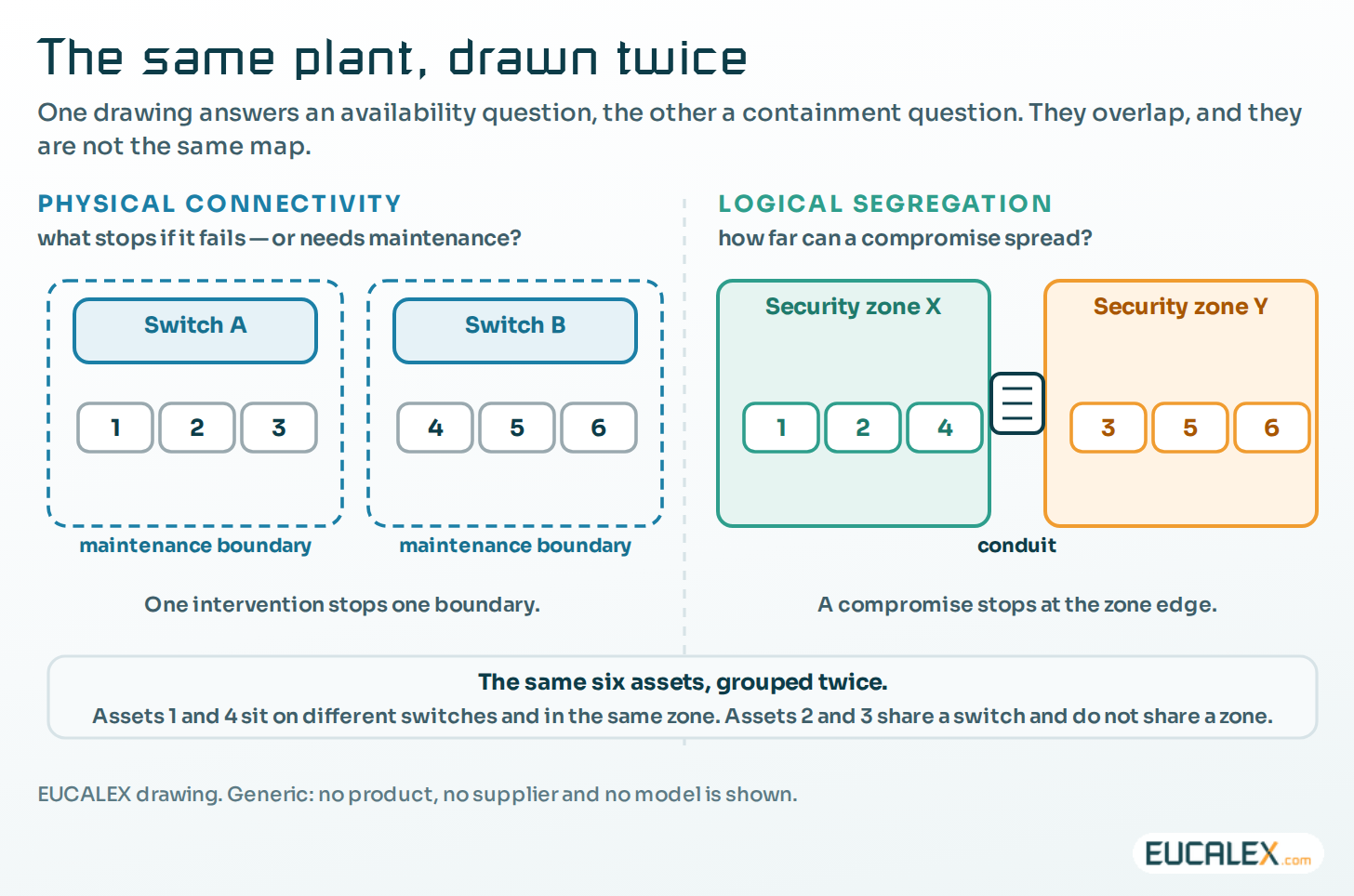
Physical connectivity, meaning which access switch each asset plugs into and how the infrastructure is spread across the site, decides what stops when a switch fails and what stops when it has to be taken out of service on purpose. Logical segregation, meaning which VLAN and which security zone an asset belongs to, decides how far a compromise can spread. Each influences the other. But a network drawn from a single plan usually ends up weak on both counts.
Design an OT network twice: once physically, for availability and maintenance, and once logically, for security and containment.
Physical connectivity: design for failure, maintenance and availability
Here the question is not who may talk to whom. It is what stops if this piece of infrastructure fails, or needs maintenance? A switch goes down because a power supply dies or someone pulls the wrong cable. It also goes down deliberately: a firmware upgrade, a replacement, electrical work in the cabinet, an afternoon of fault-finding. The planned events happen far more often than the failures, and they are the ones a good layout makes cheap.
Take two production lines that have nothing to do with each other and share one access switch. They share a lot more than a failure mode. A firmware upgrade on that switch takes both down. So does replacing it, chasing a fault on it, changing the network around it, or working on the supply that feeds it. Every planned job on one line’s network now needs a window that also suits the other line, and on a site running two shifts that window may simply not exist.
That is what we mean by a maintenance boundary: the set of production systems that a single intervention can affect. A sound physical architecture keeps those boundaries in line with how the plant actually runs, so that one part of the infrastructure can be worked on without stopping production that has nothing to do with it.
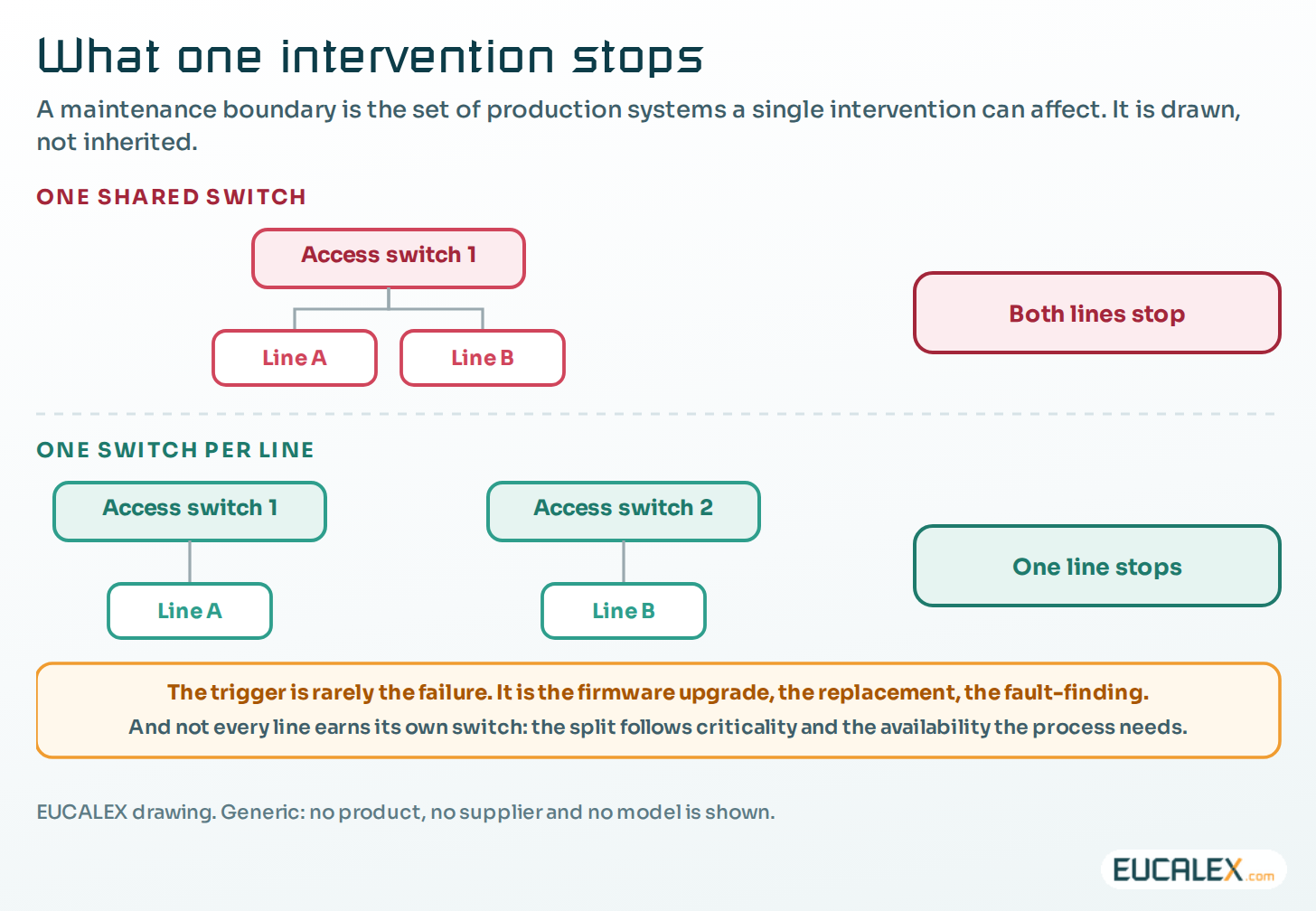
Avoid single points of failure on one access switch. If one switch carries every system a process depends on, one outage, planned or not, stops most of the site or all of it. Spread those assets so that losing any one switch costs a line, a cell or a function, never the plant.
That does not mean every machine deserves its own switch, or every switch a redundant twin. The layout is a risk decision like any other, in proportion to the criticality of what is connected and the availability the process really needs. A packaging line that can absorb a twenty-minute stop does not call for the same design as a continuous process that cannot be restarted before the next morning.
The switch itself is then chosen from what will be plugged into it. The protocols in use set the features it must support. The number of endpoints (network interfaces, not machines) sets the port count, plus spare capacity for what will be added. The environment, meaning heat, humidity, vibration and dust, decides between a standard industrial switch and a rugged model. And distance matters: where a machine needs many network connections, a DIN-rail switch in the machine’s own cabinet replaces a bundle of RJ45 runs back to the rack with a single uplink.
None of these is a security decision, and that is rather the point. The physical layout follows the process, the building and the maintenance plan. The logical layout follows the risk. The two maps overlap; they are not the same map.
Put another way, physical connectivity answers an availability and maintainability question: how should assets be connected so that failures and maintenance have an acceptable effect on operations? Logical segregation answers a security and containment question: which assets may communicate, through which controlled paths, and how far could a compromise travel? The two designs constrain each other (a zone spread over four buildings is awkward to wire, and a switch shared by two zones forces a conduit), but they should not be confused.
Logical segregation: levels, VLANs and security zones
Now the question changes: how far can a compromise spread?
The logical layer takes its structure from three references that do three different jobs: the Purdue model for the levels, ISA-95 (IEC 62264) for the hierarchy between control systems and business systems, and IEC 62443, the series developed by the ISA99 committee, for zones and conduits.
In practice, assets are classified by nature, importance, criticality and function in the process, then grouped into security zones, enforced in the firewall, and VLANs, configured in the routers and switches. Anything crossing a zone boundary goes through a conduit where the policy is applied. The aim is containment. Malware that lands in one zone should stop at its boundary, or at the very least be slowed down and noticed there.
One rule ties the two layers together: a VLAN never spans two security zones, while a zone may contain several VLANs. Earlier articles cover why a VLAN is not a security zone and why zoning should start from the risk rather than from the switch.
Twelve criteria for drawing the zones
These are the criteria we apply on site. None is enough on its own; together they produce zones that each have a reason to exist.
- No single point of failure inside a zone. This mirrors the physical rule: a set of systems whose joint loss would stop the whole site is split across several zones, for the same reason it is spread across several switches.
- One zone per supplier, and one per system type. OEM equipment, PCS, DCS and COTS each get their own, so that a weakness specific to one vendor’s product stays with that product.
- Functional grouping. A zone per manufacturing step, so that a zone boundary means something to the people who run the process.
- Critical assets on their own. Equipment of high commercial value, or critical to the process, gets a dedicated zone.
- Large PCS and DCS split up. One very large zone is one very large attack surface; several smaller ones limit what a single compromise can reach.
- COTS devices a process cell needs stay in that cell’s zone. A PC or a printer the line cannot run without is part of the line.
- Shared COTS equipment goes into one shared zone, which keeps common devices simple to manage and maintain.
- IT services and OT services are kept apart, because their life cycles and constraints differ.
- Development, validation and production in separate zones, so that nothing crosses from DEV or VAL into PROD by accident.
- Regulatory status. GMP and non-GMP systems are grouped separately, because updates and change control do not follow the same rules.
- Systems that span levels (L2 to L3, or L3 to the industrial DMZ at level 3.5) get zones of their own. Level 3.5 was not in the original Purdue model; it was added later as the buffer between the plant and the enterprise.
- Systems that talk to many others, a central server for instance, get their own zone, so that each of their conduits can be written and reviewed separately.
Where the protocol decides for you
Some choices are made by the protocol rather than the designer. Traffic that cannot be routed cannot be split across zones separated by a routed firewall, so the devices that use it, and their gateways, end up in the same zone.
BACnet, common in building management systems, is often described as non-routable. That is only half true. BACnet/IP does cross IP subnets, but device discovery relies on broadcasts, which routers do not forward, so each subnet needs a BACnet Broadcast Management Device (BBMD) to relay them. BACnet MS/TP segments, on serial lines, only reach the IP network through a BACnet router. Splitting a BACnet installation across zones takes deliberate engineering; without it, the application and its gateways share a zone.
PROFINET is not routable for most of its traffic, by design. Its cyclic real-time exchange runs directly on Ethernet frames, with no IP layer, so a controller and its devices have to share a layer-2 segment, and therefore a zone.
More zones is not more security
On one GMP-regulated site, the first segmentation pass created one security zone per VLAN: several dozen in all. On paper, that looks like maximum isolation. In operation it gave a firewall rule base nobody could review end to end, a pile of conduits for flows that were entirely legitimate, and more ways for a routine change to stop production. By then the complexity of the rule set had become a risk of its own.
Reviewing the zoning against the criteria above, with the ISA-95 and IEC 62443 logic in hand, cut the number of zones by about a fifth without weakening security. The site was left with zones it could actually manage, which is what protects availability and, in the end, the manufacturing and logistics processes.
A quick test for any zone: you should be able to say in one sentence what it protects and what it stops. If you cannot, it is a VLAN with extra paperwork.
What the standard adds
IEC 62443-3-2 (2020) makes zoning a formal requirement, ZCR 3, in six parts: establish the zones and conduits, then separate business assets from IACS assets, safety-related assets, temporarily connected devices, wireless devices, and devices connected through external networks.
The criteria above deal well with the first two. The other four are the ones site lists most often forget, and any zoning plan deserves a check against them. Safety-related assets belong in zones of their own. A maintenance laptop, or any other temporarily connected device, should not land straight in a production zone. Wireless access and connections from outside the site need boundaries of their own.
It is worth saying explicitly that ZCR 3 partitions the system under consideration into security zones. It does not tell you which switch to plug a device into. Zones and conduits are a security construct; the physical layout that carries them is a separate design, answering the availability and maintenance question above.
| Dimension | Physical connectivity | Logical segregation |
|---|---|---|
| The question | What stops if this infrastructure fails, or needs maintenance? | How far can a compromise spread? |
| Driven by | The process, the building and the maintenance plan | The risk assessment |
| Unit of design | The maintenance boundary | The security zone and its conduits |
| What it optimises | Availability and maintainability | Containment |
| What it costs when wrong | One planned intervention stops production that had nothing to do with it | An incident spreads past the boundary meant to hold it |
| Where it is written | The network architecture and the maintenance plan | The zone and conduit model, IEC 62443-3-2 |
Where to start
Neither drawing starts from a blank page. Both are already implied by what the site has built; the job is to make them explicit and then compare them.
- Write down the maintenance boundaries you already have. For each access switch, list the production systems that stop when it is taken out of service. Most sites have never put this on paper, and the list on its own changes the conversation.
- Compare them with how the plant actually runs. Where one boundary cuts across two independent lines, there is a design decision waiting to be made. Spotting it does not oblige you to act on it straight away.
- Rank by what the process can absorb. A line that tolerates a twenty-minute stop does not justify the same spending as one that cannot be restarted the same day. This is where proportionality gets decided, and it is a production decision more than a network one.
- Draw the zones separately, starting from the risk. The twelve criteria above are the input. The switch map is not.
- Put the two drawings side by side. Where a zone spans many switches, or one switch carries many zones, both the conduits and the maintenance windows get harder. That is the time to adjust one of them on purpose, rather than discovering the conflict during the next intervention.
Five common mistakes
We regularly see a switch layout presented as segregation. Spreading assets across switches limits what an outage stops; it does not stop anything talking to anything. The mirror image is designing only for the failure, when the firmware upgrade, the replacement and the afternoon of fault-finding happen far more often than a dead power supply and, being scheduled, can be designed for.
- Giving every line its own switch. Proportionality is part of the design, and a dedicated switch that protects nothing worth protecting is cost without benefit.
- Deriving the zones from the switch map. Zones come from the risk; copied from the cabling, they inherit decisions taken for entirely different reasons.
- Never comparing the two drawings. They constrain each other, and a site that keeps them apart meets the conflict during the intervention instead of at the design stage.
Ask of every switch what stops when it goes away, and of every zone how far a compromise gets. Two questions, two drawings, one network.
References
- IEC 62443-3-2:2020, Security risk assessment for system design (ZCR 3, partitioning into zones and conduits), webstore.iec.ch
- ISA, ISA-95 Enterprise-Control System Integration (IEC 62264), isa.org
- BACnet International, BACnet and the Internet: broadcasts and BBMDs, bacnet.org
- PI North America, Is it true that PROFINET traffic is not routable?, us.profinet.com
Related articles
All articles- Isolated, VLAN, security zone: the words are not interchangeableFour words that get used as synonyms in meetings. The actual protection level of an industrial network depends on which one you really have.
- Zones and conduits: start from the risk, not from the switchThe most common segmentation mistake is to design the network first and reverse-engineer the justification. It produces a beautiful diagram that…
- Industrial switches: where they earn their place on an OT network, and where they do notNot every switch on a plant needs to be industrial, and an industrial switch does not make a network reliable on its own. What the hardware actually…
EUCALEX
Have a project or a technical challenge?
Contact us: we will be pleased to discuss it with you, with no commitment.
Discuss your project with usStay informed
Receive new EUCALEX articles and technical insights by email.