
Essential, Premium or Platinum: which network does each industrial site need?
Many industrial groups no longer design each site’s network from a blank page. They keep a short catalogue of standard architectures and pick one per site. Three levels cover almost every case; call them Essential, Premium and Platinum. Each is built twice, once for the industrial network (OT: production and laboratory) and once for the corporate network (IT: office and business services), and the two meet only through firewalls.
The choice matters more than it looks. Controllers talking to operator stations in another area, SCADA servers, the MES, electronic batch records, the historian, remote support: every system on the site rides on the network, so none of them can be more available than the network is. Choose too low, and one failed switch stops a plant that was sold as highly available. Choose too high, and a mid-size site pays for a second server room that nothing depends on.
Availability in one paragraph
Availability is the share of time a service works. Engineers write it MTBF / (MTBF + MTTR): the mean time between failures, divided by that same time plus the mean time to repair. Redundancy does not make devices fail less often. It changes what a failure costs. Without a second device, a failure costs the repair time (finding a spare, restoring a configuration, restarting), which counts in hours, or in days when there is no spare on site. With a second device, it costs the switchover time, seconds or less, and the repair happens while production runs. Every device, room or link that exists only once on a critical path is a single point of failure, and the three levels differ in how many of those they leave.
What every level has in common
OT and IT are separate networks at every level. Each has its own firewall, which is mandatory and the only way in or out. OT reaches the WAN, the internet and the corporate network through it, and the flows between OT and IT are declared and controlled on both firewalls. Each domain also has its own server rooms (one, or two at Platinum) with its own directory (AD), name and address services (DNS/DHCP) and time (NTP), so the plant does not depend on corporate servers to log on, resolve a name or keep its clocks aligned. Internet access goes through a central proxy with an allow-list of destinations, never through a default route.
Inside OT, the network is organised in zones and conduits from a risk assessment (IEC 62443-3-2). The crossing to the enterprise is usually drawn as the industrial DMZ at level 3.5. That level was added to the Purdue model later; it is not in the original model, and IEC 62443 does not define it. More on this in Zones and conduits: start from the risk, not from the switch.
Industrial Wi-Fi hangs off the access switches as one more zone behind the OT firewall. Wi-Fi, vendor remote access and passive intrusion detection (IDS) are options at the first two levels. Platinum puts an IDS sensor on each side of its network.
Below Essential there is no level, only a stop-gap: a single firewall placed in front of an existing flat network, between old equipment and the office LAN. It isolates, but it gives production neither its own services nor its own zones. Acceptable for a while, with an exit date. It is not a design.
Essential: one of everything
What it is. Per domain: one firewall, one server room, one core switch, one distribution switch, and below them the access switches of the production areas. The OT server room holds the directory, DNS/DHCP, time and a few other services. IDS and Wi-Fi are optional. Nothing is doubled.
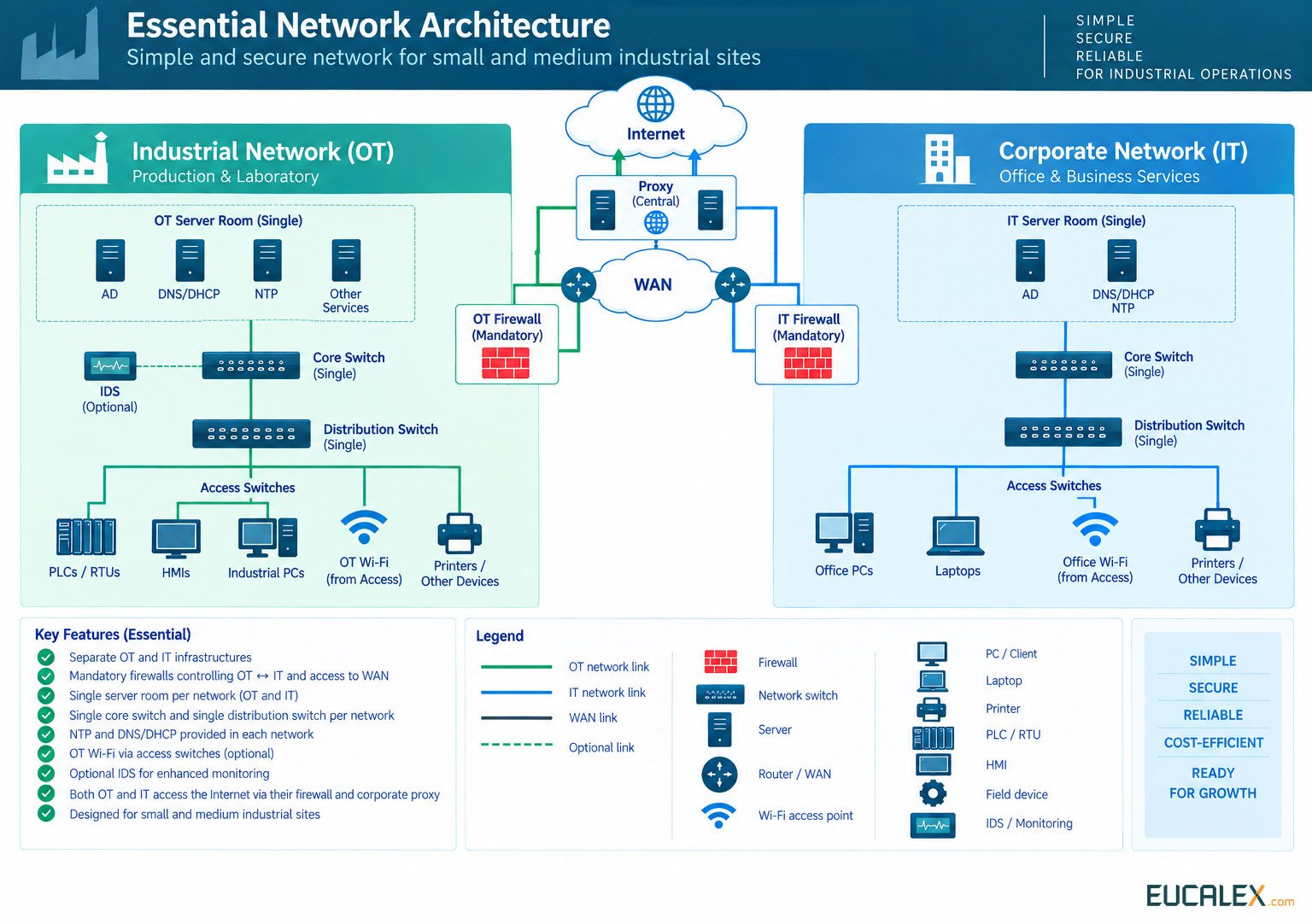
Availability. The firewall, the core, the distribution switch and the server room are each a single point of failure for the whole domain. When the distribution switch fails, the production areas lose each other and their servers. When the core fails, they lose the servers and the firewall. Controllers usually keep running their programs, but everything that crosses the network stops. When the firewall fails, OT keeps running on its own services but loses the corporate network, the WAN, the internet and remote support. Having the services on site is what protects the plant from the WAN: when the link drops, addresses, names and time keep working.
Cybersecurity. The biggest gain of the three levels is already here. Production sits behind its own firewall, with a default-deny rule base and documented flows, and it has its own directory and its own administrator accounts instead of an extension of the corporate ones. A single firewall is also a single point of control, so its configuration is backed up and its rules are reviewed. The optional IDS listens on a mirror port of the core, where it sees the traffic between production areas that the firewall never sees.
Cost. The reference point: per domain, one firewall, two switches above the access layer, a few servers and one room, and few devices to license, patch and monitor. The hidden cost is the repair time when one of those single devices fails. A spare switch on site and a tested restore procedure keep it to hours.
When to choose it. Small and mid-size sites (one building or a compact site, a few production areas, a small local team) where production can ride out a network outage of a few hours: it carries on, or stops safely and restarts without losing product. Essential delivers what matters most, separation and local services, at the lowest cost and complexity.
Build it to grow, though. Rack space, power, spare fibre strands and switch models that can be paired later mean that moving up to Premium is a matter of adding equipment rather than re-cabling the site.
Premium: the distribution layer in pairs
What it is. The same separation and the same single firewall per domain, and still one server room, now with virtualisation hosts that run the directory, DNS/DHCP, time and applications such as SCADA servers or the historian. The distribution layer becomes a redundant pair, mandatory at this level, and every access switch is connected to both. The core stays single, with a second core as an option. Wi-Fi, vendor remote access and IDS remain options.
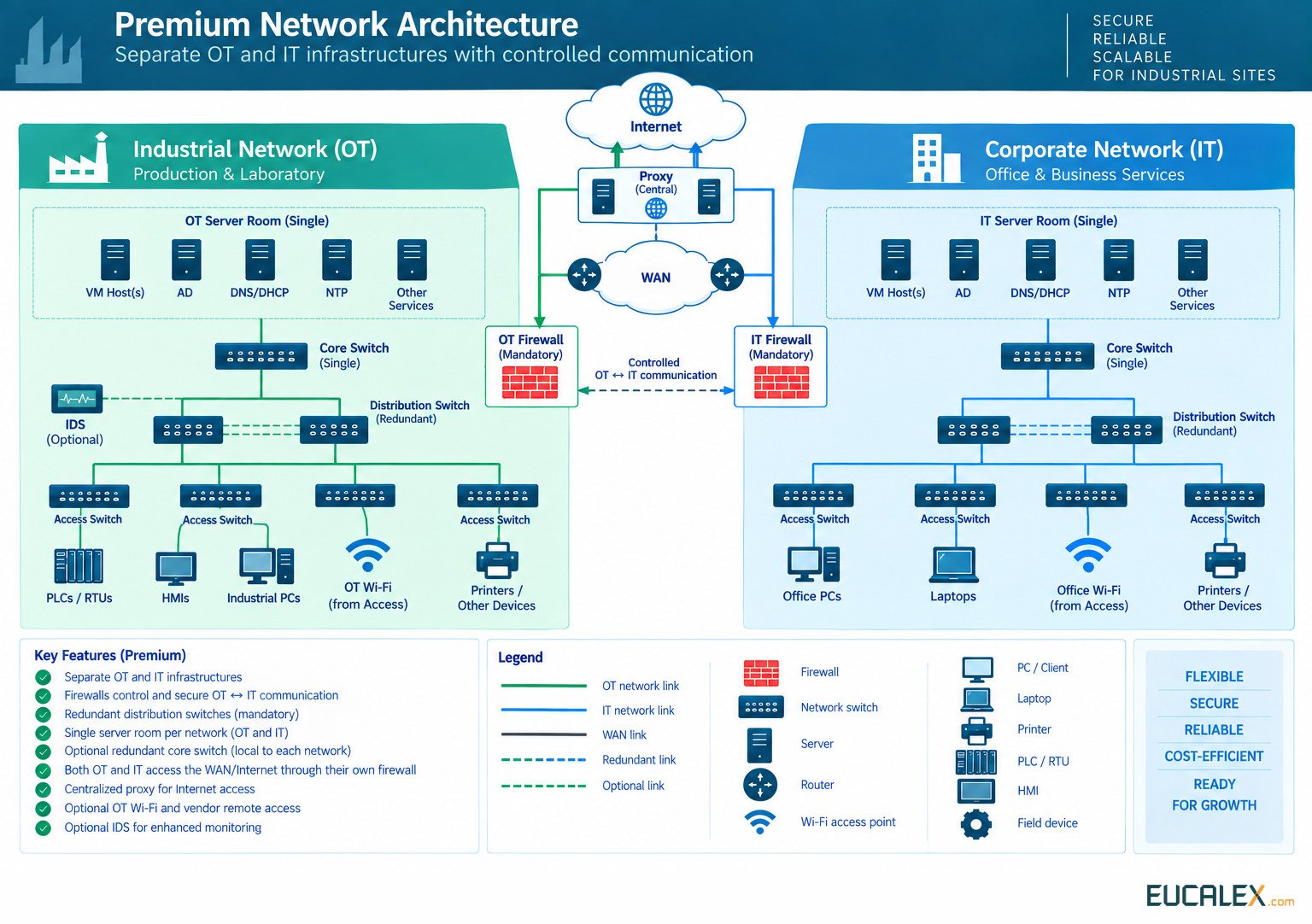
Availability. A distribution switch or an uplink can fail without stopping the production areas: traffic moves to the other one in seconds or less, and the repair waits for a convenient moment. What is still single is the firewall, the core (unless the option is taken) and the room. If the core fails, the floor loses its servers, virtualised SCADA and directory included, and its path to the firewall. Virtualisation adds a dependency of its own. With a single host, one hardware fault stops every virtual machine on it; with two hosts in a cluster, the machines restart on the surviving host.
Cybersecurity. Everything said for Essential still holds, and virtualisation raises the stakes, because whoever controls the hypervisor controls every server on it. Its management interfaces belong on a separate administration network, it is patched like everything else, and the virtual machines are backed up to a copy that ransomware on the production network cannot reach (see A backup is a hypothesis. A restore is evidence.). Vendor remote access goes through a dedicated gateway, with multi-factor authentication, access granted by someone on site for a defined time window, and recorded sessions; see Vendor remote access without opening your cell network. At this size the traffic baseline no longer fits in anyone’s head, which is when the optional IDS starts to pay for itself.
Cost. Moderately more than Essential: per domain, a second distribution switch, a second uplink to every access switch (ports, optics and fibre), virtualisation hosts with their licences and storage, and optionally a second core. The running cost grows with the skills virtualisation requires, and with the IDS and remote-access platforms if they are chosen.
When to choose it. Larger sites with several production areas or buildings, whose production stops when the areas lose each other, and whose servers have been consolidated on virtualisation hosts. Premium protects the layer that connects the areas, and the uplinks that run through the plant, without paying for a second room. Take the second core when production depends on the servers in the server room: a virtualised SCADA, an MES, electronic batch records.
The room remains a single point of failure, but cheap measures inside it go a long way: two power paths (A and B feeds), N+1 cooling, and two power supplies per device on separate circuits. On multi-building sites, a practical rule of thumb: once a building has more than four access switches, give it a distribution pair of its own.
Platinum: everything doubled, two server rooms per domain
What it is. Every function doubled, per domain: a firewall pair in high availability, two cores (A and B), two distribution switches cross-connected to both cores, every access switch connected to both distribution switches, and two server rooms (a primary and a secondary) with the servers and key services (virtualisation hosts, directory, DNS, time) replicated from one to the other. Each side, A and B, has its own IDS sensor. The internet proxy and the WAN connectivity are redundant too.
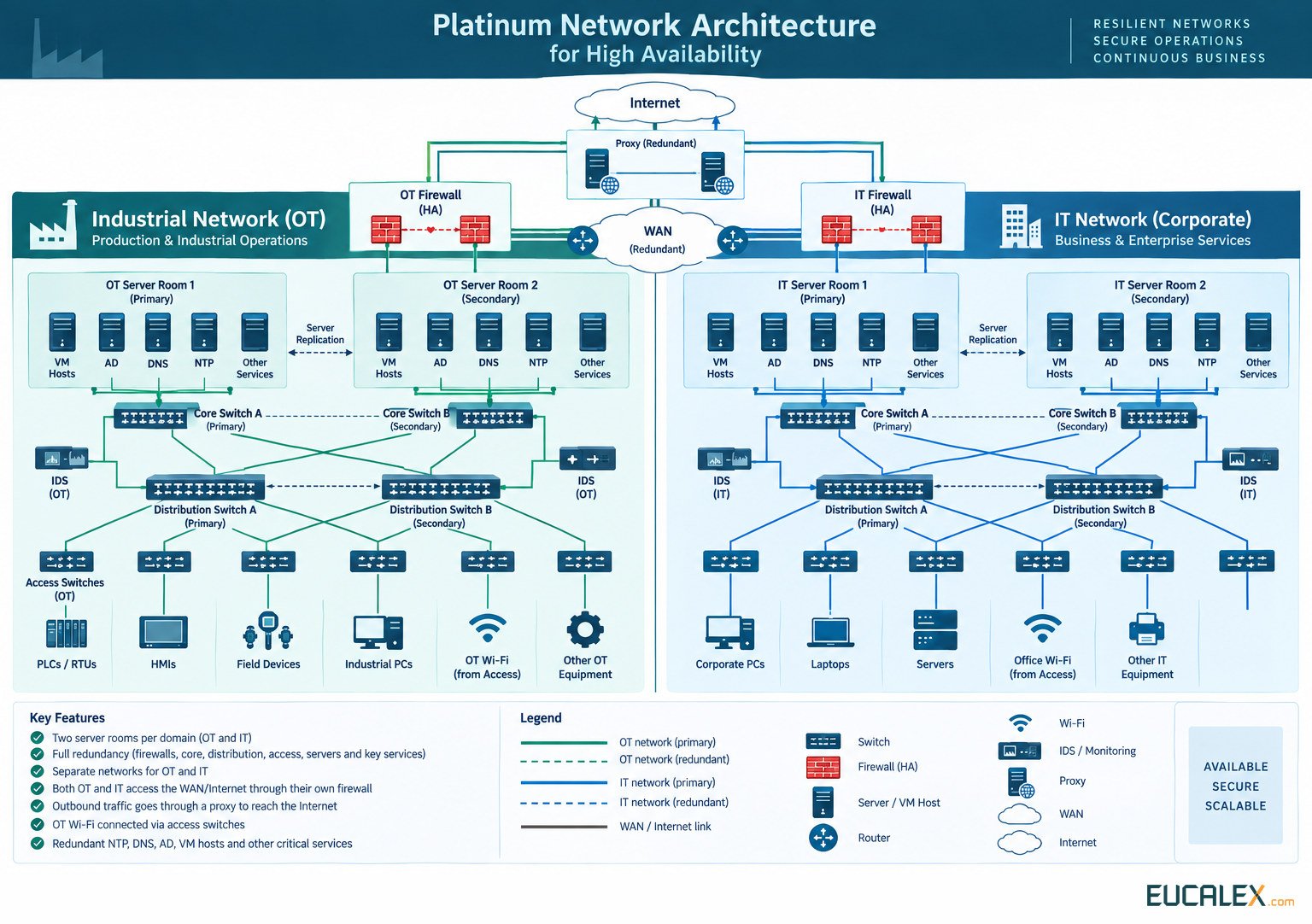
Availability. The network survives the failure of any device above the access layer, the loss of a WAN link, and the loss of a whole server room to fire, water, cooling or power. What remains single is the access switch each machine is plugged into. Where a cell cannot stop, close a ring or duplicate the path. MRP (IEC 62439-2) guarantees a worst-case recovery time of 500, 200 or 30 ms in rings of up to 50 switches, and 10 ms in rings of up to 14. PRP and HSR (IEC 62439-3) send every frame over two paths and recover in zero time, at the cost of dual-attached devices.
Switching rooms has to be designed. How much data the secondary room may lose, and how long it takes to take over, depend on the replication mode and on how the switchover is triggered. A cluster stretched across two rooms also needs a tie-breaker (a witness) outside both. Otherwise a cut link between the rooms can leave two halves each convinced it is the survivor, the split-brain case.
Cybersecurity. In OT, availability is a security objective, and Platinum is the only level that survives a destructive event in a room. Its redundancy has two blind spots. Replication copies everything to the second room within seconds, corrupted or encrypted data included, so it is no substitute for backup: offline or immutable backups remain mandatory. And the firewall pair synchronises its configuration, so a bad rule reaches both firewalls at once; every change needs a review and a tested way back. Two IDS sensors keep the network visible when a room is lost, provided their alerts land in one place. The links between the rooms carry directory data and virtual machine images. Protect them like the rooms themselves.
Cost. The highest, and the switches are only part of it. Everything is doubled per domain, and the bill adds a second server room per domain with its fit-out, power and UPS, cooling, fire detection and suppression and access control, plus replication (storage and licences), redundant WAN links, and often the civil works for a second fibre route. Running costs double as well: twice the devices to patch, monitor and document, plus the switchover tests.
When to choose it. The few sites that cannot stop: continuous processes that are long and costly to restart, aseptic production where an interruption can cost a batch, sites that are the only source of a critical product, utilities that other plants depend on. The test is easy to state. A stop of several hours or days, weighted by its likelihood, costs more than a second room.
Two rooms only help if no single event can reach both: separate fire compartments, separate power feeds and UPS, separate cooling, and two fibre routes that share no trench. Two fibres in the same trench are one excavator away from none. And plan the failover tests: switch over on purpose during planned shutdowns, because a failover nobody has tried is still an assumption.
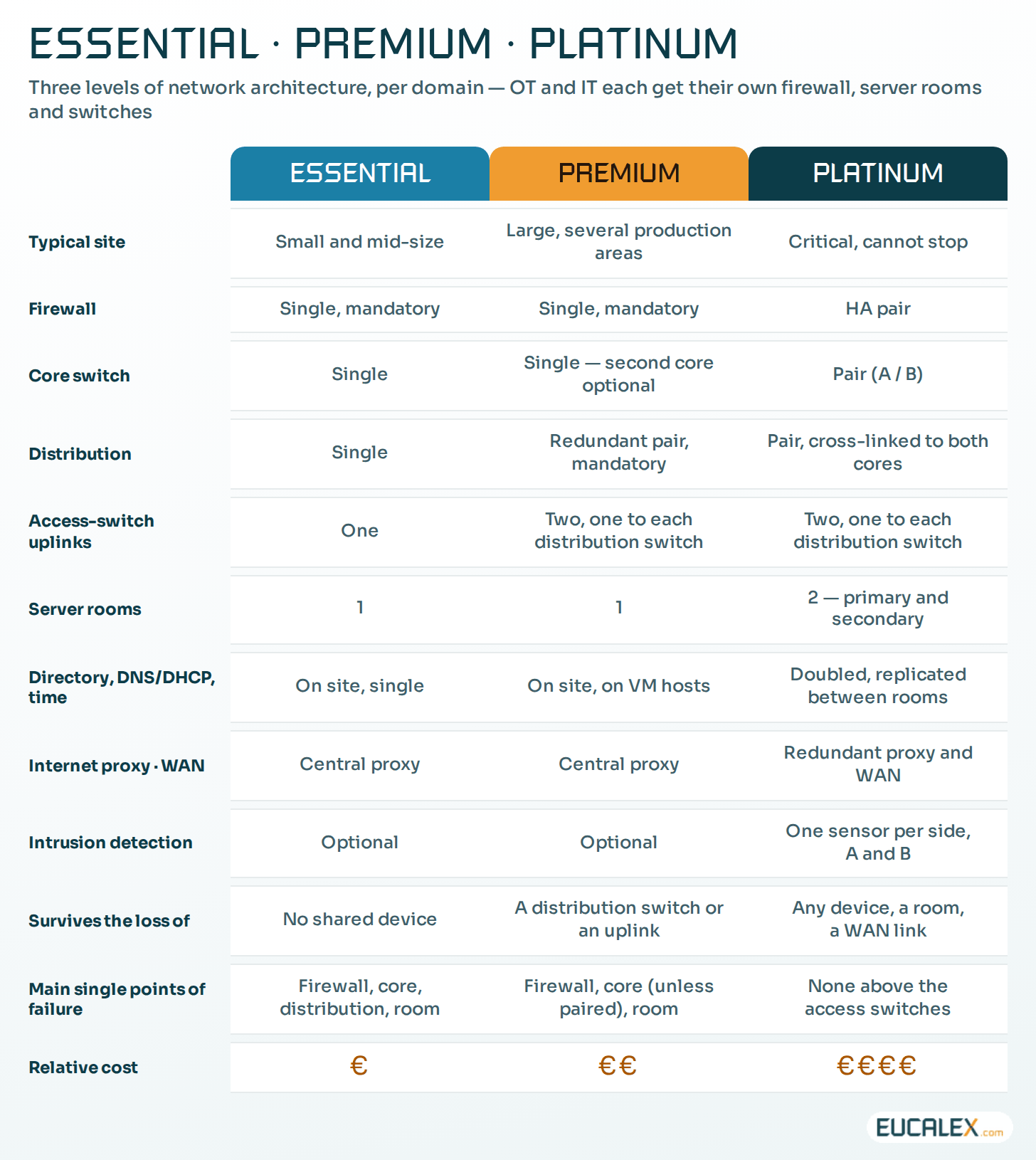
The three levels side by side
Whatever the level
- Placement of assets. A machine always depends on the access switch it is plugged into. Spread assets with failures and maintenance windows in mind, as described in physical connectivity and logical segregation.
- Time. NTP (RFC 5905) can hold better than a millisecond on a local network under good conditions, and tens of milliseconds across the internet. Sequence-of-events recording and motion control need PTP (IEEE 1588), which reaches sub-microsecond accuracy. A stratum 1 server fed by a GNSS receiver keeps the site on time even when it is cut off.
- Wi-Fi. Its own SSID and network, behind the OT firewall. Pre-shared keys and MAC filtering are not authentication. Use WPA3, or WPA2/WPA3-Enterprise with 802.1X and certificates wherever the devices support it.
Choosing the level, site by site
The usual mistake is to pick from the catalogue by site size or by budget line. Size is a proxy; the consequence of an outage is the criterion. Before a design is approved, write down five answers for each site:
- What stops when the network stops: which flows, which systems, which people.
- How long the site can live without them, and what a restart costs: a lost batch, a requalification, a safety review.
- Which dependencies sit outside the site (the WAN link, the central proxy, the corporate network), and what happens when they drop.
- Which events could take out a whole room or a cable route: fire, water, civil works, a single power feed.
- What the field survey found: fibres, routes, rooms, power, rack space.
The level follows. Hours without the network and no lasting damage: Essential. The production areas must stay connected when a switch fails: Premium, with the second core if production depends on the servers. The site must survive the loss of a room or a route: Platinum. If OT and IT end up on different levels, on a production site it is usually OT that justifies the higher one. Revisit the answer when the site changes, because a new MES, electronic batch records or a new building can move a site up a level.
The survey turns a level into a design
A design drawn in the office is a hypothesis. The field survey makes it buildable, and it often changes the bill: which fibres exist, of what type, with how many spare strands, along which routes; how much rack space, power and cooling each room really has; where every new switch will physically sit. Anyone who has opened a patch panel labelled in three different hands knows why this cannot be done from drawings. Distances decide the optics: 10GBASE-SR reaches 300 m on OM3 multimode fibre and 400 m on OM4, 40GBASE-SR4 only 100 m and 150 m. Between buildings, single-mode fibre (10 km for the LR variants) removes the question.
Two findings usually lower the cost of whichever level is chosen.
- Reuse what passes the test. Spare fibres and racks installed for IT can often carry the OT network, provided they are tested, documented, physically secured and have enough strands. The cable can be shared. The active OT equipment cannot.
- Group before you place. Map OT assets by zone and by location before placing switches. A switch per cabinet by reflex multiplies hardware, ports and firewall rules; grouping assets that share a zone and a room removes a good part of them.
The right level is the cheapest one that survives the failures the site cannot afford. Decide those failures explicitly, and write them down.
References
- IEC 62443-3-2:2020, Security risk assessment for system design: zones and conduits. webstore.iec.ch
- IEC 62439-2:2021, Media Redundancy Protocol (MRP); IEC 62439-3 covers PRP and HSR. webstore.iec.ch
- IETF, RFC 5905, Network Time Protocol Version 4. rfc-editor.org
Related articles
All articles- Industrial switches: where they earn their place on an OT network, and where they do notNot every switch on a plant needs to be industrial, and an industrial switch does not make a network reliable on its own. What the hardware actually…
- Physical connectivity and logical segregation in OT networks: two designs, two different jobsWhich switch an asset plugs into and which security zone it belongs to are two different decisions, taken for two different reasons. One decides…
- A backup is a hypothesis. A restore is evidence.“We have backups” is not an answer. The question is when you last restored one, how long it took, and whether the line ran afterwards.
EUCALEX
Have a project or a technical challenge?
Contact us: we will be pleased to discuss it with you, with no commitment.
Discuss your project with usStay informed
Receive new EUCALEX articles and technical insights by email.